July 6th, 2026 at 4:10 PM
Content MarketingThisPretty Prompt Review comes from a place of real surprise. I picked up Pretty Prompt thinking it might give me a small quality boost on rough AI prompts. That was my expectation. Maybe it would clean up some wording, maybe help a little with structure, and that would be that.
What actually happened was better than I expected. Pretty Prompt turned out to be one of those tools that quietly improves a workflow in a big way. If you spend a lot of time in ChatGPT, Claude, or Gemini, and you constantly find yourself reworking instructions so the AI finally understands what you want, this tool solves a real problem.
At its best, Pretty Prompt acts like grammar correction for prompting. You type your rough idea, click improve, and it rewrites that idea into something more structured, more contextual, and more useful. That is the heart of thisPretty Prompt Review, and honestly, that one function alone made the tool worth a serious look for me.
Pretty Prompt is built for people who live inside AI tools. That includes prompt engineers, marketers, founders, developers, content creators, and really anybody who keeps feeding ideas into large language models all day.
The promise is simple. Take a rough, vague instruction and turn it into a sharper professional prompt with one click. It works in the browser and is designed around platforms like ChatGPT, Claude, and Gemini. Out of the gate, that already makes it useful because it meets me where I already work.
There is also a broader ecosystem around it. Pretty Prompt supports additional tools and services beyond the big three, which gives it more flexibility than I expected.
One of the first things I checked in thisPretty Prompt Review was pricing, because a prompt tool can be great, but if the limits are too tight or the pricing is off, it matters.
At the time of this review, the lifetime deal starts at$39. The tiers scale like this:
Tier 1: 200 prompts per month for 1 user
Tier 2: 1,000 prompts per month for 4 users
Tier 3: 5,000 prompts per month for 10 users
Tier 4: 15,000 prompts per month for 20 users
That spread makes sense. Solo users can start small, and teams can scale up without needing a separate toolset.
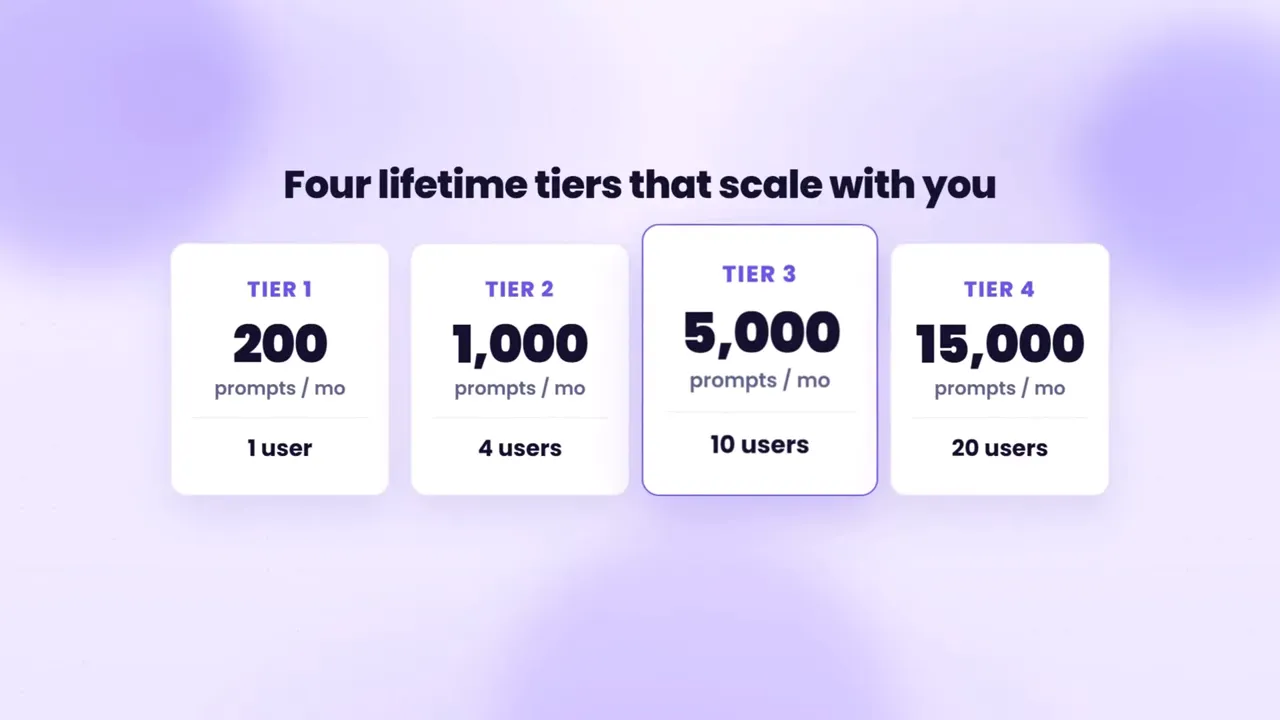
If you are the kind of user who only improves prompts occasionally, Tier 1 may be enough. If AI sits at the center of your business workflow, the higher tiers will make more sense fast.
The dashboard is clean. That may sound minor, but it matters. I do not want friction from a tool that is supposed to speed me up.
The home screen centers on the core feature: improve your prompt. The layout is simple, the left menu is easy to follow, and I did not have to hunt around to understand where things lived.
That clean setup gives Pretty Prompt a practical advantage. It is not trying to overwhelm me with clutter. It is trying to get me from rough idea to refined prompt as quickly as possible.
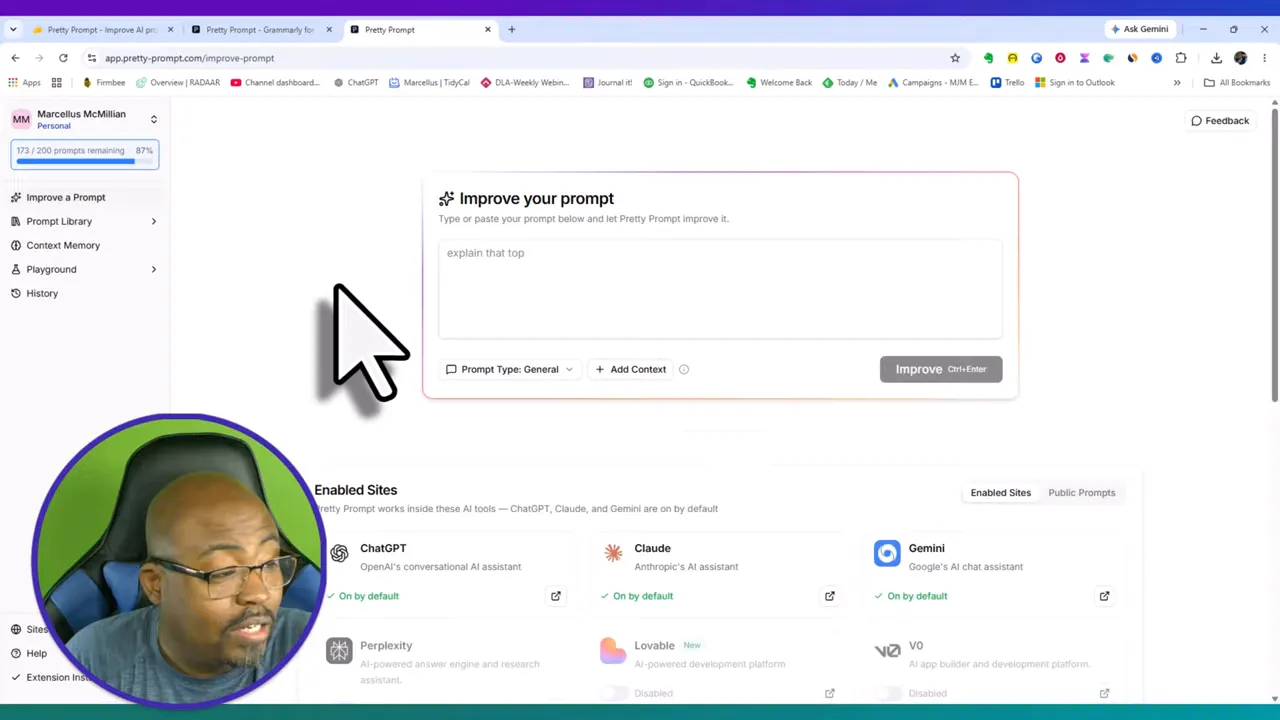
By default, Pretty Prompt supports ChatGPT, Claude, and Gemini. Those are the big ones for most people, and for me that already covered the main use case.
But it does not stop there. Inside the dashboard I also saw support for other platforms such as Perplexity, Lovable, Base44, Grok, OpenRouter, Manus, Merlin, and more. Some of those are niche, some are expanding fast, and some I had barely heard of. Even so, that broader compatibility gives the tool more staying power.
If your work touches multiple AI environments, that matters. It means Pretty Prompt is not boxed into one ecosystem.
This was one of the more useful features in myPretty Prompt Review. The prompt library lets you store prompts privately or make them public. I keep my own prompts private, but the public library is still valuable because it gives you examples and ready-made starting points.
The categories are broad enough to be practical. I found prompts for things like:
Code development
Social media
Presentations
Onboarding
Marketing and business tasks
What stood out to me was the quality. These were not throwaway prompt stubs. Many of them looked solid enough to use as-is or adapt quickly.
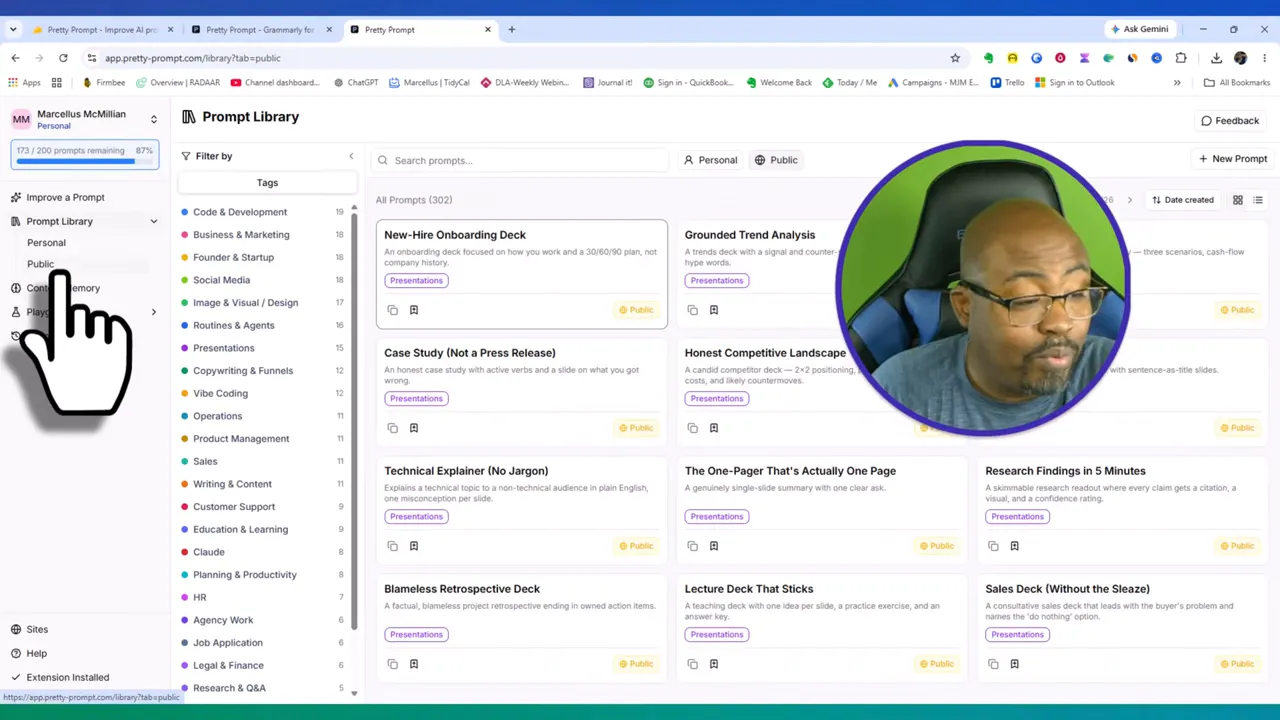
If you care about creating reusable systems, this is where the tool starts to become more than a one-click improver. It becomes a workflow asset.
That is also why this pairs well with broader content systems. If you are building repeatable output across platforms, I would also look at this article onrepurposing content for business growth, because the two ideas fit together naturally.
This is where Pretty Prompt really won me over.
I went through my own personal prompts and started improving them one by one. Instead of just lightly editing the wording, Pretty Prompt helped transform them into more structured instructions with clearer roles, context, constraints, and formatting expectations.
That changes the output. Better prompts do not just sound nicer. They actually lead to stronger results from the AI.
Over a few days, I improved a large portion of the prompts I use in my workflow and still had plenty of quota left on Tier 1. That told me two things:
The monthly cap was more practical than I first thought.
The gains from prompt cleanup were immediate enough to notice.
Context Memory is a sleeper feature. It lets me create reusable context templates based on the role I want the AI to assume or the style I want the output to follow.
There are starter templates for things like:
Developer
Marketer
Writing style
Answer style
Creative direction
For example, I can define a developer profile, set a preferred writing style, or tell the AI how I want responses delivered. That means I do not have to restate the same background every single time I write a new prompt.
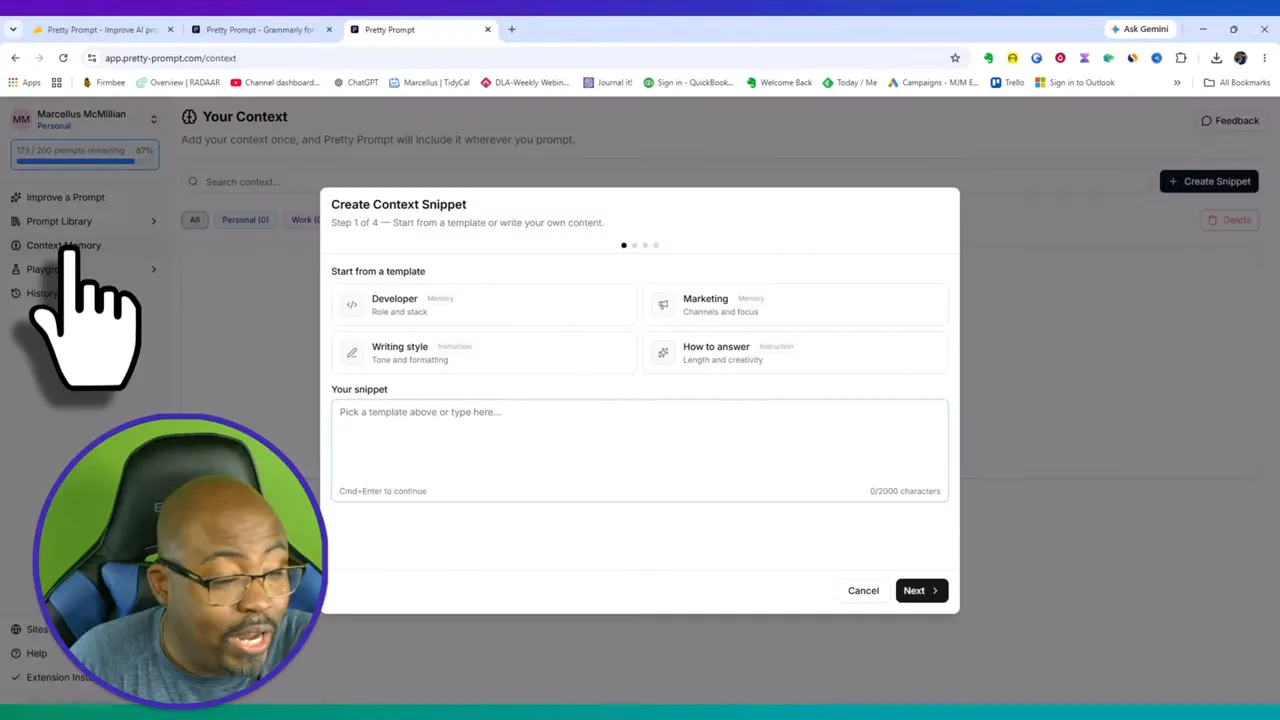
If you are particular about consistency, this matters a lot. A small context layer can make every future prompt stronger with less effort.
Another strong feature in thisPretty Prompt Review is the Playground. This lets me compare different AI models side by side.
I can select a model and chat with it, or add API providers and compare outputs from systems like OpenAI and Anthropic. That side by side workflow is useful when I have a detailed task and want to see which model handles it better.
Instead of guessing whether ChatGPT or Claude gives the better response for a prompt, I can actually test it.
That is a big deal if your work depends on squeezing the best result out of different models. It turns experimentation into something much more manageable.
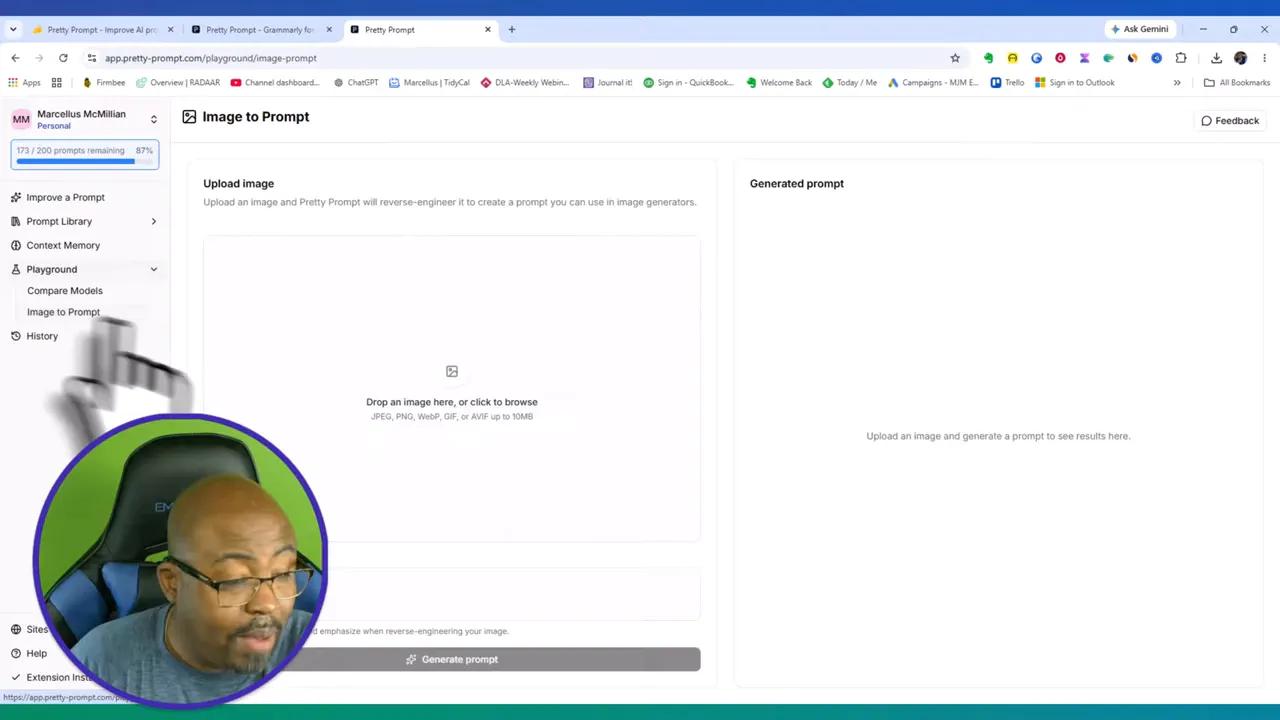
Pretty Prompt also includes an image-to-prompt feature. You upload an image and it reverse engineers that image into a usable generation prompt.
For creators, especially those working with thumbnails or visual branding, that opens up a very practical workflow. If I see a style I like, I can use it as reference material and get a prompt that helps recreate that style more intentionally.
I immediately thought about thumbnail consistency when I saw this. If you want more predictable image prompts, this feature could save a lot of trial and error.
That also connects nicely with AI-assisted design workflows. If that is your lane, you may also want to check outthis comparison of Microsoft 365 Copilot vs ChatGPT for YouTube thumbnail design.
|
The most convincing part of thisPretty Prompt Review was a simple demo.
I entered a rough prompt asking for social media posts for an upcoming webinar over the next five days. It was sloppy. I knew it was sloppy. That was the point.
Pretty Prompt took that rough idea and converted it into a much stronger instruction. The improved version assigned the AI a role, clarified the goal, defined the target audience, suggested platform optimization, specified structure, required hooks and calls to action, added hashtags, and even set tone and word-count rules.
That is a serious jump in prompt quality from one click.
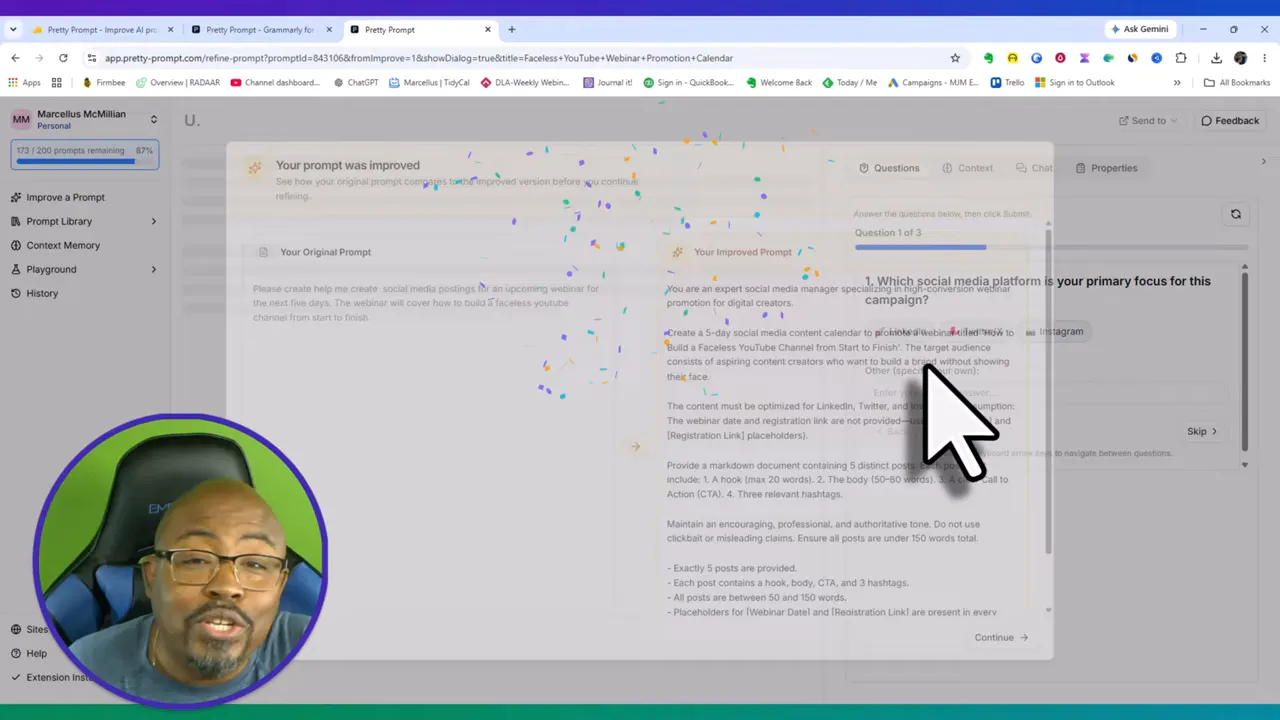
The improved version was not just longer. It was smarter. It filled in the right strategic gaps without becoming unusable.
That kind of structure is especially helpful if you are planning content across multiple channels. It is the same reason I often recommend stronger AI writing systems like the one covered inthis Voila review when productivity and repeatability matter.
One detail I appreciated was the prompt type selector. Pretty Prompt lets me define whether the prompt is:
General
Image
Video
Vibe coding
Research
Agent prompt
This matters because not every prompt should be optimized the same way. A research prompt needs different structure than an image prompt. A coding prompt needs different expectations than a social media prompt.
That extra layer helps Pretty Prompt tailor the rewrite instead of applying one generic style to everything.
It genuinely improves weak prompts. Not just cosmetically, but structurally.
The interface is clean. I can get to work fast.
The prompt library is useful. It is not just filler.
Context Memory saves time. Especially for recurring workflows.
Playground adds flexibility. Model comparison is a real plus.
Image to Prompt has creative potential. Great for visual reverse engineering.
Browser-based workflow is convenient. It supports where I already work.
Prompt quotas matter. Heavy users may outgrow the lower tier quickly.
Some advanced value depends on your workflow. If you barely use AI, you may not get the full benefit.
It is strongest for people who already understand the value of prompting. Total beginners can still use it, but power users will probably appreciate it the most.
I think Pretty Prompt is a strong fit for:
Content creators building repeatable AI workflows
Marketers writing campaigns, posts, and webinar assets
Developers who want cleaner prompt instructions
Founders using AI across multiple tasks
Prompt-heavy users who bounce between ChatGPT, Claude, and Gemini
It is probably less essential for someone who only opens an AI tool occasionally and writes basic one-off questions. In that case, the gains may feel smaller.
My honest takeaway from thisPretty Prompt Review is simple. Pretty Prompt is far better than I expected. I went in with low expectations and came out genuinely impressed.
It does what a good software tool should do. It removes friction, improves output quality, and makes an existing workflow more efficient. The one-click improvement feature is the headline, but the real value comes from how the full system supports repeatable prompting through saved prompts, context memory, prompt types, and model comparison.
If prompting is a real part of your day to day work, Pretty Prompt is not just a novelty. It is a practical upgrade.
Pretty Prompt is a browser-based prompt enhancement tool that rewrites rough AI instructions into more polished, context-rich prompts for platforms like ChatGPT, Claude, and Gemini.
Yes, especially because it improves rough prompts with one click. Beginners can get better results without needing deep prompt engineering knowledge. More advanced users will probably get even more value from features like Context Memory and the Playground.
The lifetime deal starts at $39 for 200 prompts per month for one user, with higher tiers increasing both prompt limits and team seats.
Yes. The Playground feature allows side by side comparison between models, especially when API providers like OpenAI and Anthropic are connected.
The biggest reason is performance. I expected a minor helper tool, but the software consistently transformed weak prompts into clearer, more strategic instructions that improved output quality in a noticeable way.