June 8th, 2026 at 8:51 PM
Social MediaOcoya Review time, and I want to get straight to the point. Social media tools are everywhere. Every week it feels like there is another scheduler, another AI writer, another dashboard promising to save time and run your brand for you. Most of them overlap. A few of them are solid. And then there are the ones that actually do something useful enough to earn a place in the workflow.
Ocoya sits in that interesting middle ground where it is not just a basic scheduler, but it is also not trying to be everything under the sun. It gives me social media publishing, AI writing help, built in design options, inbox management, content planning, and some genuinely useful automation features. That is why this Ocoya Review matters, especially if you are looking at the AppSumo lifetime deal versus paying monthly for some other platform.
If you want the deal page first, here is the quickest way to check it out through my recommended Ocoya offer page.
If you are a content creator, small business owner, or social media manager who needs to publish consistently across multiple platforms, I think this Ocoya Review ends with a mostly positive recommendation.
Best for: creators, small businesses, agencies, and anyone building repeatable content workflows
Not ideal for: people who only post occasionally and do not need automation
Biggest strength: AI assisted posting and RSS based automation
Biggest weakness: some setup feels a little clunky and needs testing before going fully hands off
Overall: worth serious consideration if you want to save time and centralize social posting
At its core, Ocoya is a social media management platform. That sounds simple, but the important part is how it handles the job. It is more than a calendar where I toss in posts and hope for the best. It combines scheduling, design, AI writing, asset storage, inbox features, and automation workflows in one place.
The easiest way to describe it is this. Ocoya is a social media poster on steroids. It helps me create content, organize it, schedule it, and in some cases automate the draft creation process so I do not have to start from zero every single time.
That makes it relevant for anybody trying to keep several channels moving without spending the whole day bouncing in and out of each platform manually.
One of the biggest mistakes I see people make is trying to do everything directly inside each platform. They log into Facebook, then Instagram, then X, then LinkedIn, then they get distracted for two hours and call that marketing.
That is not a workflow. That is a trap.
A good tool should reduce friction, not add more of it. With Ocoya, the value is that I can stay out of the social platforms themselves as much as possible while still keeping the brand active. That matters for productivity and it matters for consistency.
If you are trying to build a real content system, I also recommend learning how to stack and repurpose content across platforms. That is why my article on streamlining content marketing with Ocoya pairs naturally with this review.
This is the main event. Ocoya lets me write a post once and schedule it across multiple connected accounts. That alone is helpful, but what I like is that I can customize per platform when needed.
That matters because not every platform wants the same thing. A caption that feels fine on Facebook may need tightening for X. An image ratio that works one place may need a different version somewhere else. Ocoya gives me a general variation if I want speed, but it also lets me create platform specific versions when I need more control.
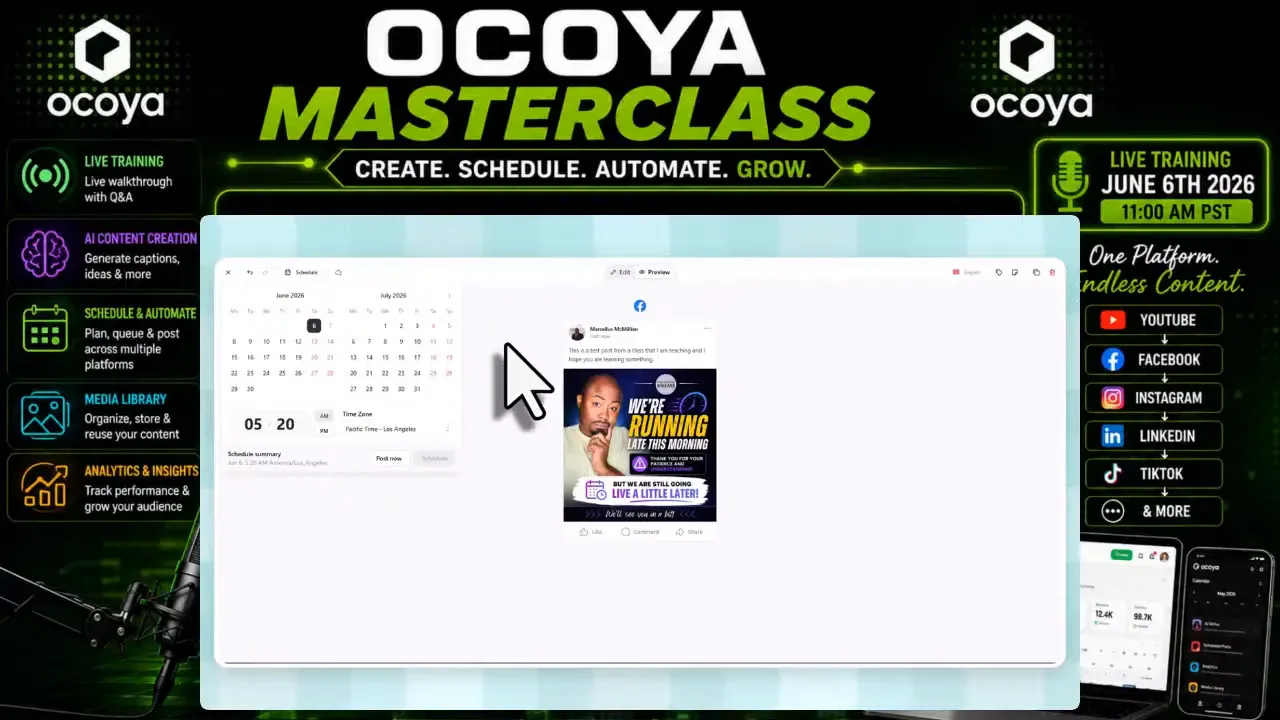
The AI side is one reason this Ocoya Review is not just another scheduler recap. Ocoya includes AI assisted writing tools right inside the post editor. I can ask it to continue a sentence, write something from scratch, add hashtags, include a call to action, or clean up what I already started.
I still believe AI content needs a human pass. Always. Read it before posting. Adjust the tone. Make sure it actually sounds like you. But as a starting point, it does save time, especially when I need a fast draft or I am trying to knock out a full week of content in one sitting.
The best use case is not replacing your voice. It is speeding up the blank page problem.
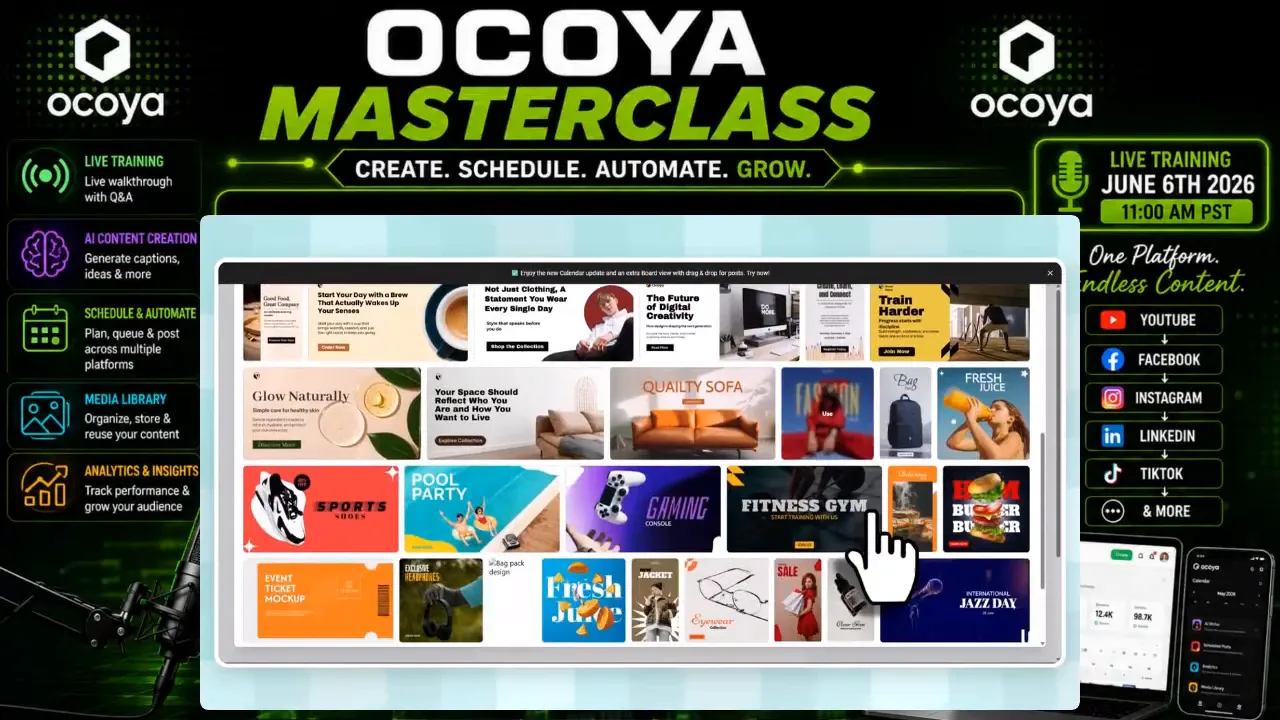
Ocoya also includes a design studio with templates and editing tools. I can start with ready made layouts, tweak text, add shapes, upload assets, use brand colors, and build something without leaving the platform.
There is also Canva integration, which is a smart move. If you already have a design workflow elsewhere, you are not boxed in. But if you just need a quick branded graphic or social post image, the built in editor is enough for a lot of everyday use.
Another underrated feature is the inbox setup. Ocoya can help centralize incoming messages, mentions, and comments so I am not constantly opening every social app one by one.
For a business owner, that is a big deal. Fast response times matter. Even when I cannot fully answer right away, I at least want a system that helps me acknowledge messages quickly and keep things organized. When the tool helps me stay responsive without getting sucked into endless scrolling, that is a win.
If you run multiple brands, Ocoya supports workspaces and team members. That means I can keep one brand separated from another and avoid turning the dashboard into a mess.
For agency style work, this becomes much more useful because different clients need their own content, their own assets, their own connections, and their own approval flow.
One of the biggest ideas I keep coming back to is what I call a social circle. That is when all your platforms support each other instead of operating like disconnected islands.
Too many people build a YouTube channel, then ignore Instagram. Or they post on Facebook but never connect it to Pinterest, LinkedIn, email, or short form content. The result is weak brand carryover and weak amplification.
A social circle means one brand message distributed intelligently across several platforms. Same core message, adjusted for each channel, all working together to increase reach, awareness, and traffic.
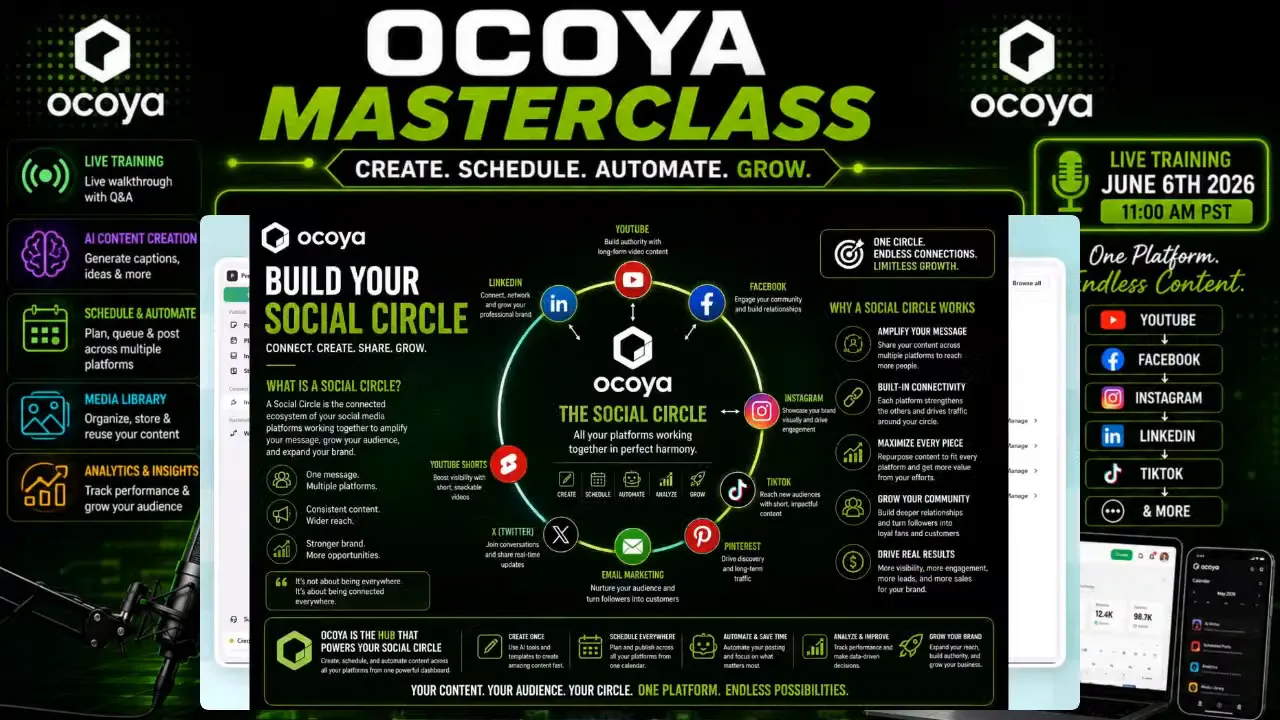
Ocoya works well here because it gives me the hub. I can create once, schedule widely, track what performs, and tighten the whole system over time. If you want to go deeper on repurposing and building this kind of engine, my piece on repurposing content for business growth is a strong companion read.
The dashboard is fairly straightforward once the accounts are connected. On the left side I have access to account settings, planner, inbox, studio, integrations, and workspaces.
A few things I liked:
Planner view makes scheduling easy to understand
Drafts are simple to manage
Connected accounts are clearly organized
Settings include useful publishing behavior controls
One setting I especially liked was the option to publish more like a human, meaning the post can go out within a short range around the chosen time instead of looking too rigid and robotic. That is a small touch, but it shows some thought about platform behavior.
Here is where this Ocoya Review gets more exciting. Ocoya is not limited to manual scheduling. It also supports workflows, including RSS based triggers and AI assisted draft generation.
This is the part that really grabbed my attention.
If I have a blog, a content feed, or even a YouTube related source that publishes regularly, I can use an RSS feed to trigger new social drafts. Ocoya can pull in the item, use AI to help build a caption, and save the post as a draft for approval.
Grab Ocoya Here!! |
| Don't Wait 7 Day Free Trial Now! |
| Grab Your Free Trial |
That approval step matters. I do not recommend full autopilot until everything is tested. But draft automation is excellent because it gets the heavy lifting done while still keeping me in control.
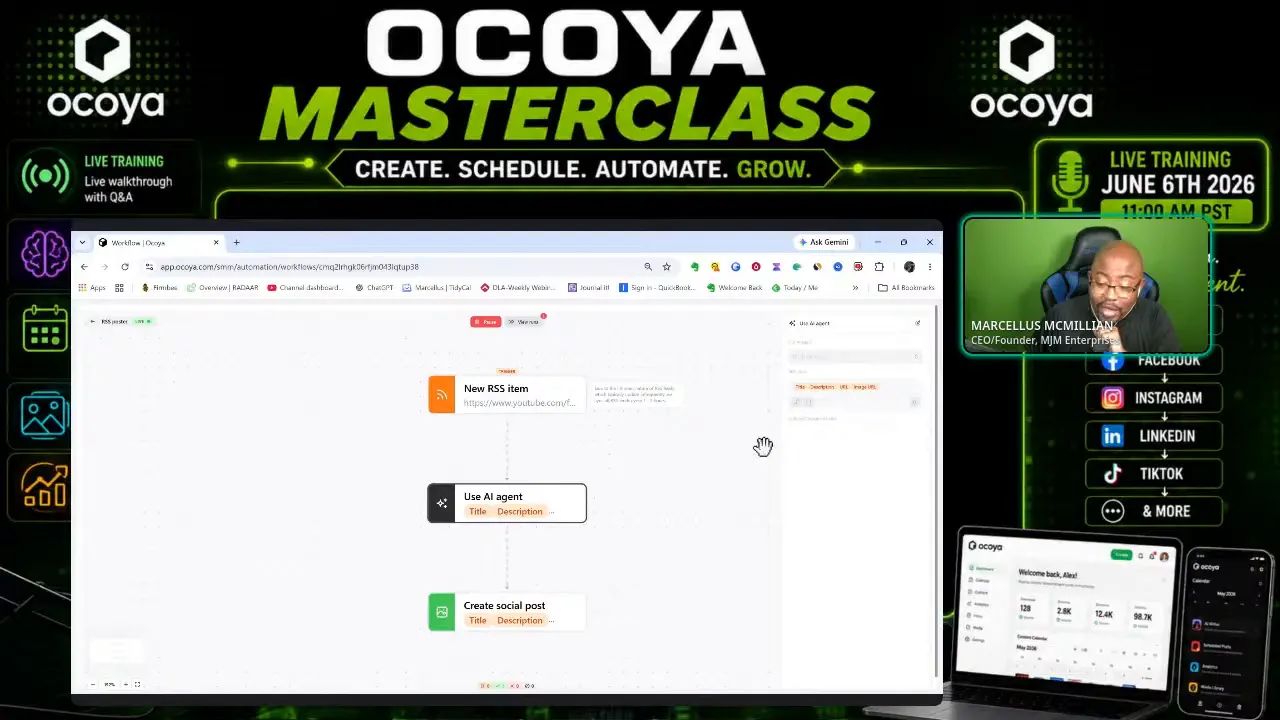
For agencies, this can be even more valuable. If a client updates a blog or publishes a new item on their site, the system can help generate a social draft without anyone having to copy and paste manually.
I am always honest about tools. I do not believe in being married to software. Tools change. Platforms improve. New options show up all the time. The goal is not loyalty to a dashboard. The goal is using what helps the business run better.
If I were setting up Ocoya as a primary part of my workflow, I would use it like this:
Create a weekly content batch session on one day
Draft core posts using AI assistance when needed
Attach branded visuals or use the design studio for quick assets
Schedule posts across selected platforms
Use draft mode heavily for RSS and automation workflows
Review analytics and duplicate what performs well
That system works especially well if you already think in themes, campaigns, or recurring weekly topics.
Ocoya includes its own media library, which is useful for storing and reusing graphics and videos. That said, if you are running a bigger content operation, you may still want a dedicated asset management tool.
I personally like keeping a real digital asset system outside the scheduler so I can drag and drop quickly, stay organized, and avoid having creative files buried all over the place. That is exactly why I recommend reading my breakdown of digital asset management with Eagle software if your content library is starting to grow.
For lighter use though, Ocoya's built in asset section is enough to get started.
Strong all in one mix of scheduling, AI, design, and planning
Useful AI tools for captions, hashtags, and content expansion
RSS automation can save a lot of time
Multi platform posting with platform specific variations
Draft approval workflow keeps automation safer
Workspaces help with multiple brands
Lifetime deal can be more attractive than ongoing monthly subscriptions
Some setup steps take patience, especially advanced workflows
Automation should be tested before relying on it heavily
AI output still needs editing
Not necessary for people who only post occasionally
Asset management is decent, but not a full replacement for a dedicated DAM system
ThisOcoya Review points most strongly toward a yes if you fall into one of these groups:
Small business owners trying to stay consistent on social media
Creators building a brand across more than one platform
Social media managers handling multiple channels
Anyone who wants to reduce manual copy and paste work
People who like the idea of AI assisted drafting, but still want final approval control
It is probably not worth it if you post once in a while and do not really need scheduling, automation, or content batching.
In my opinion, yes, if the price is reasonable and the feature access matches what you need.
The entire reason lifetime deals get attention is simple. Social media tools usually stack monthly fees forever. If you know you need a scheduler long term, and the tool is solid enough to stay in rotation, the math can work in your favor very quickly.
I always tell people not to buy software just because it is a lifetime deal. Buy it because it solves a real workflow problem. With Ocoya, that problem is content consistency across multiple platforms with less manual labor.
If that is your problem, the deal makes sense.
My final take in thisOcoya Review is pretty clear. Ocoya is a useful social media management tool with enough depth to be valuable and enough automation to be exciting. It is not perfect. It has a few rough edges. But the combination of scheduler, AI writer, design tools, planner, and RSS workflows makes it a serious option.
What pushes it over the line for me is not the basic posting. A lot of tools can do that. What makes Ocoya more compelling is the way it helps build a system. When I can create content faster, queue it smarter, and automate part of the drafting process, I am not just saving minutes. I am protecting focus.
And in business, focus is expensive.
So yes, for the right person, I think the AppSumo deal is still worth it.
Is Ocoya just another social media scheduler?
No. Scheduling is a big part of it, but Ocoya also includes AI writing tools, a design studio, inbox features, a planner, workspaces, and automation workflows like RSS based draft creation.
Who is Ocoya best for?
It is best for creators, small businesses, and social media managers who publish consistently and want to centralize their workflow. If you barely post, it may be more tool than you need.
Does the AI in Ocoya actually help?
Yes, especially for jumpstarting captions, adding hashtags, extending a post, or creating a rough draft. I still recommend reviewing and editing everything before publishing.
What is the most valuable feature in Ocoya?
For me, it is the RSS and workflow automation. The ability to turn content feeds into draft social posts can save a lot of time, especially for ongoing publishing systems.
Can Ocoya handle multiple brands?
Yes. Workspaces and account connections make it possible to organize separate brands or client accounts inside the platform.
Is the lifetime deal better than paying monthly elsewhere?
If you know you need a long term social media tool and you will actually use the features, a lifetime deal can absolutely be the better value. The key is making sure Ocoya fits your workflow first.