July 22nd, 2026 at 4:52 AM
Content Marketing
Last updated: July 22, 2026
Quick Answer: InVideo excels at AI prompt-to-video generation and granular editing, making it ideal for creators who want custom control over original content. Pictory dominates at turning long-form text and existing videos into short clips, making it better for rapid repurposing. For YouTube, choose InVideo for building original faceless channels and Pictory for extracting Shorts from podcasts or long-form videos.
Key Takeaways:
InVideo uses text prompts to generate full videos with scripts, voiceovers, and stock media.
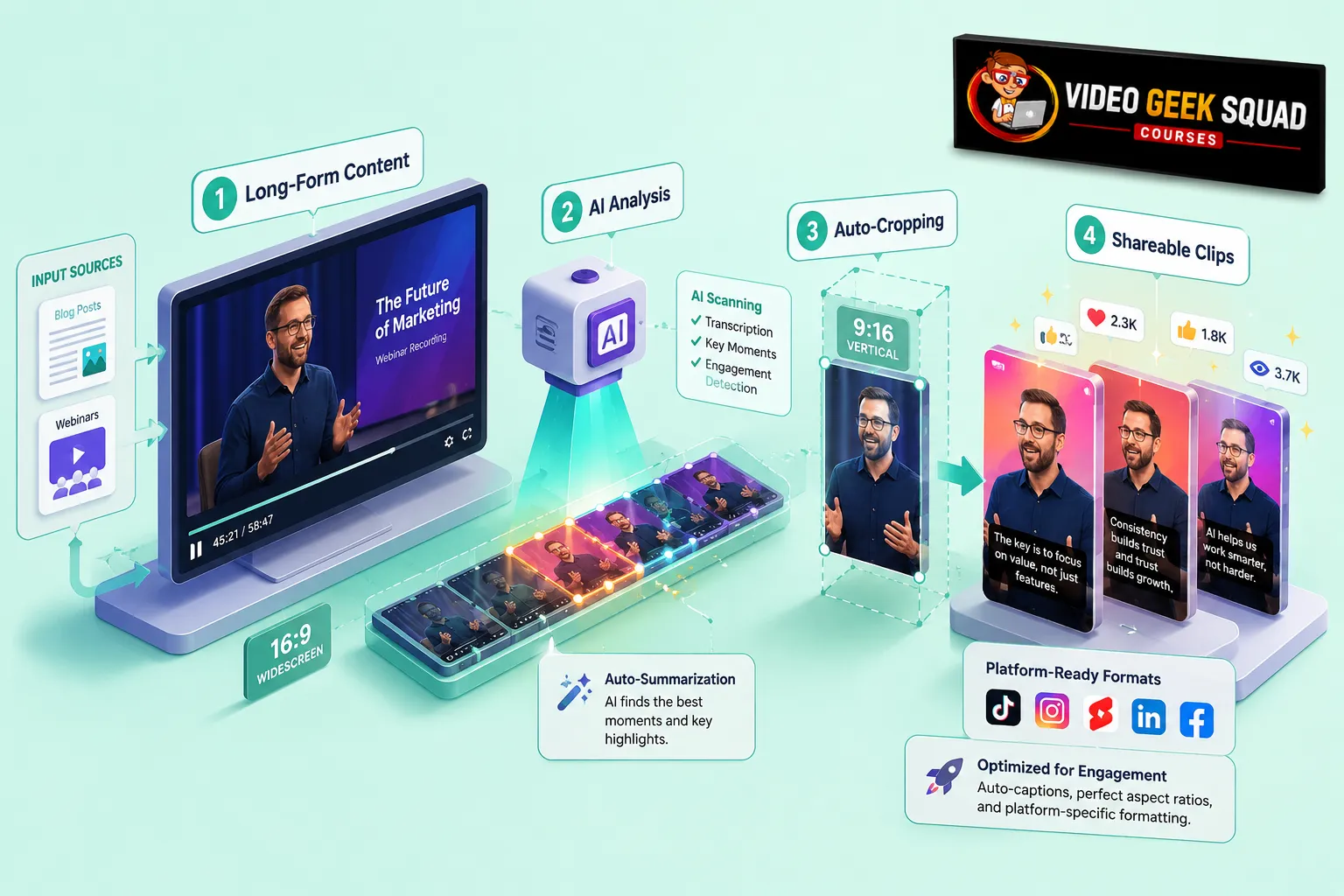
Pictory specializes in summarizing long-form content into highly engaging short clips.
The invideo vs pictory debate for YouTube comes down to original creation versus content repurposing.
InVideo offers a free plan with watermarks, while Pictory provides a 14-day free trial.
Both platforms render videos in the cloud, but InVideo provides more granular editing control.
Pictory is the superior choice for quickly generating YouTube Shorts from existing long-form podcasts.
InVideo is highly beginner-friendly, allowing users to create videos by simply typing commands.
Common mistakes with InVideo include over-prompting instead of using manual edits for precision.
Pictory's main limitation is its lack of deep, timeline-based editing capabilities.
For faceless YouTube channels, InVideo is the stronger, more versatile tool.
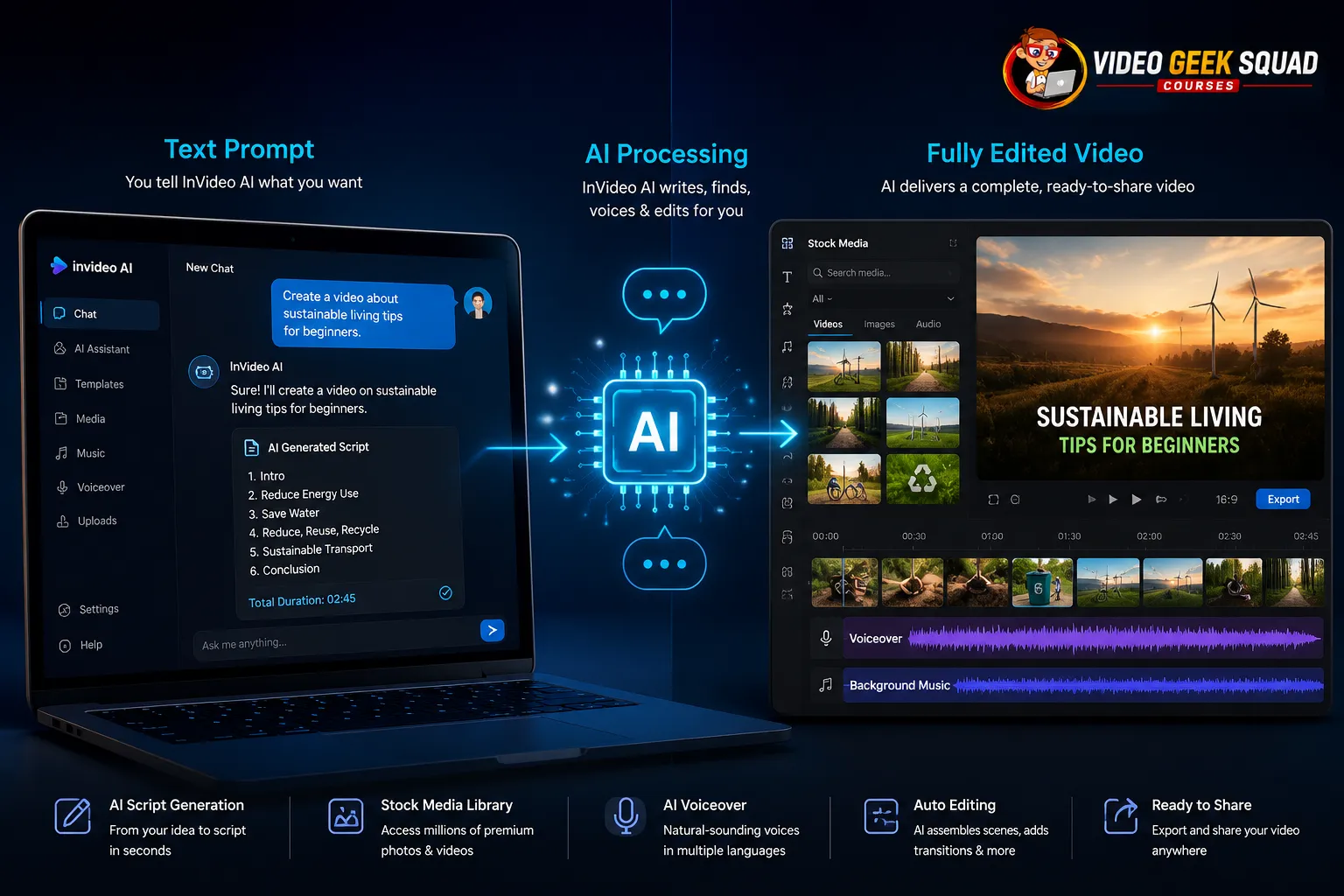
InVideo is an AI-powered video creation platform that turns text prompts into fully edited videos. You type a command, and the AI generates a script, pairs it with stock footage, and adds voiceovers and music. It works by acting as a conversational interface, meaning you can ask the AI to change scenes, swap footage, or alter the tone simply by typing instructions [6].
If you want to master rapid video creation, think of InVideo as your digital production assistant. Instead of manually piecing clips together, you focus on the message. The platform handles the heavy lifting of finding relevant stock media and syncing audio. This approach is perfect for digital entrepreneurs who want to scale their output without spending hours in complex editing software.
For those looking to level up their screen recording skills alongside AI generation, our Screencasting Ninja techniques pair perfectly with InVideo's AI capabilities.
How to use InVideo:
Enter a text prompt describing your desired video.
Let the AI generate the script and storyboard.
Review the selected stock footage and voiceover.
Use text commands to swap specific clips or change the pacing.
Export the final video to your computer.
Decision Rule: Choose InVideo if you need to create original videos from scratch using AI-generated concepts and prompts.
Pictory is an AI video tool designed to extract the best parts of long-form content and turn them into short, highly shareable clips. It works by analyzing existing videos, webinars, or blog posts, identifying the most engaging segments, and automatically cropping and captioning them for platforms like YouTube Shorts [2].
Pictory is the ultimate tool for a Content Repurposing MasterClass. If you have a 30-minute podcast or a 2,000-word blog post, Pictory can break that down into five or six bite-sized videos in minutes. This saves creators massive amounts of time that would otherwise be spent scrubbing through timelines to find good moments.
How to use Pictory:
Upload a video file or paste a URL to a blog post.
Let the AI transcribe and analyze the content.
Select the highlights you want to keep.
Auto-format the clips with captions and aspect ratios for YouTube Shorts.
Download the finished clips.
Decision Rule: Choose Pictory if your primary goal is recycling existing long-form content into short-form video.
When comparing invideo vs pictory for YouTube, InVideo is better for creating original, long-form content, while Pictory is the superior tool for generating YouTube Shorts from existing assets. InVideo gives you the creative freedom to build videos from a blank prompt, making it ideal for faceless channels, explainer videos, and listicles. Pictory excels at taking your existing YouTube long-form videos and slicing them into Shorts to drive traffic back to your main channel [4].
To succeed on YouTube, you need a mix of both long-form and short-form content. InVideo helps you build the foundation by generating those 5-to-10-minute videos that establish authority. Pictory then takes those videos, or your live streams, and turns them into 60-second hooks that capture attention.
If you are mapping out your channel strategy, you should integrate these tools into your YouTube Workflow Masterclass to maximize your output. Once your videos are ready, you can follow our How To Upload A Video To YouTube Walkthrough to get them published correctly.
Common Mistake: Using InVideo to generate long videos when you only need 30-second clips, or using Pictory to try and create original scripted content it wasn't built for.
InVideo boasts over 5,000 templates and a massive library of stock media, driven by an AI that acts as a conversational editor. Pictory's toolkit is focused on auto-summarization, auto-captions, and aspect-ratio formatting. InVideo gives you deep control over the timeline, while Pictory automates the extraction process [8].
With InVideo, you get features like AI text-to-video, automated voiceovers that sound human, and the ability to replace stock media with a single click. You can also access a wide variety of templates for different industries. If you need custom graphics to accompany your videos, combining InVideo with our VistaCreate Masterclass will give you a complete visual toolkit.
Pictory’s features are built for speed. Its auto-captioning is highly accurate, and its ability to auto-select highlights removes the friction of deciding what to post.
Feature Comparison:
InVideo: Prompt-based generation, 5,000+ templates, granular timeline editing, AI voiceovers.
Pictory: Article-to-video, long-video-to-shorts, auto-captions, highlight extraction.
Edge Case: If you need to create a highly specific corporate video with exact brand colors and precise timing, InVideo's manual editing features will serve you better than Pictory's automated extraction.
Yes, InVideo can create videos directly from scripts, and yes, Pictory does support long-form videos by allowing you to upload them for processing. InVideo allows you to paste a script, and the AI will break it down into scenes, assigning relevant stock footage and voiceovers to each block of text [6]. Pictory allows you to upload long-form videos up to a certain length depending on your pricing tier, which it then processes to find the best short clips.
Building content stacks is about efficiency. With InVideo, you can write a script in Google Docs, paste it into the platform, and have a video ready in minutes. This is a core component of Building Content Stacks for digital entrepreneurs.
Pictory handles long-form videos by acting as a smart assistant that watches the whole thing and tells you which 60 seconds are worth posting. You can upload a 45-minute webinar, and Pictory will give you five clips ready for YouTube Shorts.
Quick Example: Paste a 1,000-word blog post into InVideo to get a 3-minute explainer video. Upload that same 3-minute video into Pictory to get three 30-second YouTube Shorts.
InVideo offers a free plan with watermarks and paid plans starting around $20 to $50 per month, while Pictory does not have a permanent free tier but offers a 14-day trial with paid plans starting around $19 to $49 per month. The invideo vs pictory pricing comparison shows that both tools are similarly priced for premium features, but InVideo is more accessible for beginners who want to test the platform without a credit card [5][10].
InVideo’s free plan allows you to generate up to 10 minutes of AI video per week. This is a massive advantage for creators just starting out. If you are using PLR-All Around The Internet, you can test how InVideo turns that text into video without spending a dime. Their paid plans remove watermarks and grant access to premium stock media.
Pictory operates on a credit system. You use credits to render videos. The trial gives you a set number of credits to test the platform. Once you upgrade, your monthly allowance determines how many videos you can produce.
Pricing Breakdown:
InVideo Free: $0, 10 mins/week, watermarked.
InVideo Plus: ~$20/mo, 50 mins/month, no watermark.
Pictory Starter: ~$19/mo, 30 videos/month, no watermark.
Pictory Professional: ~$49/mo, 60 videos/month, no watermark.
Decision Rule: Choose InVideo if you are on a zero-dollar budget and want to start creating immediately. Choose Pictory if you have a budget and specifically need to process existing long-form content.
InVideo is exceptionally good for beginners because it uses a simple chat interface, and Pictory offers a 14-day free trial that allows new users to test the platform without commitment. The invideo vs pictory debate for beginners centers on ease of use: InVideo requires zero video editing knowledge, while Pictory requires just a few clicks to upload and process a file [8].
InVideo is built for people who have never opened an editing program. You simply type, "Make a video about the top 5 marketing tools," and it does the rest. If you want to change a clip, you type, "Change the second clip to a person typing on a laptop." This conversational approach removes the technical learning curve completely.
Pictory is also beginner-friendly but serves a different purpose. The 14-day free trial is generous enough to let you process a few long-form videos and see if the output is valuable for your channel.
If you are looking to go live and interact with your audience, check out our StreamYard Masterclass or our course on Live Video To Grow Your Business. You can record your live streams and then feed them directly into Pictory.
Both InVideo and Pictory render videos in the cloud, meaning your computer's processing power does not slow you down. InVideo typically exports in 1080p quality on paid plans, and rendering times take a few minutes depending on the length of the video. Pictory also processes videos in the cloud, with export times varying based on the length of the source file being analyzed [8].
Because both platforms use cloud rendering, you can start a project on a low-end laptop and still get high-quality results. InVideo’s export quality is excellent, with crisp 1080p resolution that looks professional on YouTube. The stock footage is high quality, and the AI voiceovers sync perfectly with the visuals.
Pictory’s quality depends largely on the source file. If you upload a 4K video, Pictory will extract clips in the highest quality possible. If you upload a 720p webinar, the resulting Shorts will be 720p.
Common Mistake: Rendering a massive 20-minute video on InVideo when you only need a 2-minute clip. Break your projects down to save rendering time.
A common mistake people make with InVideo is relying entirely on AI prompts without doing manual tweaks, and a major Pictory limitation is that it cannot generate original videos from a simple idea. InVideo users often accept the first output the AI gives them, resulting in generic videos, while Pictory users get frustrated when the tool fails to create a video from a one-sentence prompt because Pictory requires source material to function [4].
When using InVideo, the AI is smart, but it isn't perfect. If you just type "make a video about dogs," you will get a generic video. The mistake is not refining the prompt. You need to say, "Make a 2-minute video about training golden retrievers, using a professional tone, and highlighting three specific tips." Then, you must manually review the footage and swap out anything that doesn't fit.
Pictory’s limitation is that it is an extraction tool, not a creation tool. It cannot invent footage. It can only work with what you give it. If your long-form video is boring, Pictory will struggle to find good clips.
To avoid these pitfalls, you should organize your process using a Content Creation Workflow Kanban System. This keeps your AI generation and your manual editing separate and organized.
For faceless videos, InVideo is the superior choice because it generates original scripts, pairs them with relevant stock footage, and adds AI voiceovers automatically. Pictory can be used for faceless videos, but only if you are repurposing existing faceless content. The invideo vs pictory decision for faceless channels heavily favors InVideo because it builds the video from the ground up [6].
Faceless YouTube channels are incredibly popular right now. You don't need to show your face to get views. InVideo allows you to type a prompt, select an AI voice, and have a complete video ready for upload. This is perfect for creators who want to build multiple channels in different niches without being the "face" of the brand.
If you want to scale this process, attending a Productivity Workflow Webinar can help you systematize your faceless video production. You can also use tools like vidIQ to find the right keywords for your faceless videos before you generate them.
Decision Rule: Use InVideo if you are starting a faceless channel from scratch. Use Pictory if you already have a library of faceless long-form videos you want to chop into Shorts.
Choosing between InVideo and Pictory for your YouTube channel comes down to your specific content strategy. If you want to create original, long-form videos from text prompts and build faceless channels, InVideo is your best bet. If you already have long-form content, like podcasts or webinars, and want to rapidly turn them into YouTube Shorts, Pictory is the tool for the job.
Both tools solve different problems in the digital creator's workflow. The most successful content creators use both: InVideo to build the original assets, and Pictory to squeeze extra value out of them. Evaluate your current content library, decide which gap you need to fill, and start creating. Take action today by signing up for a free trial on InVideo or Pictory and testing them with your next video project.
Is InVideo better than Pictory?
InVideo is better for creating original videos from text prompts, while Pictory is better for turning long-form videos into short clips. The better tool depends on whether you need to create from scratch or repurpose existing content.
Can I use InVideo for YouTube Shorts?
Yes, InVideo can create YouTube Shorts. You can prompt the AI to generate a 60-second vertical video, or take a longer video and manually edit it down to a Short within the platform.
Does Pictory have a free plan?
No, Pictory does not have a permanent free plan. It offers a 14-day free trial that allows users to test the platform's features using a set number of credits before requiring a paid subscription.
Can InVideo create videos from scripts?
Yes, InVideo can create videos directly from scripts. You paste your script into the platform, and the AI breaks it down into scenes, adding relevant stock footage and AI voiceovers.
Is InVideo good for beginners?
Yes, InVideo is highly beginner-friendly. It uses a conversational chat interface where you type commands, removing the need for prior video editing experience.
What are the limitations of Pictory?
Pictory's main limitation is that it cannot generate original video content from a simple idea. It requires existing source material, like a blog post or a long video, to function properly.
Which tool is best for faceless YouTube channels?
InVideo is the best tool for faceless YouTube channels because it generates original scripts, finds stock footage, and adds voiceovers automatically from a single text prompt.
Do InVideo and Pictory render in the cloud?
Yes, both InVideo and Pictory render videos in the cloud. This means the processing happens on their servers, so your computer's hardware will not slow down the rendering process.
[1] Watch - https://www.youtube.com/watch?v=wT7lek33FCE&vl=en-US
[2] Pictory Vs Invideo Comparison 9502 - https://pexo.ai/blog/pictory-vs-invideo-comparison-9502
[3] Watch - https://www.youtube.com/watch?v=GBCRKfxf2Bk
[4] Pictory Vs Invideo - https://www.fahimai.com/pictory-vs-invideo
[5] Invideo Ai Pricing 2026 Complete Cost Guide - https://mymarky.com/blog/invideo-ai-pricing-2026-complete-cost-guide
[6] Invideo Ai Review 2026 Is It Actually Worth It - https://cut-the-saas.com/ai/invideo-ai-review-2026-is-it-actually-worth-it
[7] Watch - https://www.youtube.com/watch?v=VwlkcKDfi9Y
[8] Invideo Ai Review 2026 - https://fluxnote.io/guides/invideo-ai-review-2026
[9] Watch - https://www.youtube.com/watch?v=XbvGIm1NHtY
[10] Pricing - https://www.g2.com/products/invideo/pricing