August 10th, 2026 at 2:00 PM
YouTube MarketingIn this SkySnail Review, I am looking at an AI thumbnail generator designed to help YouTubers, content creators, and social media marketers produce thumbnail concepts quickly. The core idea is simple: give SkySnail a YouTube link, transcript, video file, or written prompt, then let the platform turn that information into a 4K thumbnail design using your templates, branding, and avatar.
For creators who are always trying to move faster, that is a big promise. Thumbnails matter. They are one of the first things people see when deciding whether to click, and creating them from scratch can turn into a serious bottleneck.
SkySnail is not trying to replace the strategy behind a great thumbnail. You still need a strong topic, clear positioning, and a design that makes people curious. What SkySnail does well is give you a faster starting point, especially if you already have a recognizable style you want to repeat.
SkySnail generates 4K thumbnail concepts from links, transcripts, files, or prompts.
Custom templates and brand kits are essential for consistent channel-level thumbnail output.
The built-in template library is limited, but custom reference uploads add useful flexibility.
The lifetime deal scaled from 40 to 450 monthly credits across four tiers.
SkySnail is an AI thumbnail designer built around content context. Instead of starting with an empty canvas, I can give the platform something that explains the video: a public or unlisted YouTube URL, a transcript, a prompt, or a video upload. It then uses that information to create thumbnail options.
The platform supports several use cases:
YouTube long-form video thumbnails
YouTube Shorts thumbnail concepts
TikTok and vertical social content graphics
Avatar-based thumbnails for personal brands
Reusable branded thumbnail templates
Basic video support tools, including titles, descriptions, tags, transcripts, safe-zone previews, and timestamps
What I like about the concept is that it is built around the way many creators already work. I have the video idea, script, outline, transcript, or uploaded video before I ever get to the thumbnail stage. SkySnail lets me bring that existing material into the design process instead of writing a completely new prompt from scratch every time.
The workflow is straightforward. From the dashboard, I start a new thumbnail project and choose how I want to provide the content.
Paste a YouTube link. This is my preferred option for a video that has already been uploaded, even if it is unlisted.
Upload a transcript. This gives SkySnail written context it can use to understand the subject and pull out headline ideas.
Upload a video file. The upload limit shown in the software is 2 GB, though this route takes longer because the file has to upload and process.
Write a prompt. This is useful when I am creating a thumbnail concept before a video is published.
There is one practical limitation to know about. Pasting transcript text into the description area is limited to 50,000 characters. For longer videos, I would not bother trying to squeeze everything into that field.
My workflow would be to upload the finished video to YouTube as unlisted, upload the SRT captions, and then give SkySnail the unlisted URL. That way, the video and transcript are already processed, and I can focus on getting the thumbnail done.
That is a smart workflow if I am serious about publishing consistently. It also pairs nicely with a documented YouTube workflow, where every asset is handled in the right order rather than scrambling for a thumbnail at the end.
Templates are where SkySnail starts to become useful for a channel that has a consistent visual identity. I can select from the available template options, or I can upload a custom thumbnail example and use it as the reference for a new creation.
In my test, I used an existing thumbnail style as the custom template. SkySnail produced a new design that followed the general visual direction while changing the content for the video. It took the original layout and turned it into a usable thumbnail draft very quickly.
This is especially valuable when I have thumbnail styles that already work for my channel. Rather than rebuilding the same composition over and over, I can save multiple variations and use them as starting points.
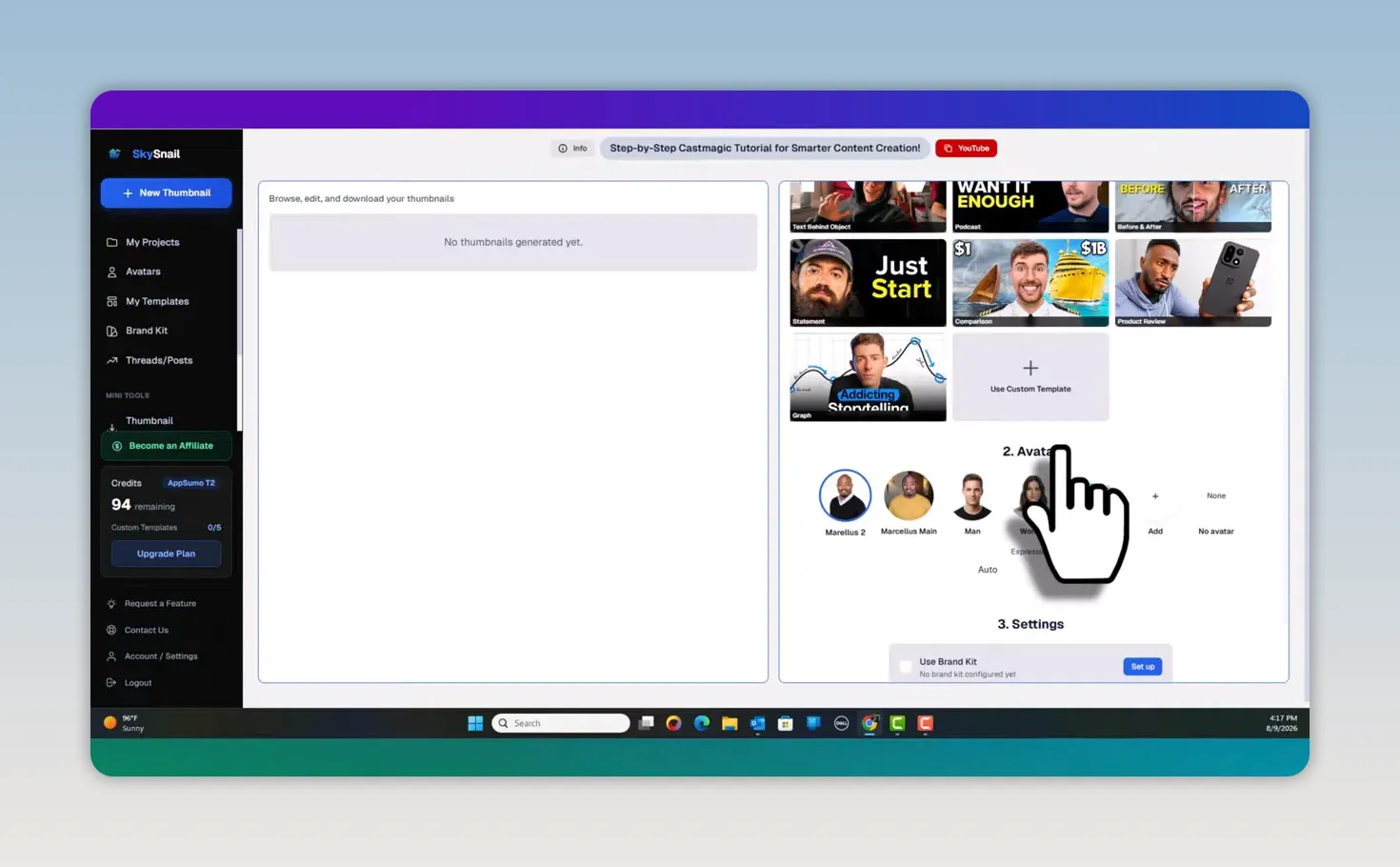
That said, I want to be honest in this SkySnail Review: the built-in template library was limited during my test. The custom-template upload feature helps balance that out, but I would not buy the tool expecting a massive polished template catalog right now.
My recommendation is to upload a small set of your own proven thumbnail styles. Think through the repeated formats on your channel:
Product reviews
Tutorials and walkthroughs
Comparison videos
News and updates
Personal-story content
Live stream announcements
Build a template for each repeatable category. That gives the AI stronger instructions and helps you avoid a random, inconsistent channel appearance.
SkySnail includes avatars, which can be useful for creators who build thumbnails around their face or personal brand. I can choose an avatar and adjust the facial expression with options such as shocked, sad, angry, and confident.
That is not just a novelty feature. Expression is a big part of thumbnail communication. A shocked look may fit a surprising result or major change, while a confident expression may make more sense for an educational tutorial or product review.
The avatar limits depend on the plan tier. In the plan I tested, I could add up to three avatars. Tier 3 showed support for up to 10 avatars, while higher options can extend further.
More important than the avatar count, in my opinion, is the brand kit. This is where I add brand colors and other visual elements to make the AI output look more like my channel and less like a generic AI image.
I would set up my brand kit before generating a serious batch of designs. Without it, the result can still be good, but it has less of my unique identity baked in. This is the same reason I recommend putting real thought into titles, graphics, and visual consistency across a channel. For more support on those fundamentals, my Building the Proper YouTube Foundation course covers the broader pieces that work alongside thumbnail creation.
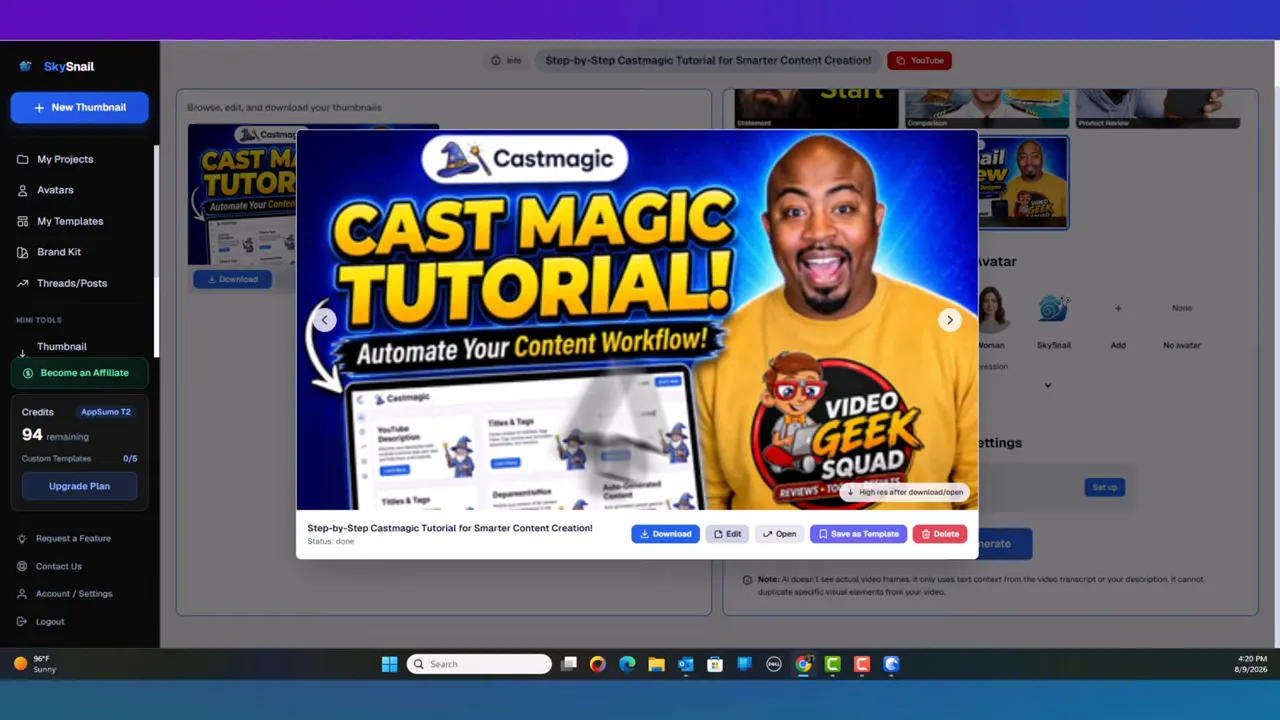
The first design should be treated as a starting point, not necessarily the final answer. One thing I liked is that I could give SkySnail quick revision instructions.
For example, I could ask it to turn a specific phrase white so the text stands out better. Small changes like this matter because thumbnail text needs contrast. If the key words do not read easily at a small size, the thumbnail is not doing its job.
SkySnail also lets me create multiple versions using different instructions. I would take advantage of that rather than settling immediately on the first image. Try alternate text emphasis, different avatar expressions, a new template reference, or a more direct headline.
Also, be careful when using designs found online as template references. Use them for inspiration and direction, but protect your own brand and avoid directly copying another creator's copyrighted graphics, logos, or recognizable artwork.
SkySnail includes a few supporting utilities beyond AI thumbnail generation. These include:
A thumbnail downloader
A transcript downloader
A safe-zone preview
A timestamp generator
Tools for YouTube descriptions, titles, and tags
A feature-request option and a way to contact the product owner
I already handle some of these tasks elsewhere in my own workflow, so I do not see them as the primary reason to buy SkySnail. Still, they are useful additions if I want fewer browser tabs and fewer separate tools.
The safe-zone preview is particularly worth using. A great-looking thumbnail can lose its impact if key text or faces are positioned poorly for the platform display. Take a moment to confirm that the important visual elements remain clear.
At the time of this SkySnail Review, the product was available through an AppSumo lifetime deal for a one-time price of $79, reduced from a stated $180 price. Lifetime deals can change or disappear, so I would always confirm the current offer before buying.
The plans shown in the offer scale by monthly credits and avatar limits:
Tier 1: 40 credits per month and 1 avatar slot
Tier 2: 100 credits per month and 3 avatar slots
Tier 3: 250 credits per month and 10 avatar slots
Tier 4: 450 credits per month and unlimited avatar slots
The right tier comes down to content volume and how many people or brands I need to represent. A solo creator with one face-based channel may not need a lot of avatar slots. Someone managing several channels, clients, or team members will likely need more room.
|
Fast concept generation: I can get from video context to thumbnail drafts without staring at a blank design canvas.
Flexible input options: YouTube links, transcripts, prompts, and video files make it adaptable to different workflows.
Custom templates: Uploading my own examples is the best path to visual consistency.
Avatar expression controls: This adds useful emotional direction to face-based thumbnail styles.
Brand-kit potential: Brand colors and assets can help outputs better match my existing content.
Useful companion features: Safe zones, downloading, and timestamp tools can reduce tool switching.
Limited built-in templates: The custom upload option is valuable because the native collection is still fairly small.
Transcript text limit: The 50,000-character field can be restrictive for long content.
Video uploads take longer: The 2 GB upload route requires additional processing time.
AI output needs review: I still need to check brand accuracy, contrast, wording, and whether the final design truly matches the video promise.
It is not a full design suite: SkySnail is best used as a rapid thumbnail generator, not as a replacement for every advanced editing tool.
I think SkySnail is a strong fit for creators who need more thumbnail volume without paying a designer for every single video. It is also useful for someone who has a recognizable visual style but wants to create new variations faster.
It is a good option for:
Solo YouTube creators producing regular tutorials, reviews, and updates
Creators who already use avatar-led thumbnails
Social media managers creating multiple visual assets
Agencies or teams managing several creator brands
Anyone who wants a backup thumbnail workflow alongside other tools
I would be more cautious if I need pixel-perfect graphic design, extensive manual editing, or a huge library of ready-made templates. In that case, SkySnail can still be a useful idea generator, but it should sit beside a more complete design tool.
That is actually how I look at lifetime deal software in general. I do not want to rely on only one product for every critical part of my content business. A diverse tool stack gives me alternatives if one platform changes, raises prices, or does not fit a specific project. My guide to evaluating SaaS lifetime deals can help with that decision process.
My final SkySnail Review verdict is positive, with a practical caveat. SkySnail is a unique AI thumbnail maker that does what I need it to do: it can take a video or transcript, understand the subject, follow a custom thumbnail direction, and produce a usable design quickly.
The strongest feature is not simply that it generates AI images. It is that I can use my own templates, avatars, and eventually my brand kit to make the output more repeatable. That is where it can help me move faster without making every upload look disconnected from my channel.
The template library needs to grow, and I would not skip quality control just because an AI generated the design. But for a creator who wants a fast thumbnail starting point, a way to test visual angles, and a tool that can fit into an unlisted-video workflow, SkySnail is worth a serious look.
Yes. I can use an unlisted YouTube link, which is useful when the video and captions have already been uploaded but the thumbnail is still being created.
Yes. I can upload an image as a custom template and use it as the visual direction for a new thumbnail generation.
The text field for pasted transcript or description content is limited to 50,000 characters, so using a YouTube link can be easier for longer content.
SkySnail can produce fast concepts and usable branded drafts, but I would still review every result and use a dedicated designer when a project needs highly customized, pixel-level work.