June 30th, 2026 at 4:16 PM
YouTube MarketingThisLivid Review comes down to one simple question: if you are tired of YouTube ads, Vimeo pricing friction, or giving up control of your video player, is Livid a smart switch?
After going through the platform, the short answer is yes, with one important caveat. Livid looks like a very promising video hosting platform for creators, small businesses, course builders, and anyone who wants a clean, branded, ad free video experience. It feels modern, uploads are impressively fast, and the interface is easy to figure out right away. But storage on the lower plan can become an issue fast if you work with a lot of video.
If your goal is to create a private video library, share content securely, migrate away from Vimeo, or host branded business videos without clutter, Livid has a lot going for it.
Livid positions itself as an all in one video hub. The big appeal is that it gives you a place to host videos without ads while letting you keep the experience on brand. That means your own colors, your own logo on supported plans, and better control over how people access your content.
This makes Livid especially attractive for:
Content creators who want a cleaner delivery experience
Small businesses sharing training, promos, or client material
Videographers delivering protected content
Course creators who need password protected video hosting
Anyone looking for a Vimeo alternative without the usual headaches
In that sense, thisLivid Review is not really about whether the software works. It clearly does. The real question is whether the plan structure matches your video workload.

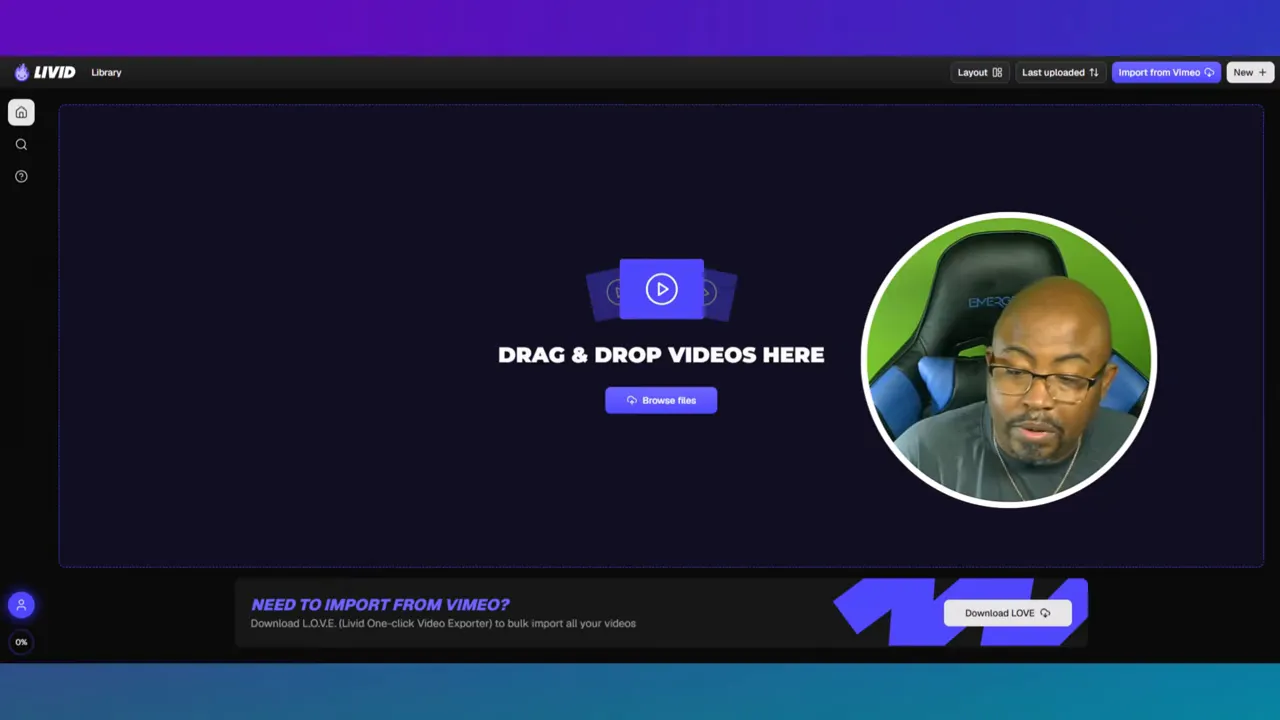
Getting started with Livid is straightforward. You activate your account, confirm your email, and land inside the video library. From there, the dashboard keeps things simple. The left side includes navigation for home, search, support, settings, billing, and sign out. Nothing feels buried.
That matters more than people think. A lot of video platforms get bloated fast. Livid goes the other direction. It gives you the core options up front and keeps the layout clean enough that you can start using it without a long learning curve.
You also get layout controls that let you change card size and aspect ratio views. For anyone managing a lot of content, that kind of flexibility helps. It is not flashy, but it improves day to day use.
If you are building systems around your content, pairing a platform like this with a workflow process can save a lot of frustration. That is one reason a visual planning method like thiscontent creation workflow Kanban system makes so much sense once your video library starts growing.
The speed of uploading was one of the first things that stood out. The upload process felt quick, and that kind of responsiveness always leaves a strong first impression. If you are regularly sending up clips, tutorials, client videos, or training modules, slow uploads can become a real pain point. Livid seems to understand that and keeps the process moving.
You can upload normally or use drag and drop, which is exactly what most creators want. No unnecessary friction.
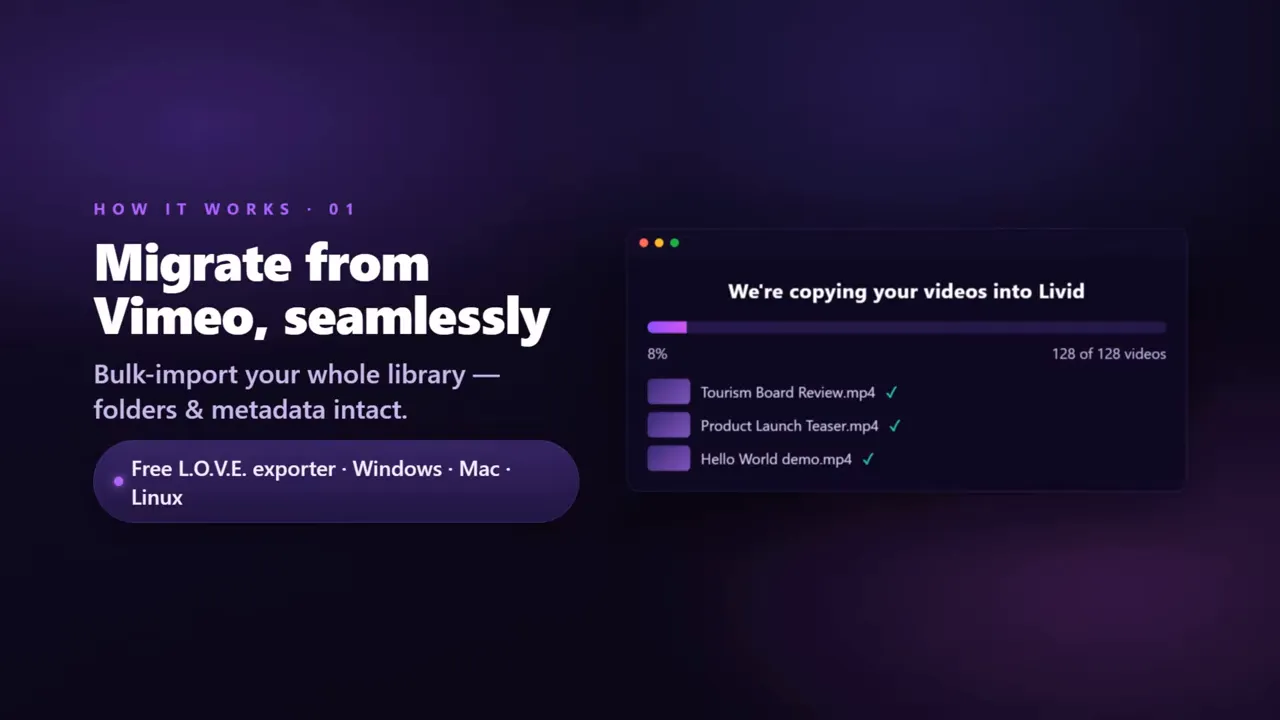
One of the more useful features is the Vimeo import option. If you already have a library over there, Livid is clearly trying to lower the pain of switching. There is also mention of a free exporter for bulk import, which makes migration more realistic for people with larger libraries.
That is a smart move. Nobody wants to manually rebuild a full video catalog one file at a time.
Another major plus in thisLivid Review is branding. Livid lets you customize the player, and higher plans add your own logo. That is a big deal for businesses and agencies. A generic player can make even polished content feel disconnected from your brand. A branded player keeps your business identity consistent from start to finish.
For trainers, coaches, and consultants, that detail helps your videos feel like part of your own ecosystem rather than borrowed space on someone else’s platform.
Livid supports public, unlisted, and password protected sharing. That covers a lot of common use cases:
Public videos for general promotion
Unlisted videos for selective sharing
Password protection for premium or private content
If you sell courses, send client previews, or host internal team content, this is one of the most practical features in the platform.
You can upload videos, create folders, and build showcases. Again, this is not overly complicated, and that is a good thing. As your library grows, simple organization becomes essential.
That also connects nicely with stronger content management habits. If digital file clutter is already a problem, you may also want to read this guide ondigital asset management with Eagle software, because the same principles apply when you are managing lots of media.
Livid is clearly aimed at people who have outgrown YouTube for certain use cases and do not want to keep paying what feels like premium overhead elsewhere.
Compared with YouTube, Livid gives you:
No ads on the playback experience
More control over branding
Better privacy options for protected content
A dedicated video library feel rather than a public social platform
Compared with Vimeo or Wistia, the value play is more about reducing cost barriers while still keeping the essentials people actually need. The pitch is simple: cleaner player, fewer surprise fees, easier entry point.
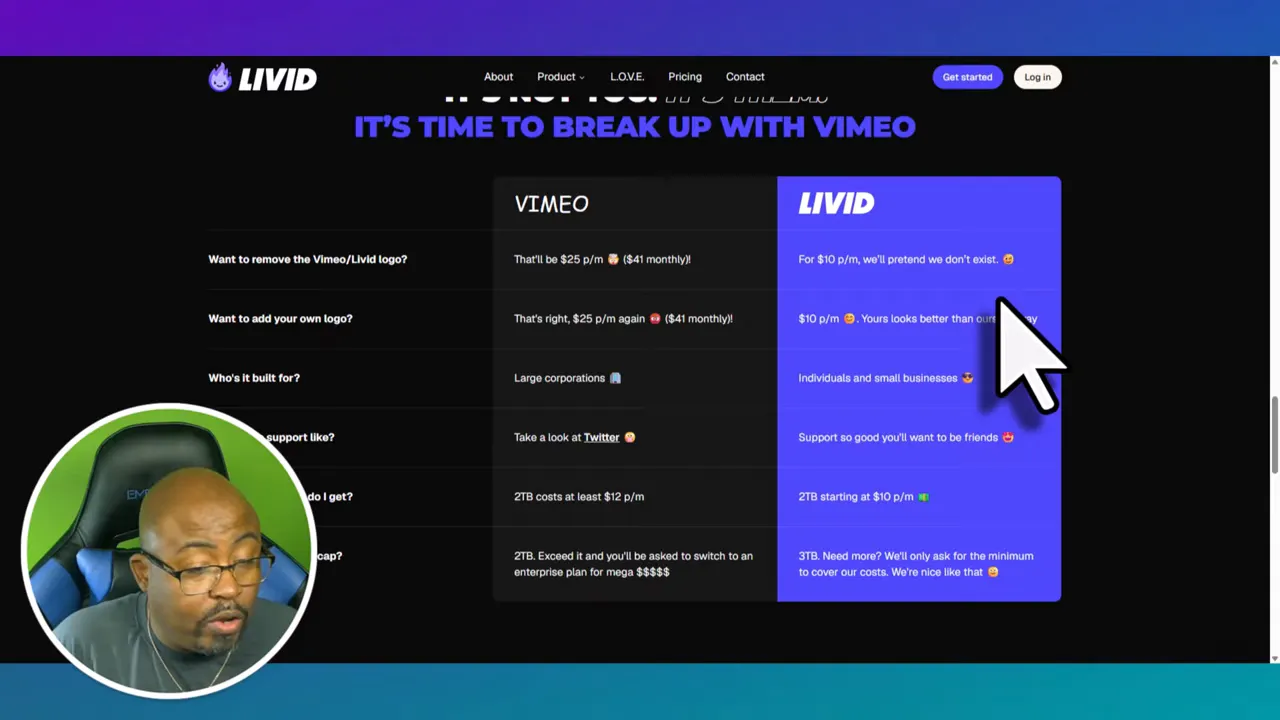
That said, Livid is not necessarily replacing every advanced enterprise video workflow. If you need heavy enterprise infrastructure, you will still want to compare details carefully. But for solo creators, small brands, and mid level content businesses, the value proposition looks strong.
Pricing is one of the biggest reasons people will look closely at Livid.
There are two pricing angles discussed here:
Regular platform pricing with free, annual, and monthly options on the main site
AppSumo lifetime style tier pricing highlighted in the review
On the standard site pricing, there is a free plan, an annual option around $10 per month billed yearly, and a monthly option around $16 per month billed monthly.
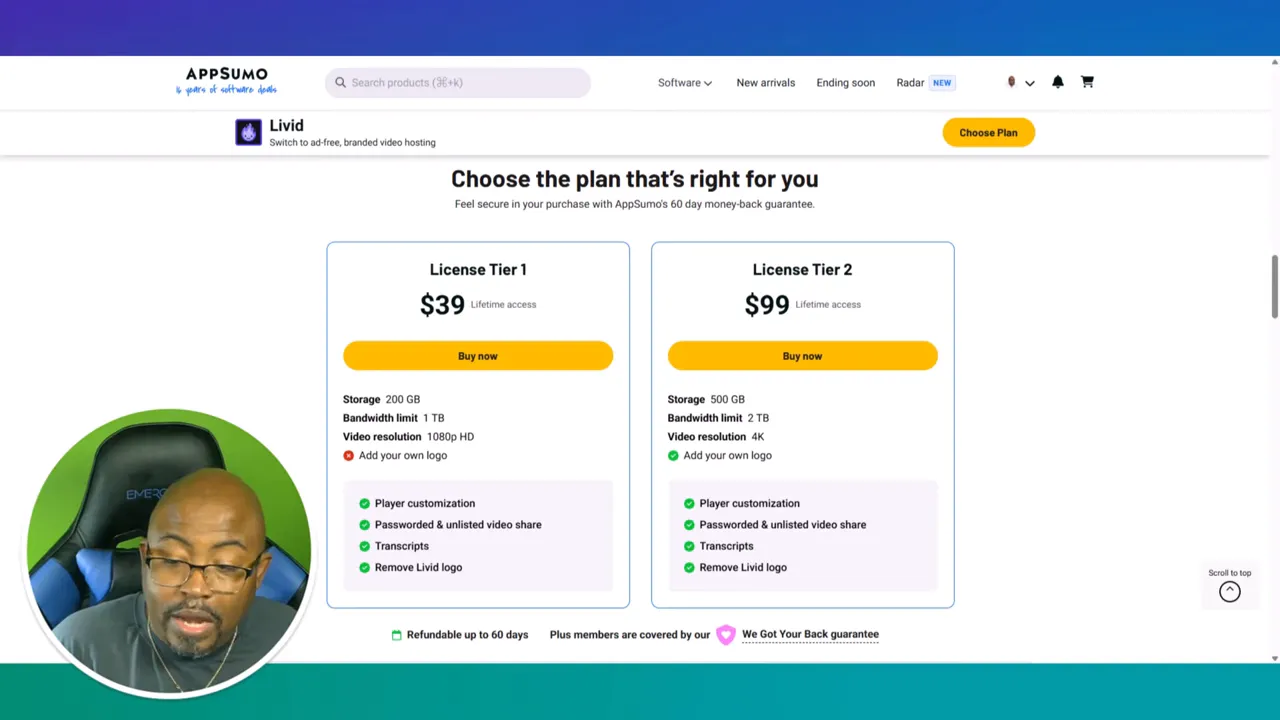
On the AppSumo side, the tiers highlighted were:
Tier 1 at $39
Tier 2 at $99
Tier 1 is positioned as a fit for solo creators.
Tier 2 adds 4K support and your own logo, making it a stronger fit for growing brands and agencies.
For current deal access, the recommended link is theLivid AppSumo offer page.
Here is the one issue that deserves real attention in any honestLivid Review: storage.
The lower account discussed appears to come with 200 GB of storage. For light use, that may be fine. For true video work, especially long form content, course material, or high resolution assets, 200 GB can disappear faster than you think.
If you are a course creator or someone who produces video regularly, that is where Tier 1 starts to feel more like an entry point than a long term home.
That is why the stronger recommendation leans toward Tier 2. It gives you more breathing room, branding advantages, and better future proofing if you plan to grow.
Livid is a great fit if you are:
Leaving Vimeo and want a smoother migration path
Hosting private or password protected videos
Building a branded content experience
Tired of ad clutter on public platforms
Managing a modest to growing video library
It is especially strong for people who need clean delivery over social discovery. In other words, if your priority is video hosting rather than audience building on the platform itself, Livid becomes much more attractive.
|
Livid may not be the perfect fit if you are:
Storing very large course libraries on the cheapest plan
Needing advanced enterprise video infrastructure right now
Primarily relying on a platform for built in public discovery the way YouTube offers
This is not a social platform first. It is a hosting and delivery platform first.
Overall, thisLivid Review lands in positive territory.
Livid does a lot right:
Very fast uploads
Clean, modern interface
Simple setup
Vimeo migration tools
Useful privacy controls
Branding options that make business sense
The main concern is storage on lower tiers. If you know your library is going to grow, skip the cheapest route and think ahead.
For solo creators testing the waters, Tier 1 can work. For businesses, agencies, and course creators, Tier 2 looks like the smarter buy.
And because this tool comes from the team behind StreamYard, there is a built in confidence factor here. People who understand video workflows tend to make better decisions about video software. You can feel some of that thinking in the simplicity of the product.
If you are building a larger publishing system around your content, you may also want to explore theYouTube Know How course for growth strategy beyond hosting alone.
Fast and smooth uploads
Easy to use dashboard
Drag and drop support
Vimeo import and bulk migration help
Branded player options
Password protected sharing
Good value compared with pricier alternatives
Lower tier storage may be too limited for heavy video users
Some branding features are reserved for higher tiers
Not meant to replace the discovery side of YouTube
Yes. Livid is clearly designed as a Vimeo alternative, especially for creators and small businesses that want ad free hosting, branding options, and easier pricing entry points.
Yes. Livid supports public, unlisted, and password protected sharing, which makes it useful for courses, client work, and private business content.
The biggest drawback is storage on the lower plan. If you create lots of video content, 200 GB can feel tight pretty quickly.
Tier 2 looks like the better fit for course creators because it gives you more room to grow and includes stronger branding benefits.
Yes. Vimeo import is one of the headline features, and there is also support for bulk migration through the exporter tool mentioned in the review.
It depends on your goal. If you want public reach and platform discovery, YouTube still has advantages. If you want cleaner hosting, private sharing, and branding control, Livid is the better tool for that job.
If you want more software reviews and tutorials like thisLivid Review, browse all Video Geek Squad posts.
For access to premium training and classes, check out theVideo Geek Squad memberships.
If you want a central place to explore more tools, reviews, and digital learning resources, visitVideo Geek Squad.