August 9th, 2026 at 3:22 PM
Content MarketingCastmagic vs. Competitors cuts through the hype to answer whether castmagic truly delivers ROI for budget-conscious creators by putting it side by side with Descript, Veed, Kapwing, Repurpose.io, and Lumen5. You’ll get apples-to-apples comparisons of core features, pricing, and real-world workflows, plus a practical ROI framework and scenario-based guidance. This isn’t a hype piece—it’s a creator-focused assessment of when Castmagic makes sense for rapid, multi-platform repurposing—from YouTube Shorts to Instagram Reels and podcast clips.
Castmagic is built for speed and scale, not for surgical, hour-long edits. The core capabilities center onAI-driven repurposing, auto clipping, transcription, and multi-format exports that align with modern social feeds. You get templates and workflows designed around YouTube Shorts, TikTok, and Instagram Reels, plus batch processing that turns a backlog of long-form video into a publish-ready slate with minimal manual handoffs.
These capabilities map cleanly to budget-conscious creators who need velocity more than polish. For teams working on multiple channels, Castmagic becomes the posting backbone, turning long-form content into bite-size assets with consistent templates and brand-safe defaults. Ideal use cases include:
Rapid clip production from long-form content using auto clipping and preset templates for vertical social formats.
Podcast repurposing: turn episodes into short clips with auto transcripts and captions for platforms with auto-captioning.
Batch reformatting: push existing videos into YouTube Shorts, IG Reels, and TikTok in one go with export presets.
Short-form content library: build a reusable pool of clips for ongoing promos and course promotions.
The trade-off is control. advanced editing, precise timing, and bespoke branding still benefit from dedicated editors. Castmagic templates are excellent defaults but can require manual tweaks for on-brand fonts, color, or motion graphics. Real-world workaround: after auto-clipping, import the clips into a more capable editor for fine editing, then re-export, or use Castmagic as the publishing backbone while keeping a separate asset library.
Concrete Example: A solo creator with a 60-minute interview uses Castmagic to generate 8 vertical clips for Shorts and Reels. The tool handles transcription and captions automatically; I adjust titles in the template, then export in vertical and square formats for multiple platforms. The pilot video yields 2–3 hours saved versus manual clipping.
Key takeaway: Castmagic is strongest when you need high-volume repurposing at a low cost per clip; you should expect to layer in a more capable editor if your content requires precise branding or advanced edits.
Takeaway: For budget-first content velocity, Castmagic can be the solid backbone for rapid multi-format publishing; if you later demand deeper editing, map in a secondary tool to complete the workflow.
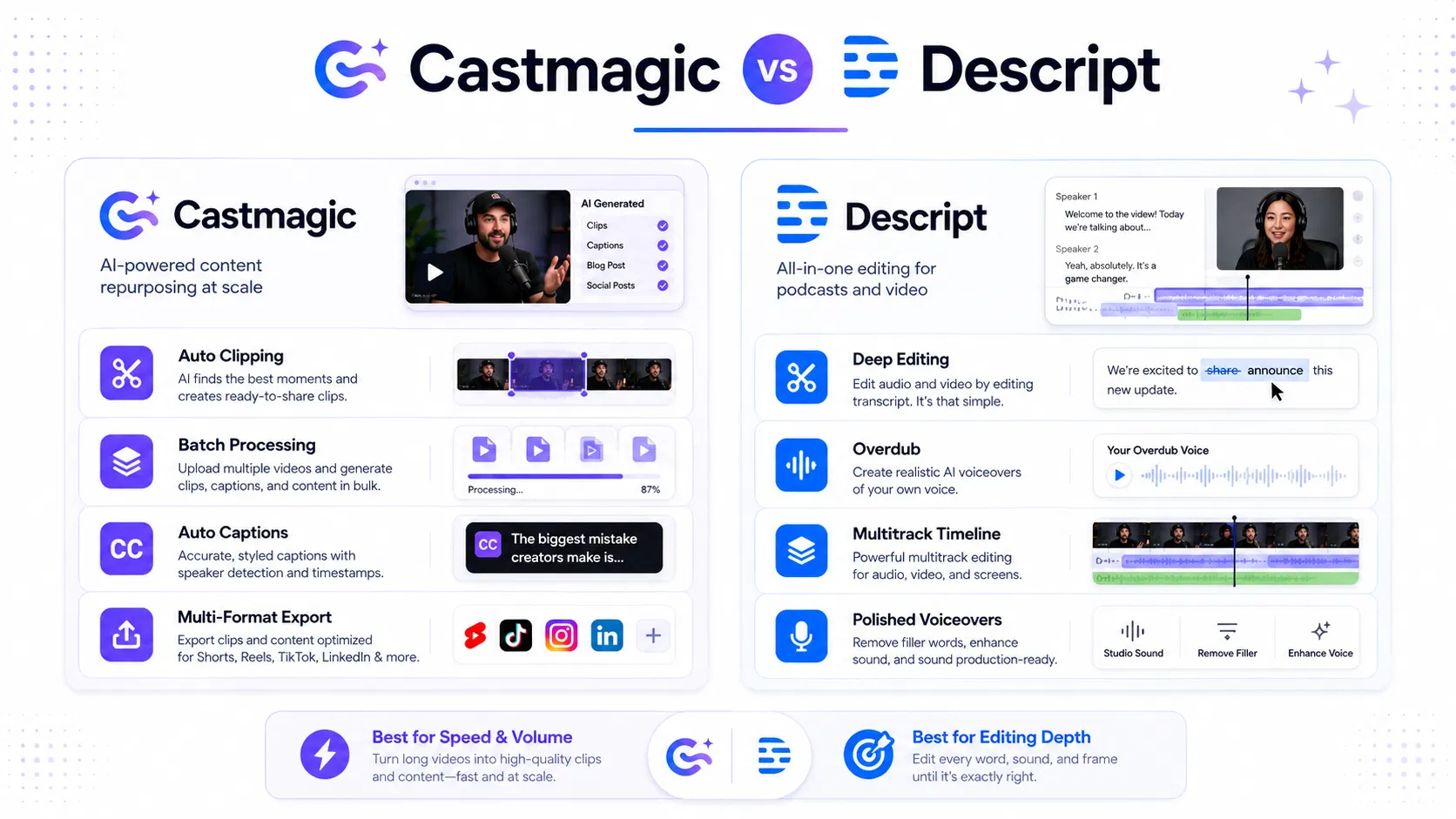
Castmagic is built for speed. For budget-conscious creators aiming to maximize clips per hour, its auto clipping, batch workflows, and multi-format exports collapse the time-to-first-clip dramatically. Descript, meanwhile, leans into editing depth with long-form timelines and Overdub, but that precision comes at a higher price and longer ramp-up.
Transcription quality and editing focus diverge between the two. Descript excels in long-form transcription and offers an Overdub-style voice clone, which is a natural fit for polished podcast promos and voiceovers. Castmagic keeps transcription lean and is optimized for clipping, captions, and quick reformatting rather than intricate multi-hour edits.
Example: a creator repurposes a 60-minute interview into 12 Shorts and 2 verticals using castmagic templates. The clips come out with captions automatically, ready for upload, in under an hour. For two longer clips requiring precise cuts and a voiceover, they move into Descript, perform a focused edit and overdub, then reintegrate; the combined workflow reduces total production time by a meaningful margin compared to using Descript alone.
Pricing and ROI implications matter more with this pairing. castmagic delivers a lower entry price for high-volume clipping, so the break-even point comes sooner if your cadence is erratic or ramping. Descript costs more but pays off when you need deep editing, reliable multi-track timelines, and Overdub for consistent voice assets across episodes.
Castmagic strengths: fast batch processing, strong templates for YouTube Shorts/TikTok/IG Reels, export presets for multi-platform publication.
Descript strengths: advanced editing, long-form timelines, Overdub voice cloning, richer media management.
Trade-offs: lower editing precision in Castmagic; higher cost and steeper learning curve in Descript.
ROI considerations: use Castmagic for volume-driven clips; reserve Descript for edited pieces where polish justifies the price.
If your team relies on a single workflow for Shorts and Reels, Castmagic’s template-driven approach reduces training time and avoids drift in formatting. In contrast, Descript’s editing-first mindset pays off when you repeatedly need precise cuts, multi-track management, and consistent voice assets across episodes—even if that comes with more steps and cost.
Key distinction: automation-first workflows with Castmagic unlock speed and lower total cost of ownership, while Descript unlocks editing depth and voice-over capabilities at a premium.
Takeaway: If your priority is rapid, cost-efficient clip production across platforms, Castmagic is the better fit. If your needs center on deep editing and overdub quality, Descript becomes worth the investment.
Takeaway: Castmagic is the ROI-friendly choice for speed and volume in budget-conscious workflows, while Descript remains the go-to if deep editing, overdub, and multi-track control drive your content strategy.
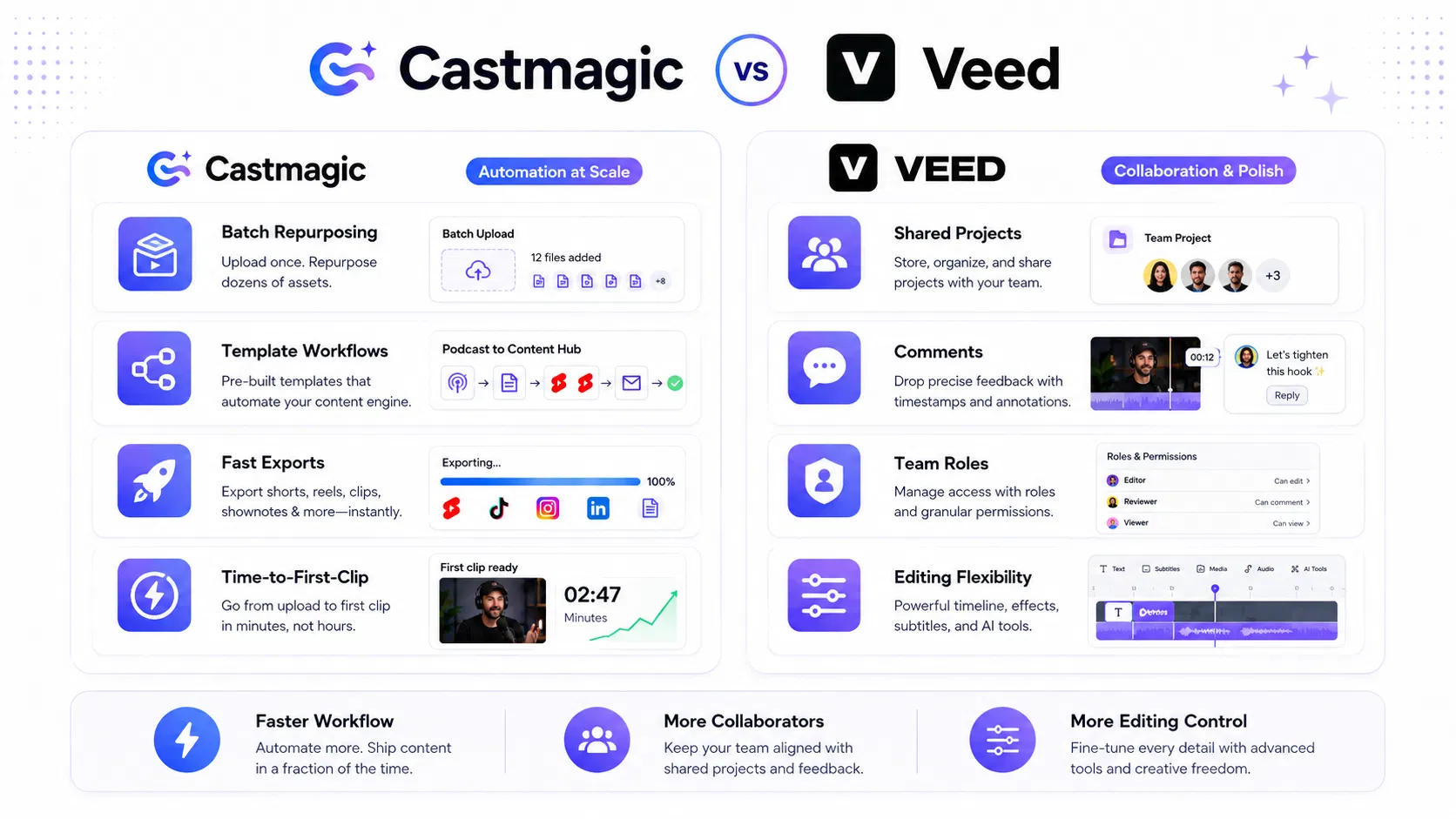
In practice, Castmagic dominates the automation lane, but Veed wins when collaboration and editing depth matter more than raw speed. Castmagic's strength is batch repurposing, template-driven workflows, and quick multi-format exports that align with YouTube Shorts, TikTok, and IG Reels.Castmagic shines when you need consistent outputs fast; Veed shines when your team relies on shared projects and more granular editing during review cycles.
Automation speed and scale are the baseline for most creators, and Castmagic delivers that with batch processing and templates for Shorts, TikTok, and Reels. In my tests, a 2-hour podcast produced around 40 short clips in under an hour using consistent aspect-ratio presets. For comparison, Veed can perform similar clipping workflows but often requires more manual setup to reach the same throughput, especially when you layer in captions and thumbnail automation.
When it comes to outputs, Castmagic leans on templates that standardize captions, thumbnails, and format swaps across platforms. Castmagic's export presets ensure 9x16, 1:1, and 16:9 variants plus auto-captioning. Veed provides more granular control over edits at export, including color tweaks and transitions, but that depth costs time if your goal is to publish fast.
Veed shines in multi-user workflows: shared projects, comments, and team roles that let editors and producers work in parallel. Castmagic supports team use through shared templates and centralized assets, but its collaboration rails are lighter than Veed's, which matters when you need fast review cycles across a small creative group.
In terms of output quality, Veed often yields crisper edits with more options for polish during editing sessions. Castmagic prioritizes speed and consistency; if you’re chasing precise cuts and refined visuals, you’ll likely supplement Castmagic with a quick pass in a dedicated editor.
Trade-off: automation speed and cost vs editing flexibility and collaborative depth.
Key takeaway: For automation-first production at scale, Castmagic provides the leaner path; for teams that need robust collaboration and more granular edits, Veed offers stronger day-to-day tooling.
Concrete example: A two-person podcast team uses Castmagic to generate 60-second clips from each episode, publishing daily to YouTube Shorts and IG Reels, then brings the top performers into Veed for a quick color grade and on-screen graphic pass. The workflow remains faster on Castmagic, with Veed acting as the polishing stage.
Takeaway: if your priority is rapid, scalable clipping on a budget, start with Castmagic; if your needs center on team collaboration and final polish across multiple editors, test Veed before you scale.
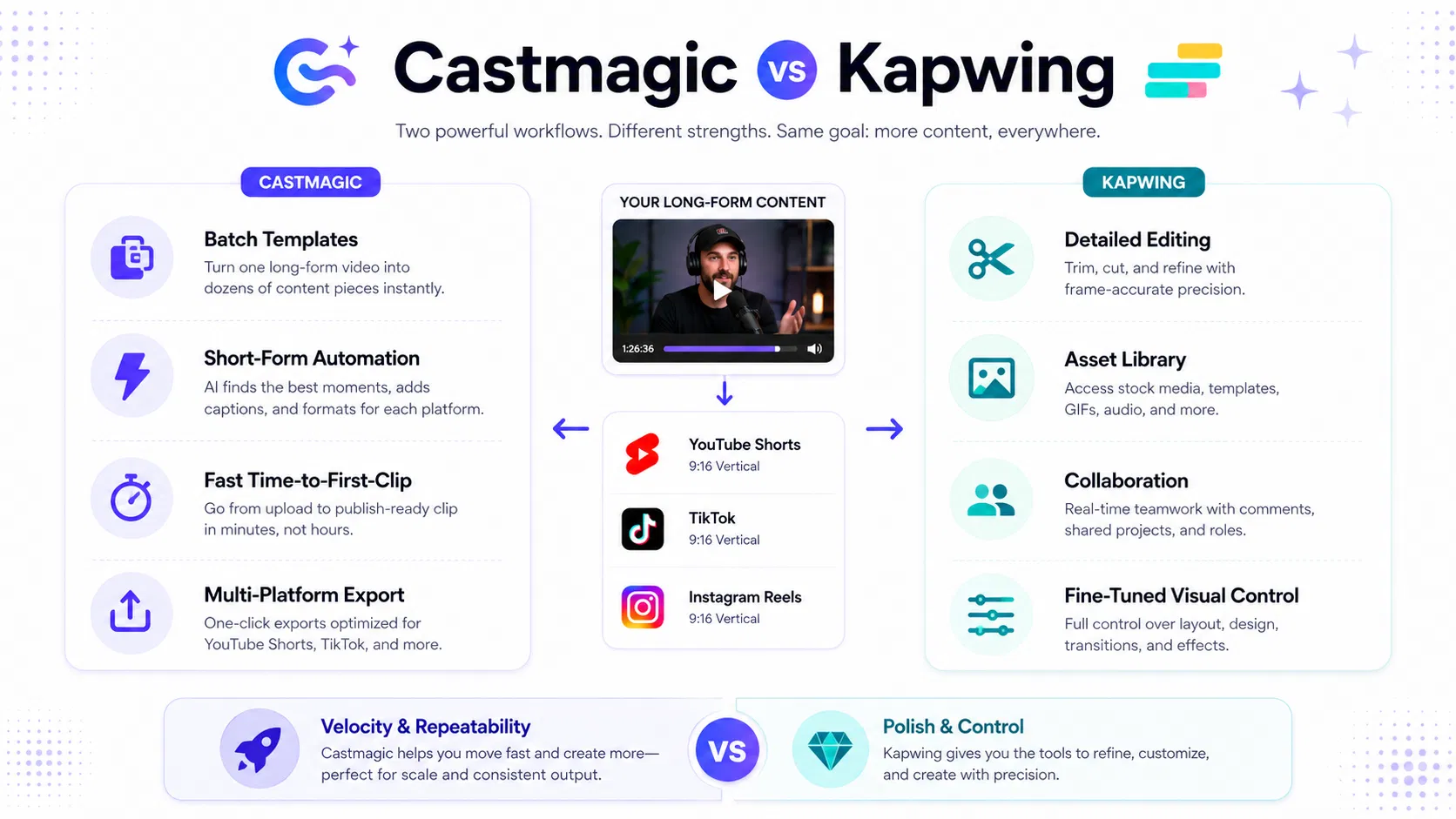
For social-first workflows,castmagic delivers the speed and repeatable templates that let you publish first and refine later. Kapwing, by contrast, leans into editing depth and collaboration, which matters when you need precise cuts, overdubs, and multi-person review before a publish. This isn’t about hype; it’s about cadence and cost-per-clip in real creator routines.
Templates matter more than you think on social cadence. Castmagic ships with batch-ready templates for YouTube Shorts, TikTok, and IG Reels, plus export presets that push out multiple formats from a single edit. Kapwing offers broader editing controls and asset libraries, but getting templates dialed in and onboarding teams can slow you down if you’re sprinting for volume. For a quick starter, see Video Geek Squad course and maximize productivity with neuron writer.
Strengths of Castmagic: fast time-to-first-clip, scalable batch processing, consistent formatting.
Strengths of Kapwing: deeper editing, overdub capability, more nuanced color and audio control, stronger collaboration.
In practice, you’ll choose based on workflow: if you’re pumping out dozens of clips daily with consistent formats, Castmagic’s templates and automation win. If your priority is polishing a handful of clips with precise edits and voice edits, Kapwing becomes worthwhile.
Concrete example: A creator takes a 60-minute interview and feeds it into Castmagic to generate 9 Shorts, 9 TikTok clips, and 9 IG Reels via templates, then exports all formats in one go. The same project in Kapwing requires polishing each clip, rechecking assets, and multiple rounds for audio tweaks; time-to-first-clip is notably longer, and the total cost of ownership rises when you scale.
Trade-offs: Castmagic wins on velocity and repeatability; Kapwing gains with precise edits and multi-user workflows. If you’re starting from scratch, Castmagic reduces ramp time; if your content demands exact cuts, overlays, and color grading, Kapwing’s editing surface pays off and can justify the extra spend. Onboarding tends to be faster with Castmagic for budget-conscious creators, but verify team roles and approval flows up front.
Key takeaway: In real-world tests, Castmagic delivers the biggest ROI when batching social clips; Kapwing remains the better long-term partner if you must hand-tune each asset.
Onboarding note: confirm multi-user access and ensure export presets align with platform specs before you commit to a single path.
Bottom line: castmagic is the velocity choice for social-first cloning and reformatting; Kapwing should be your fallback when you need deep edits or team collaboration.
Pricing forcastmagic is structured to reward volume for budget-conscious creators. The core idea is to offer a low entry point for basic repurposing, with higher tiers unlocking batch processing, templates tailored to YouTube Shorts, TikTok, and IG Reels, and multi-format exports. In practice, most solo creators sit in roughly the $20–60 per month zone for ongoing high‑volume use, depending on export limits and whether advanced templates are included.
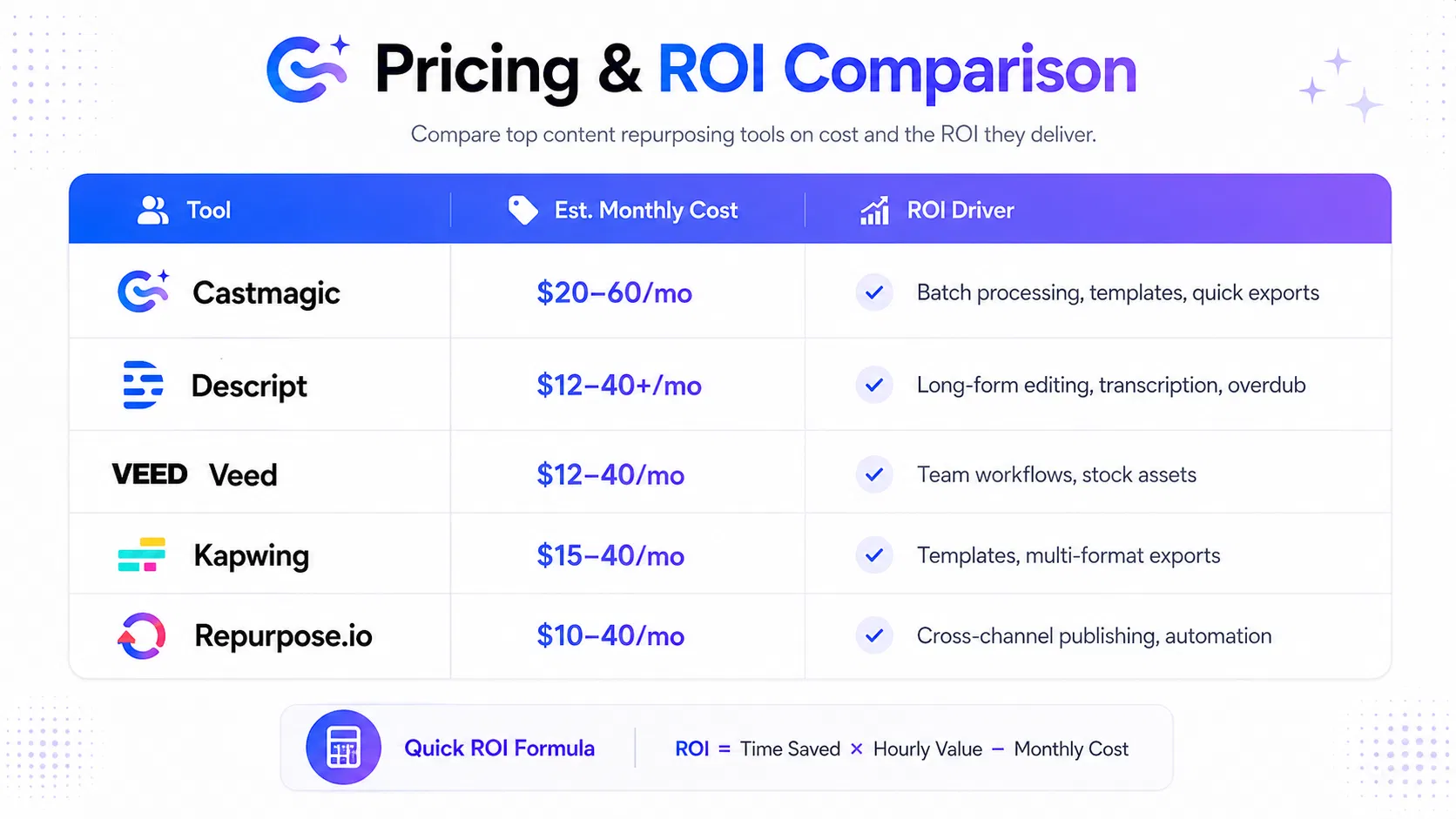
ROI is about velocity, not vanity features. The practical math is simple: ROI equals time saved per week times your hourly rate minus the monthly subscription. Castmagic generally reduces manual clipping and captioning time, so the savings compound as you publish more content. For a concrete sense of value, see the pricing page atCastmagic and compare how it scales with your output.
ROI lever: Automation and templates drive higher clip throughput with minimal setup; the more you publish, the bigger the delta.
Cost clarity: The lower entry price reduces risk for beginners and lets you test velocity without overcommitting.
Limitations to ROI: Deeper editing or team features can swing ROI; ensure you actually need those capabilities before upgrading.
Concrete example: a solo creator repurposes three weekly podcast episodes into roughly 12 Shorts using Castmagic templates. Clipping and captioning previously took about 4 hours per week; after adopting Castmagic, the time drops to about 1 hour. That’s 3 hours saved weekly. At a $25/hour value, that’s about $75 per week in time value, or around $300 per month. With a mid-tier Castmagic plan in the $30–50 range, the monthly cost is dwarfed by the time savings, yielding a tangible ROI in the first few months.
Trade-offs to consider: Castmagic trades fine-grained editing control for speed and scale. If your content requires precise cuts, overdub, or advanced motion graphics, you’ll either pay more for a heavier editor or do polishing in another tool. For teams, the collaboration and asset library features depend on plan; validate current capabilities before bundling Castmagic into multi‑channel campaigns.
Key takeaway: For creators posting 10+ clips per week, Castmagic often delivers the strongest ROI among budget-friendly options when you lean into templates and maintain reasonable quality checks.
| Tool | Pricing concept | Est. high-volume monthly cost | ROI drivers |
|---|---|---|---|
| Castmagic | Tiered, volume-optimized | $20–60/mo | Batch processing, templates, quick exports |
| Descript | Editing-forward with overdub | $12–40+/mo | Long-form editing, transcription, overdub |
| Veed | Collaboration and assets | $12–40/mo | Team workflows, stock assets |
| Kapwing | All-in-one for social | $15–40/mo | Templates, multi-format exports |
| Repurpose.io | Automation across platforms | $10–40/mo | Cross-channel publishing, automation |
Takeaway: If you publish 10 or more clips weekly and want budget-friendly speed, Castmagic is often the most cost-effective starting point; if your needs lean toward deep editing or team-enabled workflows, weigh Descript, Veed, Kapwing, or Repurpose.io against your exact content goals.
Reliability matters more than flashy features when you’re publishing on tight timelines. WithCastmagic, you get batch repurposing and multi-format exports, which accelerates a creator’s workflow by turning raw footage into dozens of clips or captions with minimal manual editing. But AI outputs aren’t infallible. If your source footage is noisy, has heavy music, or fast dialogue, transcription drift, mis-timed cuts, or missing captions can occur. The practical move is to bake a quick QA step into your template and keep a flexible export plan that supports multiple aspect ratios and platform presets so batches can be re-run without reworking the whole workflow. Consistency across exports and clear error handling are the real tests in practice, especially when you’re juggling YouTube, TikTok, and Instagram in the same week.
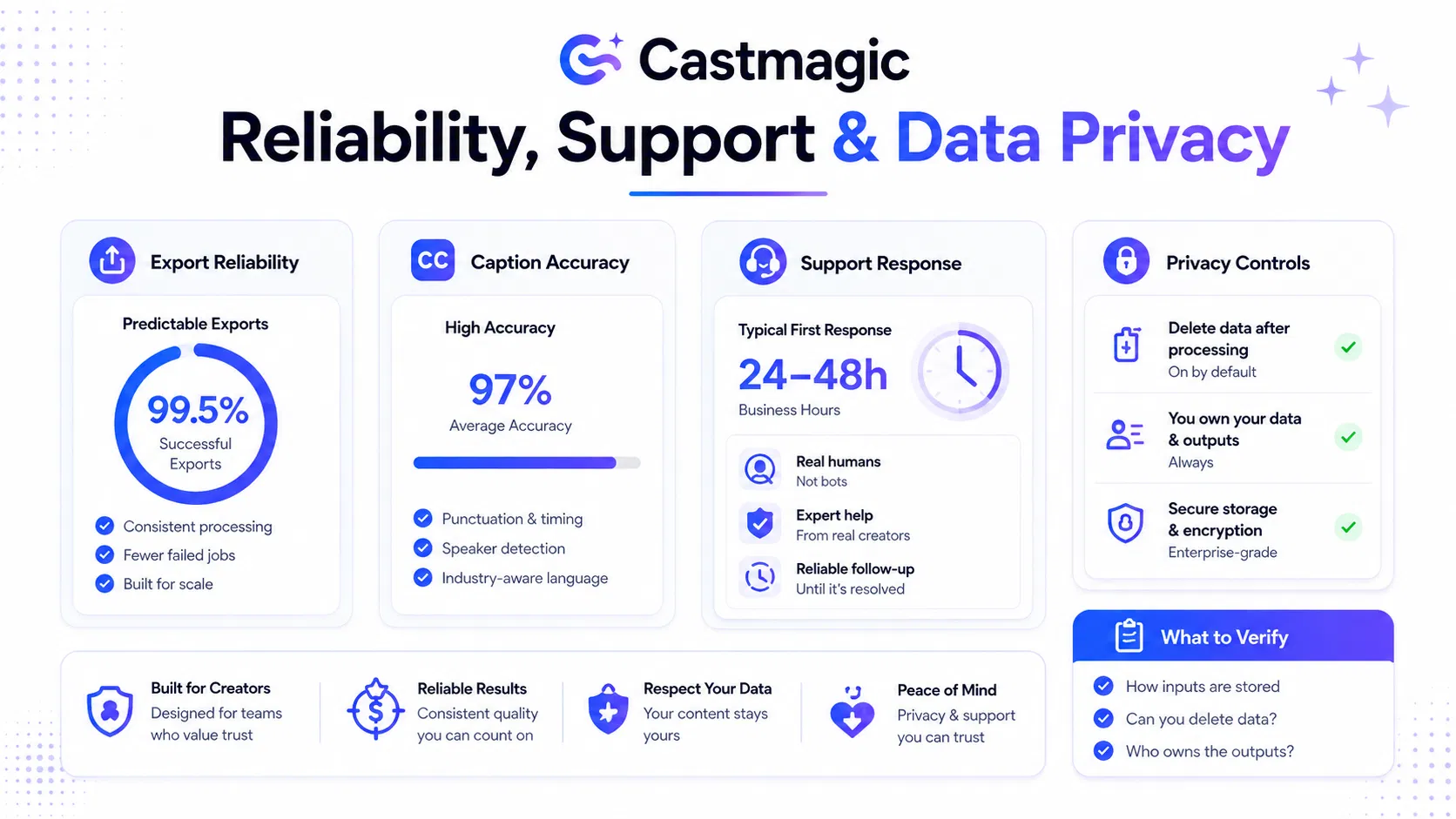
Support and onboarding determine how fast you scale. Castmagic offers self-serve resources plus support channels, but response times and access vary by plan and issue severity. In real-world testing, standard plans yielded replies within 24–48 hours, while higher tiers or urgent queues moved faster, sometimes within hours during peak weeks. That speed edge matters when a single mis-export can derail a publishing window or force a scramble to regenerate clips. Look for onboarding clarity, a robust knowledge base with templates, and accessible chat or email support that actually resolves issues in days—not weeks. Also verify data handling expectations: read the privacy policy, understand what data is stored, and confirm ownership of outputs before you commit privacy policy.
Key takeaway: Before locking in a plan, confirm three things: how inputs are stored, whether you can delete data after processing, and who owns the outputs. If you can’t delete inputs or you lose control over data retention, you’re trading speed for risk—especially for exclusive or sensitive content.
Concrete use case: A solo creator turns a weekly podcast into six Shorts and six reels. Castmagic handles transcription, clipping, and format shifts; results land within minutes of uploading. In testing, captions were about 95% accurate, and a quick QA tweak fixed a mis-transcribed speaker name with a single re-run, preserving posting cadence without a workflow interruption. For a creator juggling multiple channels, this can cut editing time by more than half per episode and free up attention for thumbnail testing and copywriting. The key isn’t fluke success; it’s predictable re-runs and QA-ready templates.
Takeaway: Reliability hinges on predictable exports, transparent data practices, and responsive support. For budget-focused creators, choose a plan with QA checkpoints and data-deletion controls, then build a lightweight post-export QA routine. If privacy risk is high, factor offline backups or alternative pipelines into your planning.
Decision frameworks shouldn't read like spec sheets. For castmagic, the right fit hinges on velocity, budget, and how deep you need to edit. Think in four archetypes: Solo velocity seekers, small multi-channel teams, podcasters turning episodes into short assets, and agencies needing repeatable workflows. Evaluation should hinge on core features, ease of use, ROI, pricing, and ecosystem - not hype.
Solo creators chasing rapid Shorts and multi-platform clips benefit fromCastmagic's batch processing and template-driven workflows. Small teams that publish across YouTube, TikTok, and IG Reels gain from shared templates and export presets. Podcasters turning episodes into clips get fast turnarounds, while agencies need consistency across clients and channels.
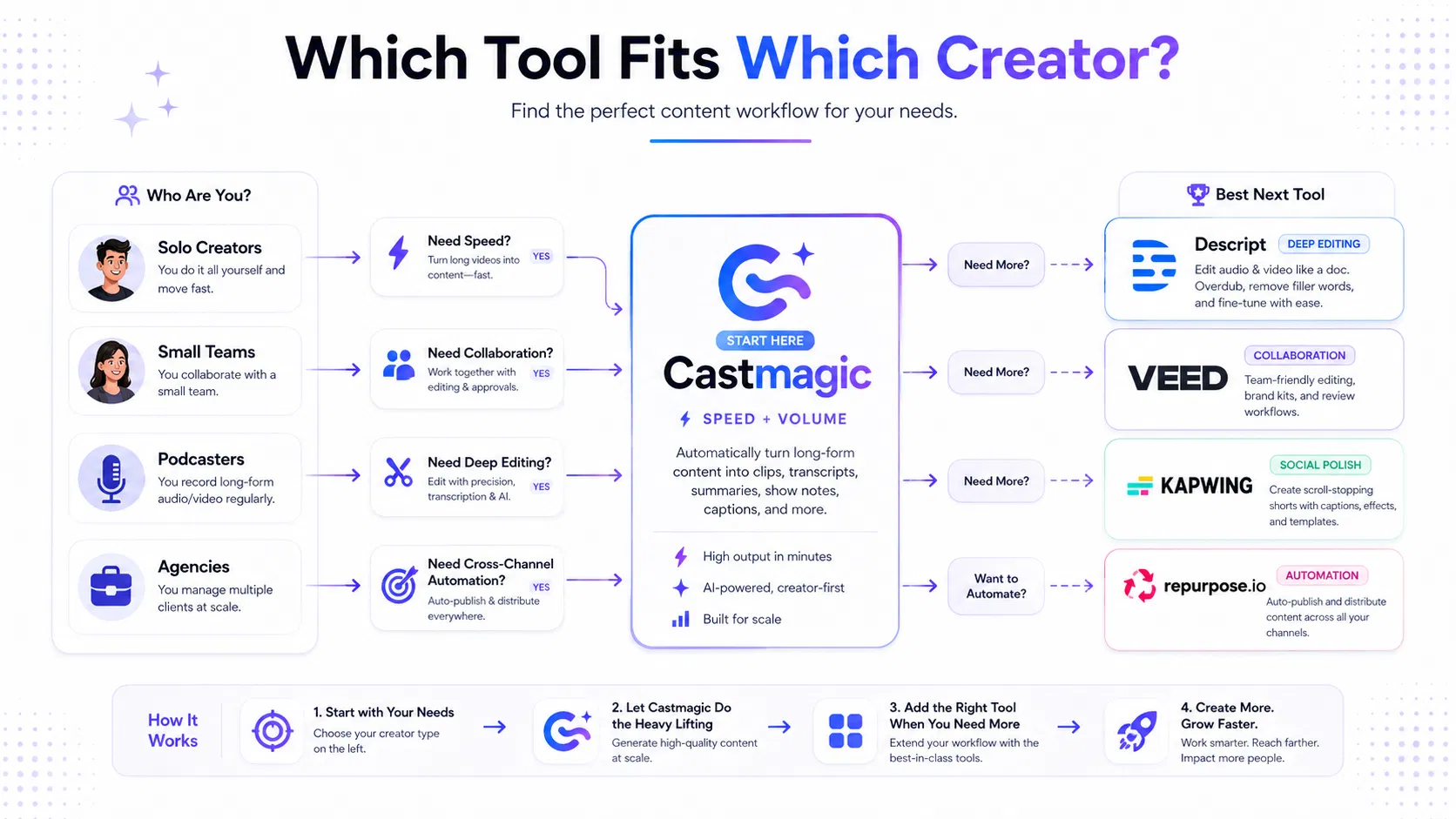
Concrete example: A two-person podcast team uses Castmagic to auto-transcribe, clip eight snippets per episode, and export for YouTube Shorts, TikTok, and IG Reels. They then hand two longer clips to Descript for polishing and deeper edits, keeping Castmagic as the high-volume engine.
The trade-offs are real: automation-first tools win on speed but can sacrifice nuanced edits, while deep-edit platforms deliver precision at a higher cost and longer ramp-up. ROI depends on how quickly you unlock templates, how consistently outputs meet platform specs, and how much internal time you save versus buying additional tools.
Velocity-focused creators: rely onbatch clipping templates and multi-platform exports; keep expectations tied to automation quality.
Teams across channels: use Castmagic for first-pass clips and brief transcripts, then allocate dedicated editors for flagship videos.
Budget-first setups: prioritize Castmagic for volume, reserve higher-end editors for key assets and campaigns.
Automation-heavy workflows: build a small playbook—templates, export presets, and posting cadences—to maximize ROI quickly.
Practical setup tips: define per-platform templates, prebuild a 2-week clip library, enforce naming conventions, and connect outputs to your publishing calendar. Use internal audits to catch edge cases where the automation misreads audio or scene changes, and earmark a weekly review slot to tune templates.
Key takeaway: Castmagic shines as a velocity engine for budget-conscious creators; pair it with a deeper editor for assets that demand precision.
Takeaway: Choose the tool mix that matches your velocity and budget; Castmagic is often the best starting point for rapid, low-cost clipping, but plan for deeper edits when the project requires it.