July 28th, 2026 at 2:00 PM
ProductivityThis UseArticle Review takes an honest look at a new AI-powered affiliate website builder that promises to take the heavy lifting out of affiliate content. The big idea is simple: choose products, set a publishing schedule, and let UseArticle create and publish SEO-focused affiliate articles on a ready-made site.
Affiliate marketing sounds passive until you are the one researching products, writing every review, formatting posts, adding links, building pages, and keeping a schedule. I like tools that help cut down that workload, but I do not believe in buying software just to put it on a shelf. It needs to fit into a real digital-business strategy.
In this UseArticle Review, I am breaking down the dashboard, product marketplace, article generator, website settings, automation tools, pricing, strengths, limitations, and who I believe this platform is really for.
UseArticle is built for bloggers, creators, solopreneurs, and affiliate marketers who want to create affiliate-focused websites without building every page from scratch. It combines a product marketplace, article generation, publishing tools, templates, product-link management, SEO settings, and scheduled automations in one platform.
Core purpose: Create and publish affiliate articles at scale.
Content types shown: Product reviews, value analysis, best-product content, problem-solution content, update reviews, and quick verdicts.
Site tools: Site templates, headers, footers, CTA fields, sitemap tools, custom scripts, and product pages.
Automation: Choose products, writing style, schedule, post frequency, and notifications.
SEO tools: Search Console guidance, sitemap access, and IndexNow support for notifying search engines.
Best fit: People who already have affiliate offers and a clear plan for traffic and conversion.
UseArticle launched in September 2024. At the time of this review, it had reached number four Product of the Day on Product Hunt and was available as an AppSumo lifetime deal. That tells me it is a fresh product with potential, but it also means buyers need to be comfortable learning a platform that is still developing.
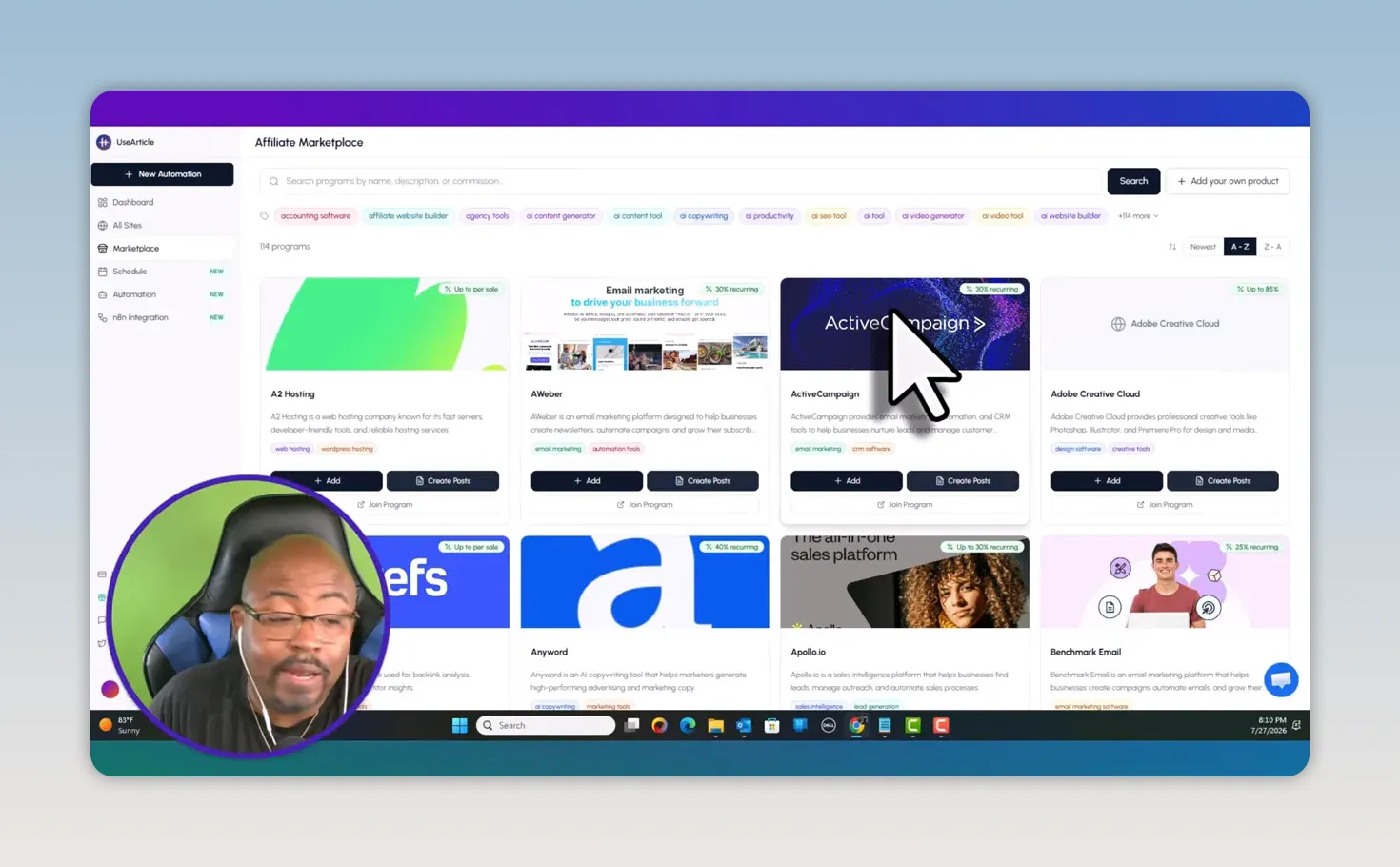
The dashboard is clean and card-based. From the main navigation, I can access the dashboard, all sites, affiliate marketplace, schedule, automations, and other site-level options. The experience is straightforward enough that I can see the flow quickly: create a site, add products, create content, then automate the posting schedule.
That is the real selling point of this UseArticle Review. This is not just an AI writer where I copy text into WordPress afterward. UseArticle is trying to be the website, the affiliate product organizer, the content generator, and the publishing workflow at the same time.
Creating a new site starts with a site name, a description, and a design direction. The available style choices shown include classic, 3D bold, minimal, and editorial. Once the site is created, UseArticle gives me a basic homepage with an area for curated products and a journal section for published posts.
The initial site is simple, which is honestly fine. The important thing is that it gives me a foundation to customize. I can add a site title, description, header call to action, header link, footer information, post footer copy, language settings, and SEO information.
For anyone who needs a stronger content system around this process, my content creation workflow Kanban system is a helpful companion. Automation works much better when there is a real planning process behind it.
The marketplace is where UseArticle lists potential affiliate products and programs. It includes a range of recognizable software offers, but I want to make one thing very clear: a marketplace does not replace due diligence.
Before I create content around any offer, I need to know:
Whether the affiliate program is active and available to me.
Whether the commission is one-time or recurring.
What the actual commission amount or percentage is.
Whether the product has enough demand to justify a content effort.
Whether I can genuinely explain, demonstrate, or recommend the product.
If I cannot quantify the opportunity, I am probably not going to do very well with it. Affiliate marketing is numbers. I need to understand clicks, conversions, commissions, traffic sources, and content performance. A site full of random AI articles is not a business plan.
UseArticle also lets me add a product directly from a product URL. The platform can extract product details and create a product entry. I then need to add my affiliate link. This is a useful shortcut, especially if I already belong to a program and do not want to rely on the platform’s marketplace listing.
I would personally use my own affiliate URLs whenever possible. That keeps my tracking organized and gives me more control over the offers I am promoting. If link tracking is a major part of your setup, take a look at my Switchy.io review for tracking affiliate links and conversions.
Once a product is added, UseArticle can generate an article based on a selected content template. In the demo, I used Camtasia and selected an honest product review. The tool created a complete article with a title, article body, product references, and links.
The generated example used a headline centered on real experience, not a generic “best software” title. That is a good direction. Affiliate content has a better chance of connecting when it sounds like it was written for a real person with a real problem.
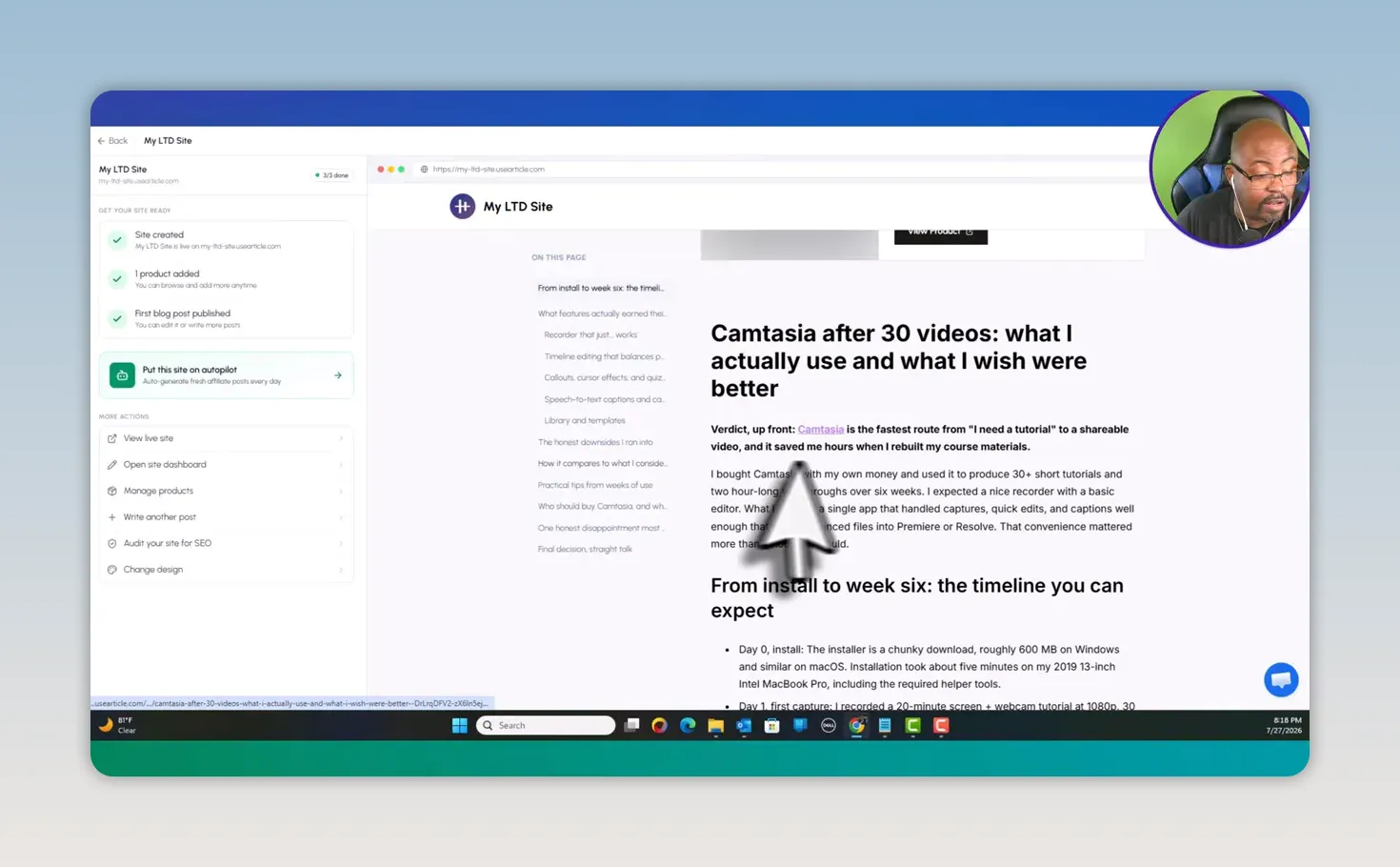
Still, this UseArticle Review would not be honest if I suggested publishing everything untouched. I would always review the article before relying on it. AI gives me a starting point, not permission to make unverified claims. I need to check pricing, features, product changes, comparisons, and affiliate disclosures.
UseArticle provides editing controls for each post, including the post URL, featured product, thumbnail or header image, and deletion options. I can also edit product-specific elements such as:
Product price
Star rating
Review count
Pros and cons
Product description
Affiliate and referral links
These details matter because they make an affiliate article look more like a useful review page and less like a plain wall of AI text. However, the information has to be accurate. Do not invent a rating, review count, or price just because the field exists.
One thing I liked in this UseArticle Review is that the platform does not ignore the technical side of publishing. It includes areas for Search Console setup, sitemaps, site SEO details, custom scripts, and IndexNow.
IndexNow is designed to notify participating search engines when a page changes, while sitemap and Search Console setup help organize the broader discovery process. You can learn more about Google Search Console directly from Google.
UseArticle also gives space for custom scripts, which is important if I want to add analytics or other code to monitor what is happening on the site. Ranking, indexing, and traffic do not happen because I press publish. I need to track what pages are being found, what is getting impressions, what earns clicks, and what needs improvement.
The dashboard also exposes custom content prompts. This is a valuable feature because it allows me to tune the instructions behind different article formats. If I have a particular voice, disclaimer, CTA style, or positioning angle, custom prompts can help align the generated content with my business.
The automation builder is where UseArticle becomes more than a simple article generator. I can give an automation a name, choose the website, set how long it should run, decide how often posts should publish, select templates, choose products, define a writing style, and opt into email notifications.
In the example workflow, I set up two posts per day for 30 days. That produces a planned total of 60 posts. The system then displays the posting volume, word count direction, tone, and selected templates.
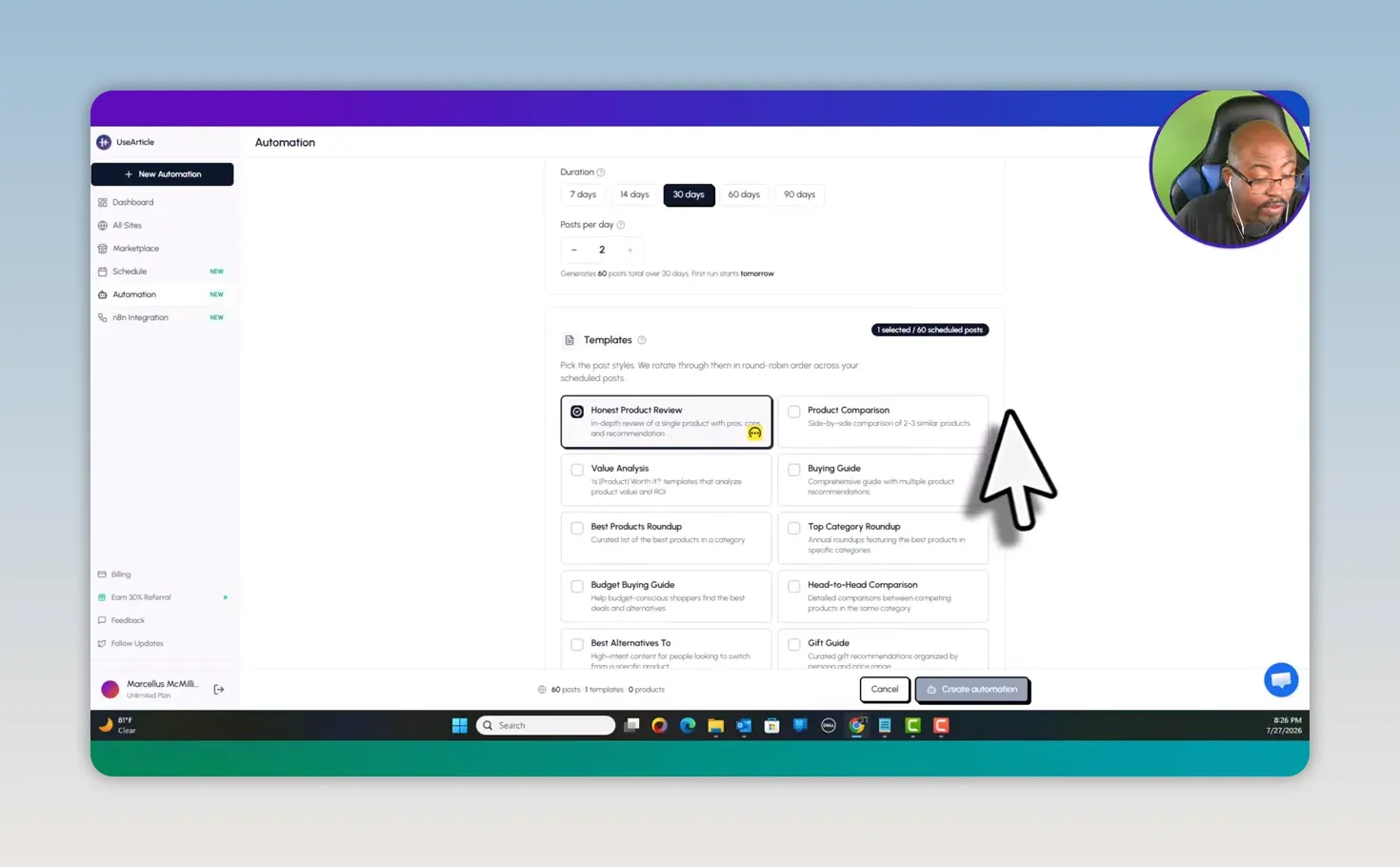
This is powerful, but it is also where I would slow down. Publishing at scale only helps if the product selection and content quality are solid. I would start with a smaller schedule, review the first batch of posts, adjust prompts and templates, then scale the workflow once I know the content fits my standards.
I would also combine the site with a traffic strategy. For example, I could build a focused YouTube channel around the same niche, create demos and reviews, then send people to detailed product pages on the UseArticle site. That gives each piece of content a job and creates a stronger ecosystem than relying on search traffic alone.
The pricing shown in this UseArticle Review is based on the AppSumo lifetime deal presented during the walkthrough. Both tiers were presented with a 60-day money-back guarantee.
| Plan | Price | What Stood Out |
|---|---|---|
| Tier 1 | $49 | Three websites, up to two posts per day, and up to 100 blogs per website. |
| Tier 2 | $119 | Unlimited websites, up to 10 posts per day, bring your own key capability, and auto-generated thumbnails. |
For a casual experiment or a small number of niche sites, Tier 1 may be enough. But for a serious affiliate marketer with multiple projects and a plan to create substantial content, Tier 2 makes more practical sense. The unlimited website capacity, higher post allowance, thumbnail feature, and bring-your-own-key capability offer more room to grow.
That said, the exact location and setup for bringing in an API key was not clear during my walkthrough. I located N8N and OpenAI-related areas, but I was not able to confirm the full bring-your-own-key setup path. I would contact support for clarification before treating that feature as a deciding factor.
|
All-in-one approach: It combines sites, product listings, articles, templates, SEO settings, and automation.
Clean interface: The card-based dashboard is easy to understand and navigate.
Direct product URL support: I can bring my own offers and affiliate links into the system.
Scheduling tools: The automation builder gives a clear view of posting volume and timing.
Editable site details: Headers, footers, CTAs, templates, product data, and post presentation can be adjusted.
SEO essentials included: Sitemap, Search Console direction, IndexNow, and custom-script settings are easy to find.
It is a newer product: New software can have changing features, missing documentation, and workflow quirks.
AI output needs human review: I would not publish product claims, pricing, ratings, or reviews without verification.
Automation is not a traffic strategy: Articles need promotion, authority, and a defined niche.
Affiliate links need attention: The dashboard showed notices about missing links even after product links were added, so I would double-check every setup.
Bring-your-own-key setup needs clarity: I was not able to confirm the exact configuration process in the dashboard.
I think UseArticle is best for affiliate marketers, niche-site builders, bloggers, and content creators who already understand the offers they promote. It makes the most sense when I have a list of products, affiliate approvals, a website angle, and a plan for traffic.
It can also be helpful for a creator who wants to turn videos, tutorials, product demonstrations, and reviews into a supporting content site. If content repurposing is part of your plan, my Content Repurposing Masterclass can help you build a system that gets more mileage from every piece of content.
I would not recommend UseArticle to someone looking for instant passive income with no work involved. The tool can automate publishing, but it cannot replace product research, affiliate compliance, real value, SEO strategy, audience trust, or consistent promotion.
This UseArticle Review comes down to one thing: I like the direction of the product. It is a good-looking platform with an easy-to-follow workflow, useful automation options, ready-made affiliate site components, and a strong focus on getting product content published.
The biggest opportunity is clear. Instead of manually building every affiliate page from the ground up, I can create a focused site, add offers I actually promote, generate structured articles, customize the presentation, and schedule content in advance.
But I would use it as a business tool, not a magic button. I would start with a real niche, verify every product detail, add my own perspective, use tracking links, monitor indexing, and improve the pages that get traction. Used that way, UseArticle has the potential to become a useful part of an affiliate content machine.
UseArticle is an AI-powered platform for building affiliate-focused websites, adding products and affiliate links, generating review-style articles, and scheduling content publication.
Yes. UseArticle allows product URLs to be added so product details can be extracted. I can then add my affiliate or referral link to the product entry.
UseArticle generates affiliate article drafts and includes site SEO tools such as sitemap access, Search Console guidance, IndexNow support, site metadata fields, and custom prompts. I would still review and improve each article for accuracy and originality.
Tier 2 is the stronger choice for serious affiliate marketers because it includes unlimited websites, up to 10 posts per day, auto-generated thumbnails, and bring-your-own-key capability. Tier 1 can work for a smaller test project.
UseArticle can automate parts of content production and publishing, but affiliate income still depends on product selection, accurate content, traffic, trust, conversion performance, and ongoing optimization. There are no guaranteed earnings.