August 14th, 2026 at 2:30 PM
Content Marketing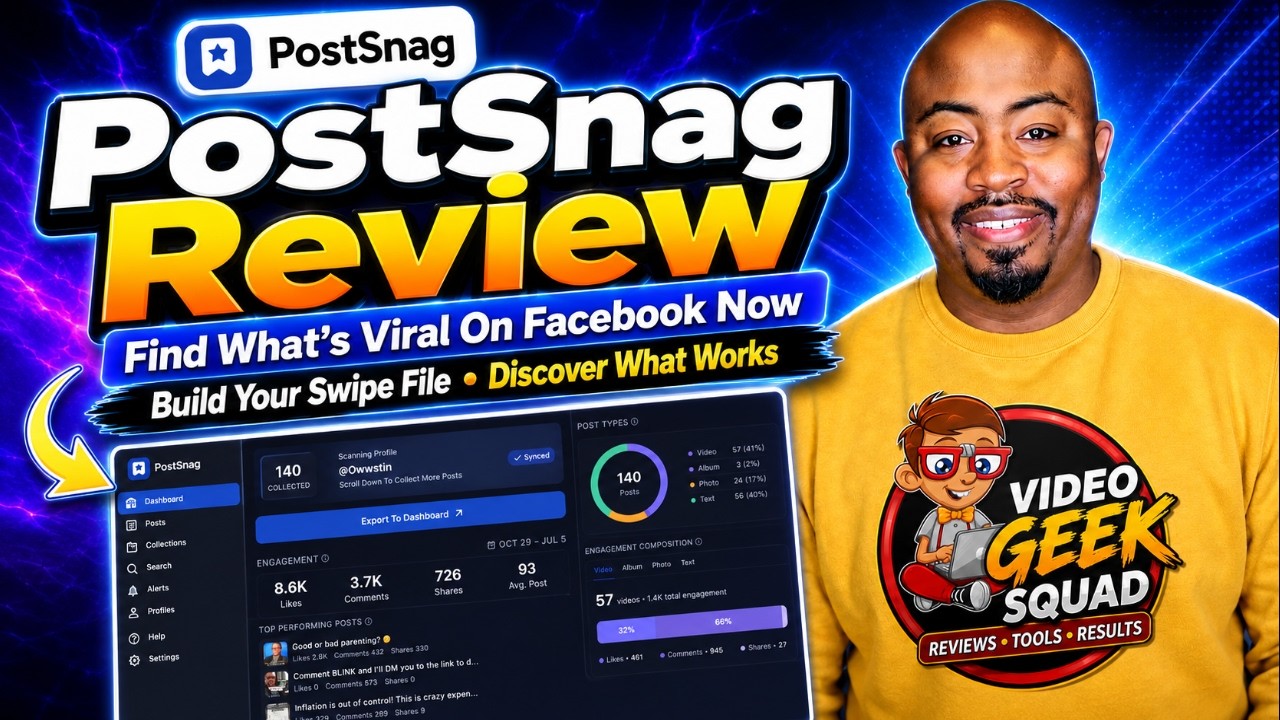
This PostSnag Review is for anybody serious about growing a Facebook page without sitting around guessing what to post next. If your goal is more reach, engagement, shares, and potential monetization, PostSnag gives you a practical way to research the posts already performing in your niche. Instead of chasing random ideas, I can scan pages, profiles, and groups, identify what is getting traction, and use that information to create stronger content for my own audience.
PostSnag is a Chrome extension and research dashboard built around one simple question: what is working on Facebook right now? It captures posts while I scroll through a Facebook profile, page, or group, then sends that data to a dashboard where I can analyze engagement, formats, top posts, outliers, posting activity, and more.
I give PostSnag a full 5 out of 5 stars for the direction it is taking. It is the kind of tool I had been looking for because it turns Facebook research into a repeatable process instead of a time-consuming scavenger hunt.
At its core, PostSnag helps creators, marketers, agencies, and business owners study public Facebook content that is already getting engagement. It does not magically make a post go viral. What it does is give me data so I can stop creating blindly.
The extension works directly alongside Facebook. After adding the Chrome extension, I go to a relevant Facebook page, profile, or group. A small PostSnag control appears on the side. Once I activate it, the extension begins collecting post data as I scroll.
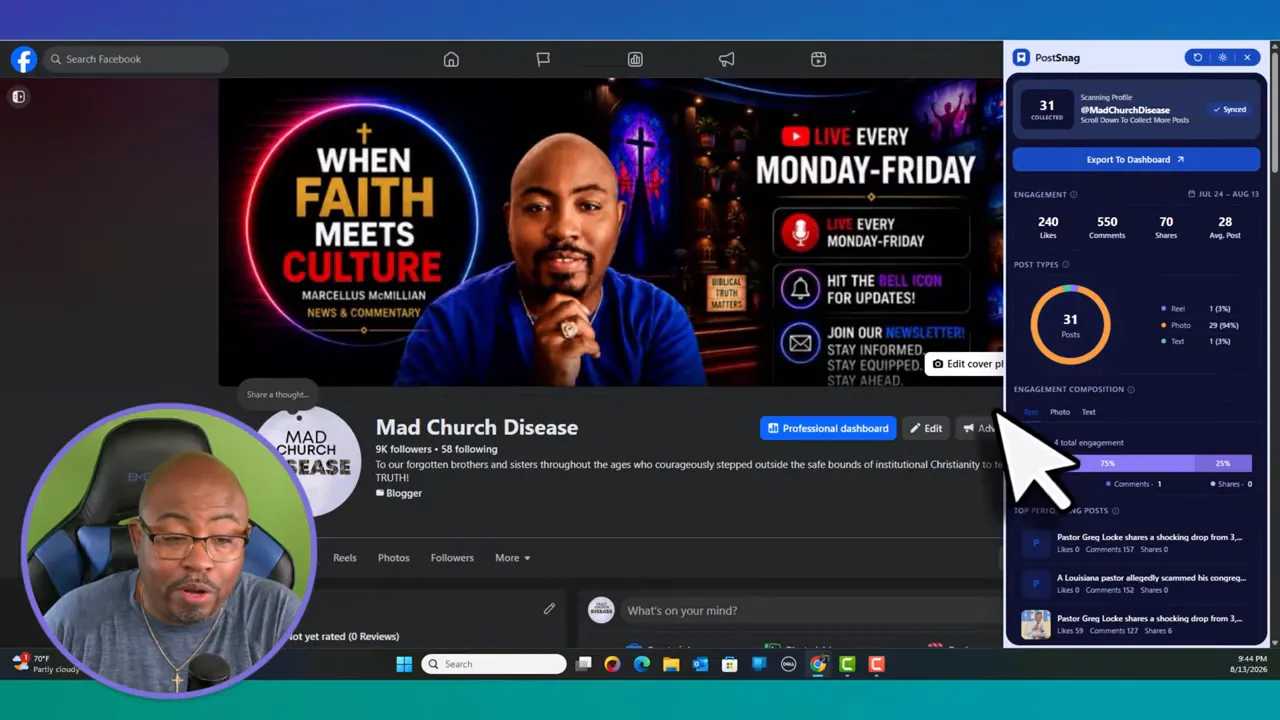
As I move through the feed, PostSnag captures the posts it encounters and updates its totals. I can see that it is gathering information such as posts captured, likes, comments, shares, and engagement activity. When I have scanned far enough back, I export the collection to my PostSnag dashboard.
That is the big value proposition in this PostSnag Review. The software takes content that is hiding in plain sight and organizes it into something I can actually use for content planning.
The best place to start is not with a huge list of random accounts. I begin with pages and profiles that are clearly serving the same type of audience I want to reach. Those may include direct competitors, respected creators, publications, organizations, communities, or pages covering the same subjects.
Then I build a research library over time. In my own account, I added multiple relevant profiles, which is why my dashboard contained meaningful data from the start. A brand-new account will be empty until it has profiles and scans loaded into it.
Find a relevant Facebook page, profile, or group in my niche.
Open the PostSnag extension and begin a scan.
Scroll through enough posts to capture a useful date range.
Export the scan to the dashboard.
Review engagement, shares, content formats, and outlier posts.
Turn the patterns into original content ideas for my own page.
I recommend scanning at least 30 days of posts when researching my own page. A monthly scan gives me enough information to see what really performed, not just what had a good day. If I publish frequently, I may need to scroll through a large number of posts to cover a full month. That is fine. I am not worried about the total number of captured posts. I am looking for the content that rose above the rest.
For competitor research, I would not wait until the end of every month. I would check key profiles every other day or on a schedule that makes sense for my niche. That gives me a way to spot trending content while the conversation is still active.
If building a more consistent content process is a priority, my content creation workflow Kanban system is a useful companion to this type of research. PostSnag can supply the ideas, while a workflow system helps make sure those ideas actually get turned into content.
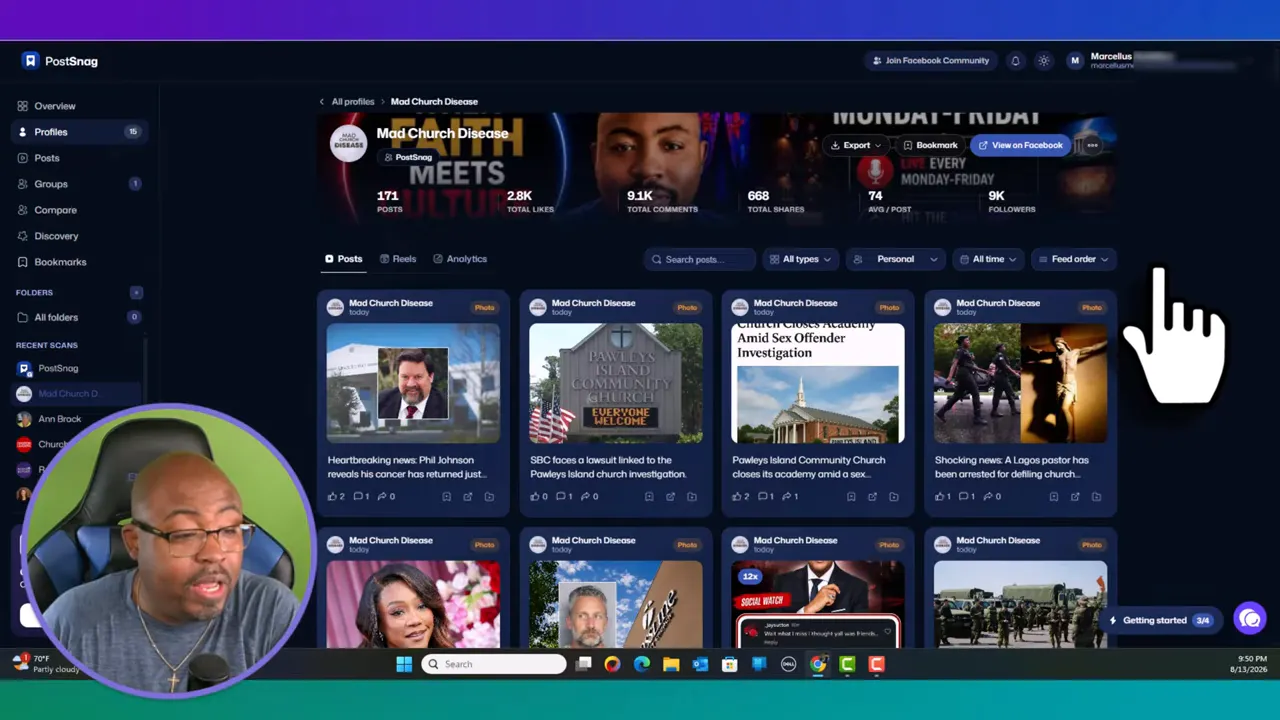
Once a profile is exported, PostSnag turns the scan into a visual library of posts. I can see post cards, engagement activity, and the content that attracted the strongest response. In one demonstration scan, the profile had 171 captured posts, along with totals for likes, comments, and shares.
The feature I like most is the outlier indicator. PostSnag highlights posts that did significantly better than the normal performance of that profile. Those are the posts I want to study first.
An outlier does not mean I should copy somebody else's post word for word. That is not the play. I study the pattern behind it:
Was the topic highly relevant or timely?
Did the post use a photo, Reel, link, album, or plain text?
Did the headline or first line create curiosity?
Did it prompt people to comment, share, or ask questions?
Was there a useful point of view that can be approached in an original way?
Then I can revisit my own high-performing posts and give them a fresh angle. I might update the format, ask a sharper question, create a follow-up, add context, or turn the core subject into a new Reel. This is especially useful when I have already niched down and know what my audience comes to me for.
That is why this PostSnag Review is not just about spying on competitors. The bigger opportunity is learning from my own content history. If a post connected with my people once, there is a good chance the underlying topic, format, or message can inform future content.
The main overview organizes data from the profiles I have added and helps me identify broader content trends. I can see leading creators, engagement leaders, audience size, post formats, posting activity, Reel durations, timing patterns, and top posts across the library.
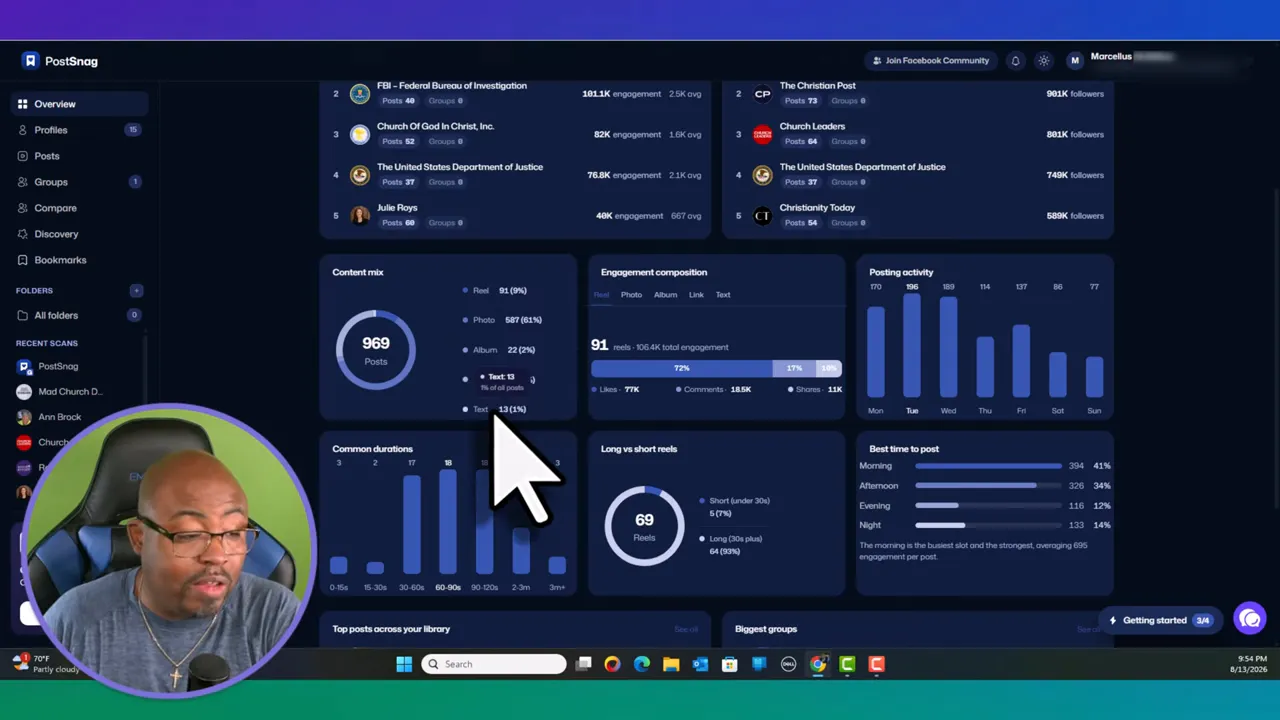
Some of the dashboard insights include:
Top creator: The creator in my tracked library with standout performance.
Best day and time to post: Pattern-based timing suggestions from the collected data.
Most-used format: Whether the strongest creator relies most on photos, Reels, or other formats.
Content mix: The number of Reels, photos, albums, links, and text posts in the library.
Engagement composition: How formats contribute to interaction levels.
Posting activity: The days of the week that show the strongest posting or engagement patterns.
Reel duration: Whether short or longer Reels appear more frequently in the tracked content.
These numbers are not a commandment. They are clues. For example, a dashboard may show that Monday, Tuesday, and Wednesday are strong days in a certain library while the weekend drops off. That does not mean weekends will fail for every business. It means I should test my own content against the patterns the tool found instead of assuming every page behaves the same way.
PostSnag also shows long versus short Reels, including duration ranges. That matters because format length can reveal how a niche communicates. A page built around quick visual hits may use short Reels, while an educational page may see longer content working just as well.
PostSnag is not limited to a single profile. I can track a collection of pages and use the Profiles section to see which accounts are producing the most engagement. The tool can also display associated groups for some profiles, giving me another place to look for conversations and content ideas.
The comparison feature is useful when I need to decide which creators deserve my attention. I can select two or more profiles and compare key details such as:
Captured posts
Follower counts
Groups
Bookmarks
Verification status
Post performance breakdowns
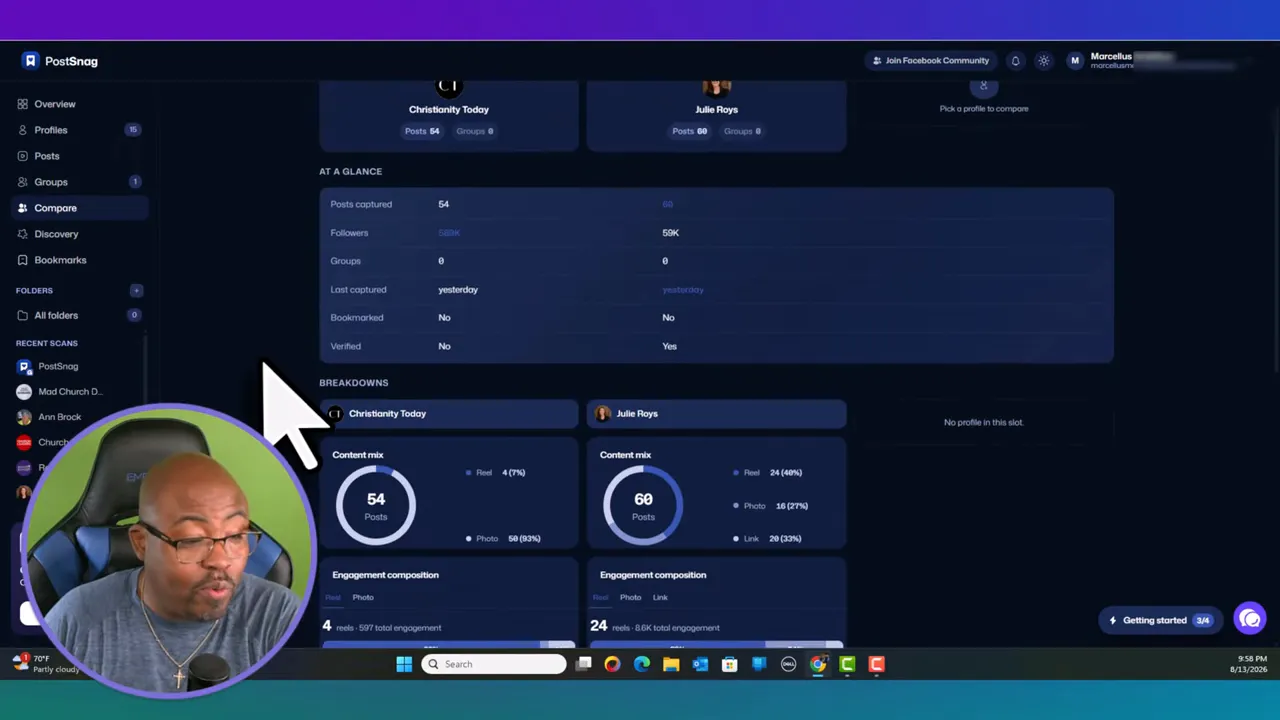
This is a major strength in this PostSnag Review. I can build a shortlist of people and pages worth studying instead of wasting time on accounts that have a large audience but weak interaction. Big follower counts are nice, but engagement tells a more useful story.
I can also bookmark individual posts and profiles. That may sound small, but it makes the research process much smoother. If I find a post that triggers several content ideas, I can save it. I can then organize saved posts into folders, possibly by campaign, date, topic, content format, or post angle.
For those who want to build a larger strategy around turning one subject into multiple useful assets, I also recommend checking out the Content Repurposing Masterclass. PostSnag gives me the research signals, while repurposing lets me expand a proven idea across multiple content types.
PostSnag includes settings for new posts from tracked profiles, group activity, bookmarked milestones, product news, usage information, and a weekly digest. The weekly digest is designed as a Monday morning summary of recently captured content.
I especially like the ability to go from a tracked profile in PostSnag directly back to Facebook through the “View on Facebook” option. When I am doing regular research, small conveniences like that matter. I do not want to search manually for every account every time. I want to move quickly, scan, study, bookmark, and get back to creating.
A practical daily habit could look like this:
Open the profiles I am tracking.
Run a quick scan of new posts.
Bookmark anything that looks like a strong outlier.
Write down one original content angle inspired by the pattern.
Add that idea to my content calendar or workflow board.
That process can take a short amount of time, but done consistently, it gives me a growing bank of relevant content ideas. If YouTube is also part of your business, my YouTube productivity hacks training can help bring the same consistency to your video workflow.
At the time of this PostSnag Review, there are three plan options:
Free: $0, including the extension, three profile scans per week, and a limit of up to 30 posts per scan.
Pro: $19 per month for unlimited profile and group tracking.
Lifetime: A one-time payment of $139 for lifetime access and future features included at the launch price.
For somebody who just wants to see how the tool works, the free tier is a good entry point. The limits are real, though, so it is better suited to light testing than serious ongoing research.
The Pro plan makes sense if monthly billing is preferable. But if I know I will be consistently researching Facebook and using unlimited tracking, the lifetime plan is the clear value in my eyes. A one-time purchase at $139 costs less than many months of paying $19 per month.
As always, pricing and feature availability can change, so I recommend checking the current PostSnag offer and plan details before purchasing.
It gives me a structured way to find Facebook posts that are already working.
The Chrome extension captures data while I scroll through profiles, pages, and groups.
Outlier indicators make high-performing posts easier to identify.
The dashboard combines formats, timing, engagement, Reel duration, and top-post analysis.
Profile comparisons help me focus on the most valuable accounts in a niche.
Bookmarks and folders make content research easier to organize.
The lifetime option is strong value for regular users.
A new dashboard will not be useful until I add profiles and complete scans.
Capturing a meaningful history requires scrolling through a good amount of content.
Analytics reveal patterns, but I still need to test what works for my unique audience.
The tool is a research assistant, not a shortcut around creating original and valuable content.
My final take in this PostSnag Review is simple: if Facebook is important to my content strategy, I want this kind of data. PostSnag gives me a clean way to track my own wins, study relevant creators, spot engagement outliers, compare profiles, and build content ideas from real activity instead of guesswork.
The best use of PostSnag is not copying viral posts. It is learning why certain ideas, formats, hooks, and conversations connect with people, then making that insight my own. If I consistently scan my niche, save the strongest examples, and create original posts based on real patterns, I give myself a much better shot at growing reach and engagement.
PostSnag is best for: Facebook creators, niche publishers, marketers, agencies, entrepreneurs, and anyone responsible for generating social content consistently.
PostSnag is not ideal for: Someone who expects a push-button viral-content machine or who is unwilling to spend time studying the data and creating original work from it.
I do recommend doing your own research before purchasing any tool. Some links may be affiliate links, which means I may receive compensation if a purchase is made. Please review the FTC compliance disclosure for more information. Results from Facebook marketing depend on the niche, the quality of the content, consistency, timing, and the work put into the strategy.
Grab PostSnag Here! |
| Grab The Lifetime deal Today! |
| Grab The Software Here! |
PostSnag is a Chrome extension and dashboard for researching Facebook pages, profiles, and groups. It captures posts while you scroll and organizes the results into engagement and content analytics.
Yes. You can scan your own page to identify posts that received strong engagement, comments, likes, and shares, then use those insights to refresh successful topics and formats.
Outliers are posts that perform noticeably better than the normal activity for a tracked profile. They are useful starting points for studying content patterns that may be worth adapting in an original way.
At the time covered here, PostSnag offered a free plan, a $19 monthly Pro plan, and a $139 one-time Lifetime plan. Check the official offer page for current pricing and features.
If you plan to regularly track Facebook profiles and want unlimited usage without recurring monthly payments, the $139 lifetime plan is the strongest value presented in this PostSnag Review.
Grab PostSnag Here! |
| Grab The Lifetime deal Today! |
| Grab The Software Here! |