April 22nd, 2026 at 4:30 PM
ProductivityIf you have been hunting for a real journal it app review because you are tired of bouncing between a planner, notes app, task manager, habit tracker, and journal, I get it. That is exactly why this tool caught my attention.
At first glance, Journal It looked like one of those apps that tries to do everything and ends up becoming a mess. I honestly thought it might complicate my workflow instead of simplifying it. But after spending time with it, clicking around, testing the web version, and using the mobile app, I started to see what makes this one different.
Journal It is built as an all-in-one system for daily planning, journaling, notes, tasks, goals, habits, and organization. It is available on iOS, Android, Mac, and the web. It also works offline and syncs when you are back online, which is a big deal if you do not want your productivity system falling apart every time your connection does.
This journal it app review covers what the app does well, where it may still fall short, who it is best for, and whether the AppSumo lifetime deal is actually worth considering.
The biggest promise here is simple: put your life in one place.
Most of us use one app for notes, another for tasks, another for habits, and maybe a calendar or planner on top of that. That sounds manageable until things start slipping through the cracks. A task lives in one app. A note is buried somewhere else. A goal gets written down but never connected to daily action. Before long, the system that was supposed to help is just more work.
Journal It is designed to fix that problem by giving you one connected space for:
Daily planning
Journaling
Task management
Goal tracking
Habit tracking
Notes and outlines
Collections and labels
Custom KPIs and progress snapshots
That is the core idea behind this journal it app review. This is not just a digital journal. It is a personal operating system.
I am going to be honest here. The first time I saw Journal It, my immediate reaction was, “This might be too much.”
That is important, because a lot of productivity tools fail right there. If an app makes you feel like you need a weekend workshop just to enter a note, it is probably not going to stick.
What changed my mind was taking a few minutes to sit with it and look at the structure. Once I understood the main sections and how they relate to each other, it started feeling much more practical. It is still a robust app, but it is not nearly as intimidating as it first appears.
That is one of the biggest takeaways from this journal it app review: Journal It has depth, but the basic workflow can be learned pretty quickly if you focus on the essentials first.
The strongest selling point is that Journal It combines planning, journaling, goals, tasks, and habits inside one unified app.
You are not stitching together a bunch of plugins or trying to force different services to cooperate. The app is designed to work together from day one.
For example:
Your habits can connect directly to your goals
Your goals can connect to projects
Your planner gives you day, week, and month views
Your notes live in the same ecosystem as your tasks
That connection is where the value is. A lot of apps can store information. Fewer apps help you connect the information in a meaningful way.
This is one of those features that does not always get enough attention, but it matters.
Journal It works fully offline and syncs when you reconnect. That means you can keep using it without depending on constant access to the internet. If you are someone who works on the go or simply wants a system that feels reliable, this is a real plus.
Journal It is not limited to plain text. You can add photos, track mood, attach files, and even use video attachments. If your journaling style is visual or you like documenting ideas with screenshots and images, that flexibility is useful.
You can also insert photos between text, which makes entries more natural and less rigid than some traditional note apps.
One thing I liked in this journal it app review is that the app does not force every note into one format. You get several note styles, including:
Text notes
Outline notes
Collections
Folders
If you are coming from Evernote or another traditional notes system, collections and folders will feel familiar. If you prefer structured outlines, that option is there too.
Journal It goes beyond writing and planning. It lets you connect habits and goals, then track custom KPIs so you can measure progress over time.
That might sound advanced, but it can be as simple as tracking things like:
Water intake
Walking or exercise
Reading
Work sessions
Project completion
For people who like seeing trends and progress snapshots, this is a strong feature set.
Journal It includes optional end-to-end encryption. If privacy matters to you, that is a welcome option, especially for an app that may hold personal journaling, sensitive notes, or business information.
Journal It is available across:
iOS
Android
Mac
Web
Cross-device sync is included, so your information can move with you. That matters if you plan on capturing ideas from your phone but doing deeper organization on desktop.
The app is also ad-free, which I appreciate more and more these days. Productivity apps should not feel like a billboard.
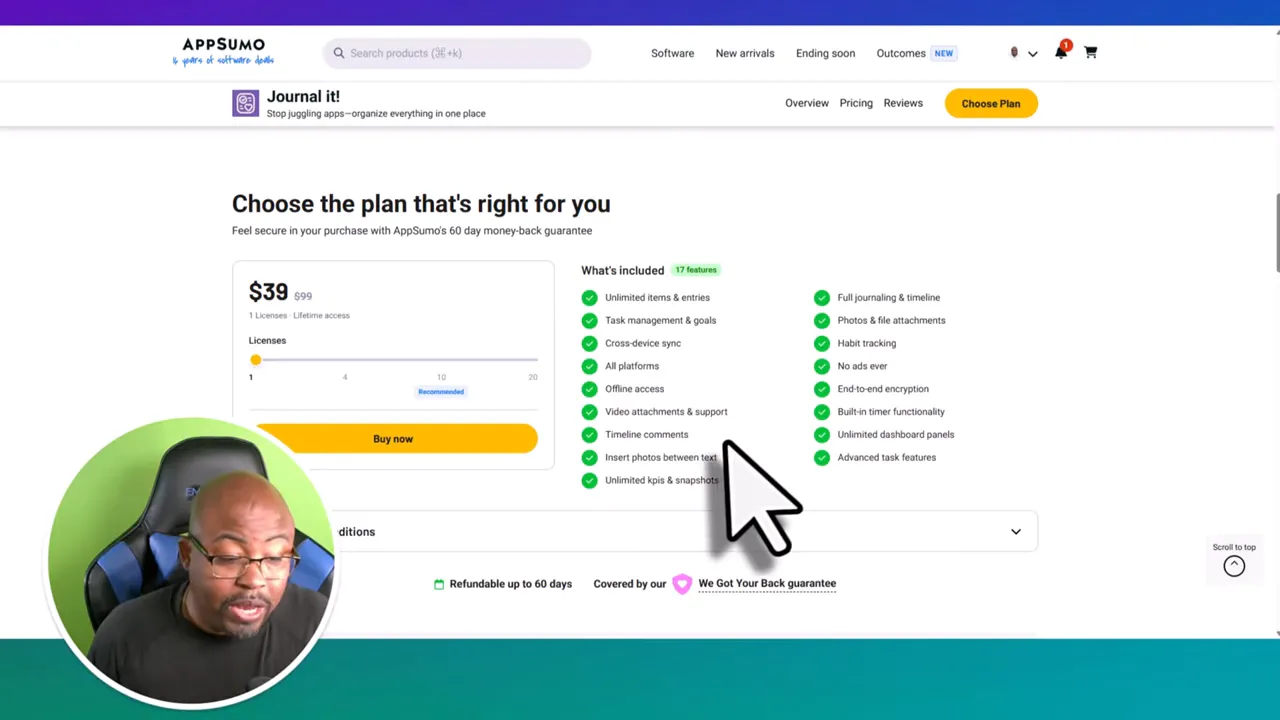
At the time covered here, Journal It Pro was available on AppSumo starting at $39 as a lifetime deal, with multiple tiers going up to tier four.
The base plan was described as including a surprisingly broad set of features, such as:
Unlimited items and entries
Task management and goals
Cross-device sync
Offline access
Video attachments
Timeline and comments
Photo support
Unlimited KPIs and snapshots
Habit tracker
No ads or popups
Optional end-to-end encryption
Built-in timer functionality
Unlimited dashboard panels
Advanced task features
If you are a solo entrepreneur, creator, freelancer, or just somebody trying to get organized without paying for five subscriptions, that price is what makes this especially interesting.
The web version is where the app started making sense for me.
When you log in, you land on a dashboard with a left-side navigation and your planning workspace. The key is not trying to learn every feature at once. Focus on the main sections first.
Don't Miss This Deal |
| Grab TubeOnAI Today!! |
| Grab Software Today Lifetime Discount!! |
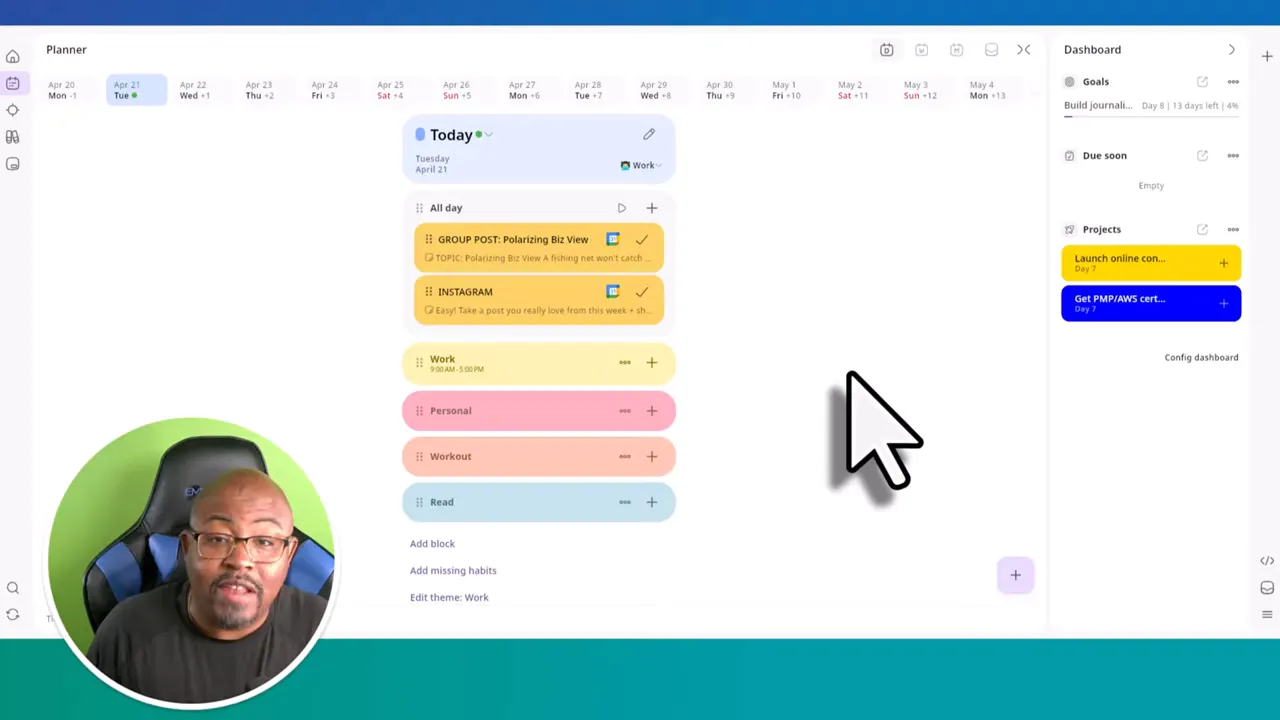
The planner gives you your daily, weekly, and monthly views. This is where you can block out time, add categories like work, personal, workout, or reading, and build a simple plan for the day.
If you want to add an entry, there is a plus button that lets you create it quickly by adding a title and date.
This is the part of the app that can replace a basic planner without much friction.
The objectives section is where Journal It becomes more than a calendar. Here, you can create and manage:
Tasks
Goals
There is a dropdown so you can switch between task mode and goal mode. If you are trying to build a result-oriented system rather than just a list of things to do, this section matters a lot.
Simple examples could include drinking more water, walking regularly, or completing project milestones.
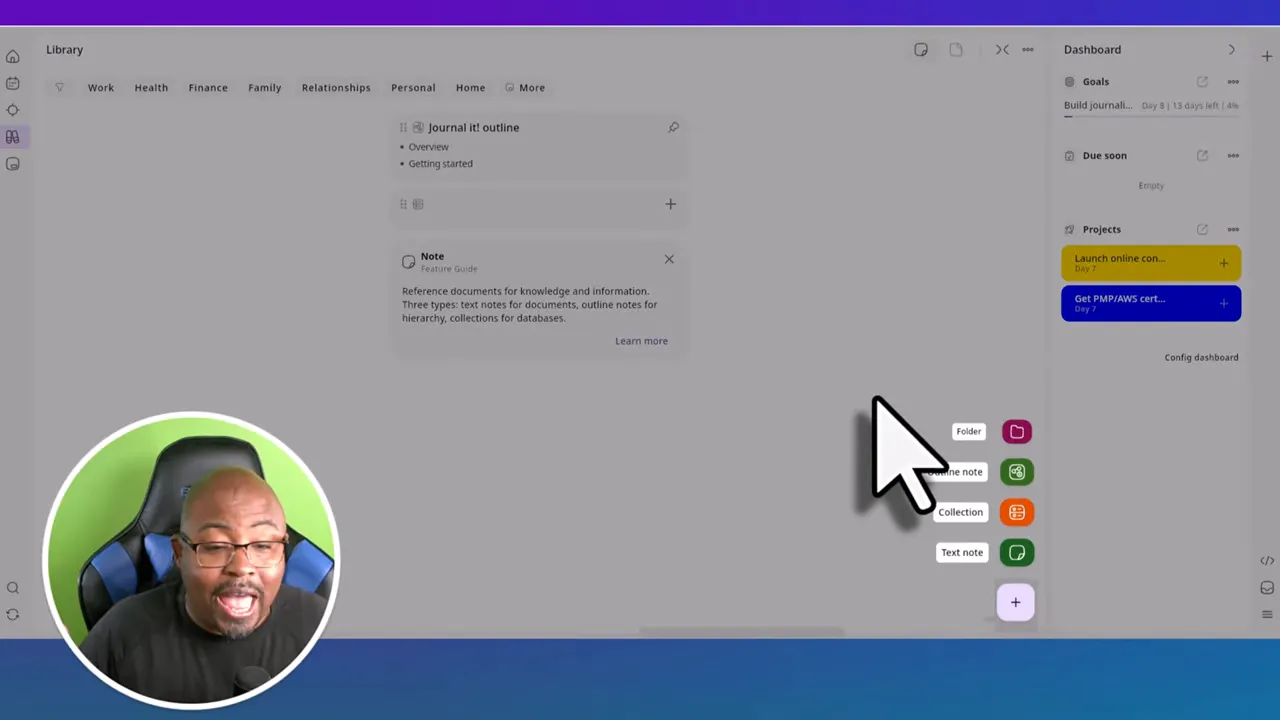
The library is where your documents and notes live.
Using the plus button in this section, you can create:
Folders
Outline notes
Collections
Text notes
If you are looking at Journal It as a possible Evernote replacement, this is one of the sections you will care about most.
The organizer is basically your labeling system. If you like tagging and organizing information so you can retrieve it quickly later, this is where that happens.
You create labels and attach them to related content. That can help when you need to pull up notes, files, or project materials without digging around manually.
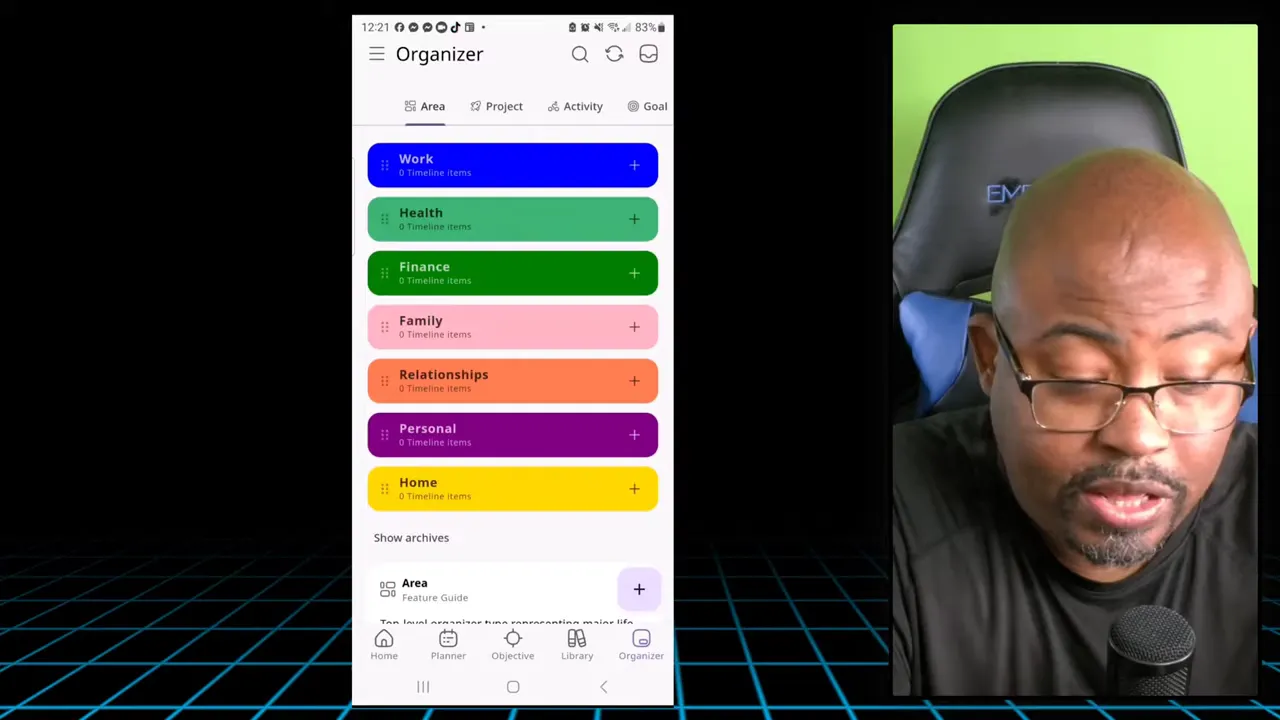
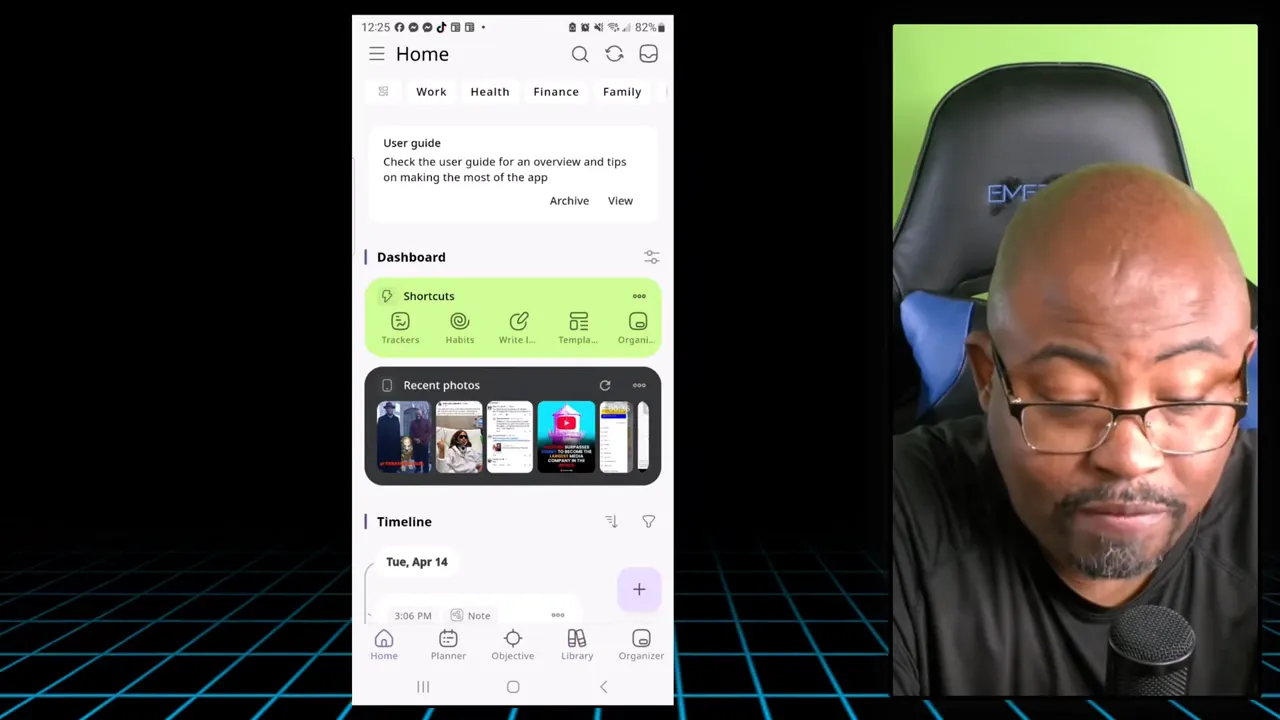
The mobile app follows the same core logic as the web version, but the layout is different. Once you understand the categories, it feels familiar.
On mobile, you get access to:
Goals
Due soon items
Projects
Calendar
Gallery
Statistics
Quick note capture
Templates
Connected calendars
The statistics section is especially interesting because it gives you a snapshot of how much you are actually using the system. You can see things like photo count, note count, goals, tasks, projects, and even time blocks spent.
If you like having your productivity data visible, that is a nice touch.
The bottom navigation on mobile makes the app easier to move through. You can jump between planner, objectives, and library without much effort.
This is one of the biggest questions around this tool, especially if you are trying to move away from expensive note-taking apps.
My take in this journal it app review is this: it can replace a lot of Evernote for many users, but there is one missing piece.
The missing feature is the web clipper.
Right now, that is the one gap that stands out if you are a heavy Evernote user. The ability to clip web content directly into your system is a major workflow feature for researchers, creators, and anyone collecting online information.
The good news is that this appears to be something the company has considered. But as of the information available here, there is no web clipper yet.
That means Journal It can absolutely handle notes, organization, collections, labels, and personal planning, but if web clipping is central to how you work, you need to factor that into your decision.
Without that feature, it is close. With that feature, it could become a much stronger Evernote alternative.
Everything is connected. Notes, tasks, goals, habits, and planning all live in the same system.
Offline support is excellent. That adds reliability and peace of mind.
The pricing is attractive. A one-time payment is easier to justify than stacking monthly subscriptions.
The app has real depth. It is not just a journal with a fancy name.
Cross-platform support matters. Web and mobile access make it practical.
No ads or popups. That keeps the experience clean.
The first impression can feel overwhelming. There is a learning curve at the beginning.
No web clipper yet. This is the biggest limitation if you are coming from Evernote.
Some navigation takes getting used to. The same features exist across web and mobile, but they are laid out differently.
Based on everything I tested, Journal It makes the most sense for:
People tired of using multiple disconnected productivity apps
Solo business owners and creators
Anyone who wants to connect goals, tasks, and habits
Users who care about privacy and offline access
People looking for a lower-cost alternative to stacking subscriptions
It may be less ideal for:
People who want a super minimal notes app with no learning curve
Heavy web-clipping users who depend on that feature daily
So, is this a scam or a legit productivity tool?
From my experience, it looks legit.
More specifically, it looks like a serious all-in-one productivity app that may surprise people who initially assume it is too complicated. Once you break it down into planner, objectives, library, and organizer, the structure becomes much easier to understand.
The biggest reason I think this tool has potential is clarity. Instead of scattering your life across five disconnected apps, Journal It gives you one place to manage the moving pieces.
That does not mean it is perfect. The missing web clipper is real. But even with that limitation, there is a lot here for the price, especially if the AppSumo lifetime deal is still available.
If you want the short version of this journal it app review, here it is: Journal It is a strong option for anyone who wants an all-in-one planning and notes system without endless setup or ongoing subscription fatigue.
Journal It is an all-in-one productivity app that combines journaling, planning, notes, tasks, goals, habits, labels, and progress tracking in one platform.
Yes. It is available on iOS, Android, Mac, and the web, with cross-device sync included.
Yes. One of its standout features is offline-first functionality. You can keep working offline and sync your data when you reconnect.
For many people, it can replace a large part of an Evernote workflow, especially for notes, organization, and planning. The main missing feature is web clipping.
It supports text notes, outline notes, collections, and folders. It also allows media like photos and file attachments.
Yes. You can connect habits to goals, goals to projects, and track custom KPIs to measure progress over time.
Yes. It offers optional end-to-end encryption for users who want additional privacy and security.
If you want an all-in-one productivity app and prefer a one-time payment over ongoing subscriptions, the AppSumo lifetime deal is very compelling, especially for solo users.