August 31st, 2026 at 2:10 PM
Content Marketing
ClickRank Review: if keeping up with title tags, meta descriptions, internal links, rankings, and Search Console data has started to feel like a full-time job, ClickRank is built to take a big part of that workload off your hands. I have been using it to organize and improve SEO work for Video Geek Squad, and I like what this tool is trying to do. It puts website health, on-page fixes, performance reporting, and AI search visibility into one dashboard.
That does not mean ClickRank is a magic ranking button. Nothing replaces strategy, useful content, and real work. But when there are dozens or hundreds of technical items sitting on a website, having a tool that identifies them and helps fix them can save serious time.
This ClickRank Review covers what it does best, where I think it needs work, how the dashboard functions, and who should seriously consider it.
ClickRank is an AI SEO platform for bloggers, e-commerce businesses, marketers, and agencies that need a clearer way to manage site optimization. Its core strength is not deep keyword research. Its core strength is finding on-page SEO problems and helping solve them quickly.
After adding a lightweight snippet to a site and connecting the available data sources, ClickRank crawls pages and surfaces issues involving titles, meta descriptions, H1 tags, image alt text, schema, and internal linking. It also brings clicks, impressions, click-through rate, average position, geographic data, and keyword distribution into one place.
Best for: site owners who want to clean up technical SEO tasks without living inside Google Search Console.
Great for: people managing multiple pages or websites that need repeated metadata improvements.
Not ideal as: a complete replacement for a dedicated keyword research platform.
My take: ClickRank is a strong workflow tool, especially for on-page fixes and clear reporting.
ClickRank is an AI-assisted SEO tool designed to improve a site’s visibility in traditional search and in AI-powered search environments. The platform positions itself around helping sites become more accessible to systems such as ChatGPT, Claude, Perplexity, and Gemini, along with Google.
The platform launched in December 2024. At the time covered here, it had reportedly reached roughly 60,000 monthly visitors and held a 4.5 rating from nearly 500 AppSumo reviews. The strong feedback makes sense to me because the dashboard is clean, the tools are straightforward, and it focuses on tasks that can become very repetitive.
The concept is simple: connect the website, let ClickRank audit it, review the problems, and use AI suggestions or bulk actions to address the items that matter.
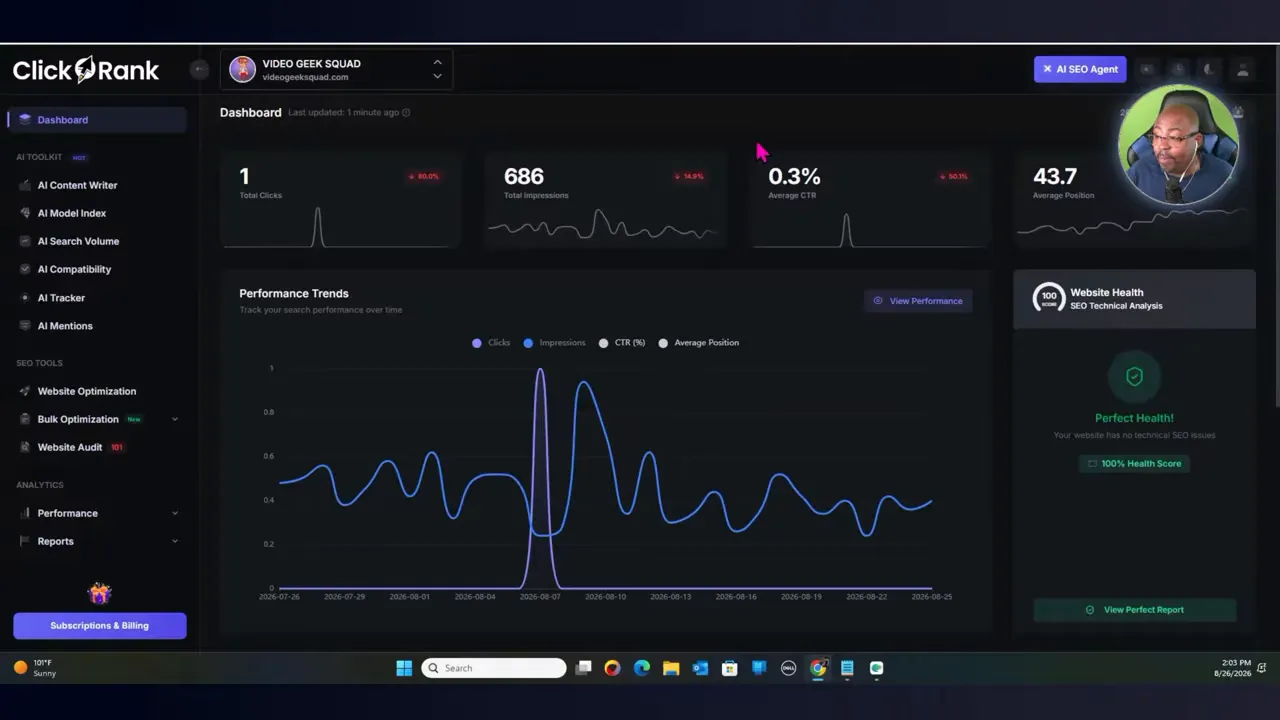
I always say this: if I cannot quantify what I am doing, then I am just running a hobby. SEO needs numbers. I need to know whether impressions are growing, whether pages are earning clicks, what keywords are improving, and where I am losing ground.
The ClickRank dashboard gives that broad view without forcing me to jump between multiple tabs. After connecting Google Search Console, the dashboard can display key data including:
Website health score
Average search position
Total clicks
Total impressions
Click-through rate
Keyword distribution by ranking position
Geographic performance
Traffic source and device information
In my own setup, I could see an overall website health score and an average position around 43.7, along with rankings distributed across first-page and second-page positions. This kind of information lets me focus on opportunity instead of guessing. A page sitting near the bottom of page one or the top of page two often deserves attention before I spend time creating something entirely new.
ClickRank also offers analytics around keywords, pages, countries, devices, and traffic dates. The reporting area includes keyword insights, new page insights, pages with low click-through rates, query CTR data, long-tail keywords, and winner versus loser comparisons for both pages and keywords.
For anyone who finds the Google Search Console interface a little overwhelming, this is one of the practical benefits of ClickRank. It pulls the core performance conversation into a more action-oriented workspace.
If tracking content and search performance is a major part of your business, I also recommend reviewing my guide to understanding metadata and ranking content. The foundation still matters, whether the content is a blog post, a product page, or a video.
ClickRank has more than standard SEO tools. It also includes an AI toolkit that focuses on whether a website is structured in a way that AI systems can understand and represent effectively.
The built-in AI copywriter can generate SEO articles based on a selected keyword, language, and target country. There are multiple language options, which makes the feature useful for projects serving different markets.
I see this as a starting point, not a finished-content machine. The value is in getting a draft framework moving quickly. I would still add my own experience, examples, brand voice, and fact-checking before publishing anything. That is how I approach AI content in general, and it is the same principle I teach in my Content Creation With AI course.
The AI Model Index Checker lets me analyze how a site may be seen across AI models. The interface is designed around entering a website URL and receiving information on content structure, accessibility, metadata optimization, and recommendations for improvement.
There is also an AI Model Compatibility feature and AI Search Volume Analyzer. These are meant to help evaluate a site’s readiness for AI search and analyze AI-driven search interest around keywords. The AI Mentions section allows prompt-based tracking, which can help monitor whether a brand or business is appearing in relevant AI-generated responses.
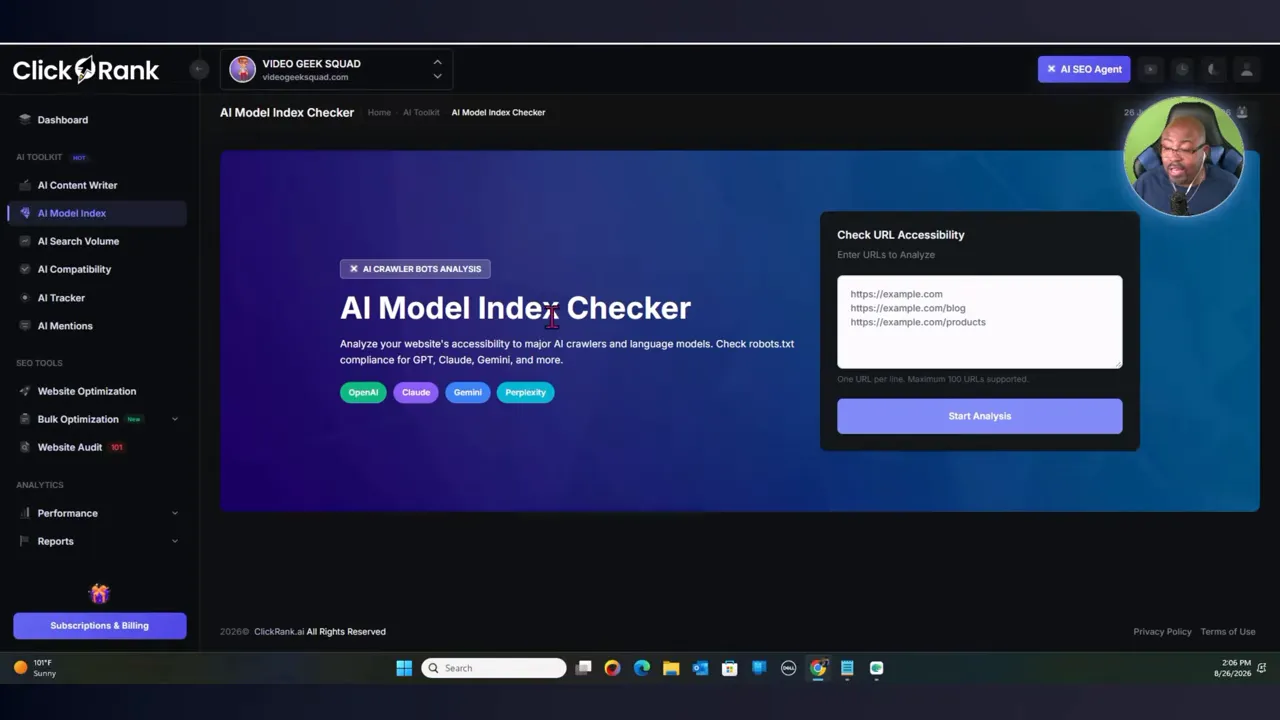
To be clear, AI search is evolving fast. I would not treat any one report as the final truth about whether a business is visible in every AI platform. What I like is that ClickRank gives me another place to inspect the factors I can control: structure, accessibility, metadata, and content clarity.
This is where ClickRank shines for me. The website audit identifies issues that need attention, and the bulk optimization tools turn what could be a long manual project into a manageable workflow.
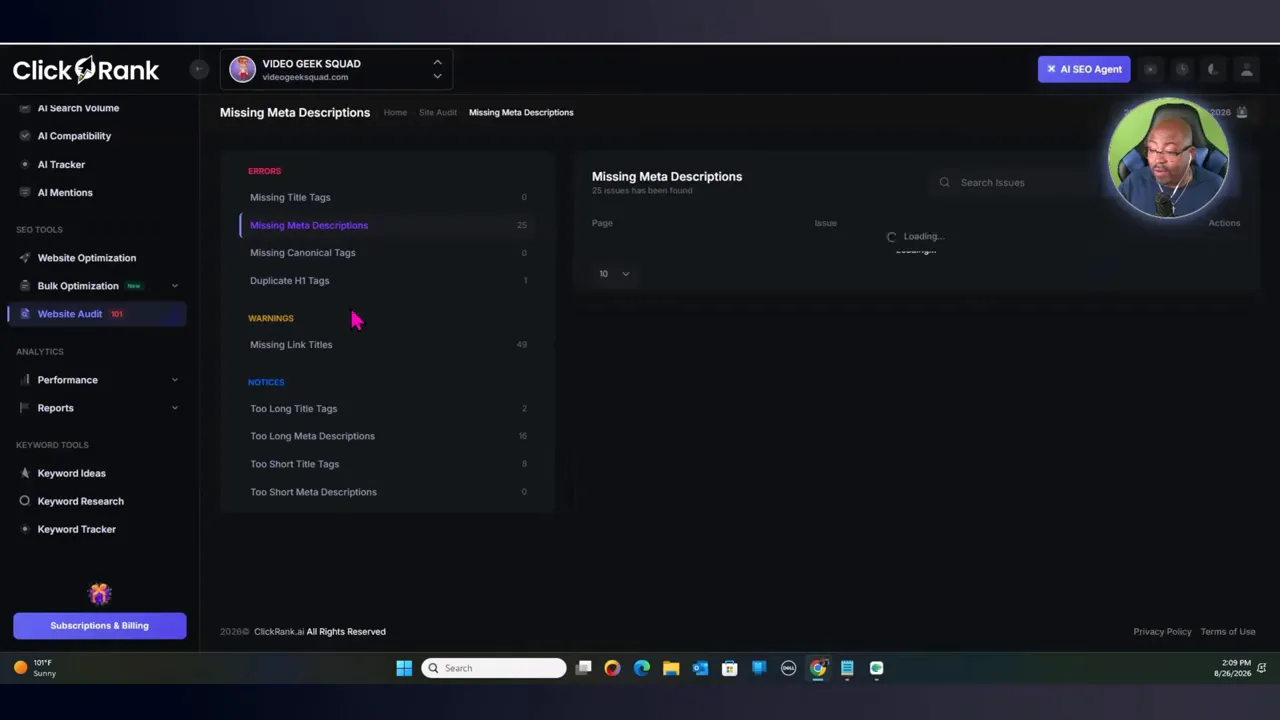
In the audit example, ClickRank showed a mix of resolved issues and remaining errors. Those remaining items included missing titles, meta descriptions that were too long, title tags that were too short, duplicate H1 tags, and missing link titles. Rather than opening each page and hunting for every issue manually, I could open an issue category and use the available solve action.
Missing title tags
Title tags that are too short
Meta descriptions that are missing, too short, or too long
Duplicate H1 tags
Missing link titles
Other page-level optimization issues identified in the audit
The bulk optimization section can generate titles and meta descriptions across multiple pages. That is powerful when a large site has accumulated gaps over time. ClickRank can also let me work through individual issues if I want more control over each page.
One thing I appreciate is the ability to inspect the page and see what was changed. In one example, the platform shortened a title tag to better fit the expected range. If the change is not right for the page or brand, there is an option to revert. That matters because SEO automation should not mean giving up control.
My practical workflow is to handle the smallest issue groups first. If there are eight short titles, sixteen overlong meta descriptions, and forty-nine missing titles, I start with the smaller groups. While ClickRank processes those changes, I can move through the next tasks. It keeps momentum going.
Still, I need to say this plainly: review AI output. AI can save the labor of drafting and applying changes, but it does not automatically understand the full context of every offer, page, audience, or brand message. Treat its recommendations as fast assistance, not automatic perfection.
|
ClickRank includes keyword ideas, keyword research, and a keyword tracker. Those tools are useful to have inside the platform, especially for monitoring terms and reviewing search opportunities. But this is the area where I would not rely on ClickRank alone.
For serious keyword discovery, competitor data, and deeper search analysis, I would use a dedicated keyword platform alongside ClickRank. Semrush, Ahrefs, or another established research tool may provide more depth for building the initial keyword strategy.
That is not a deal breaker for me because ClickRank is valuable for what it does after the strategy has been selected. I can research the opportunity elsewhere, create the content, then use ClickRank to audit, optimize, track, and keep the technical side organized. For another perspective on choosing the right platform for the job, check out this software evaluation framework.
The ClickRank pricing shown starts at $89 for lifetime access. The three-code option is positioned as the sweet spot at $267, including five websites and larger crawl capacity. The right plan depends on how many properties I manage and how often I need the platform crawling and optimizing pages.
For a single small site with only a handful of posts, I would make sure the basic plan limits match the site’s needs. For an agency, a publisher, an e-commerce operation, or somebody with several websites, the larger option makes more sense because it spreads the cost across multiple properties.
Lifetime deals always deserve a careful look. I want to confirm the current limits, support, features, and future roadmap before buying. If you are considering a lifetime purchase, this guide on when to invest in software lifetime deals is a useful companion resource.
Clean dashboard that makes SEO performance easier to understand
Integration with Search Console data for clicks, impressions, CTR, and rankings
Website health scoring and detailed audit categories
Fast AI-assisted fixes for titles, meta descriptions, and other on-page items
Bulk optimization for sites with many pages
Ability to review changes and revert when needed
AI visibility tools covering compatibility, indexing, mentions, and search volume
Strong value proposition for managing repetitive optimization work
Keyword research is not the platform’s strongest feature
AI-generated changes require human review before treating them as final
SEO results still depend on content quality, competition, authority, and consistency
Newer AI search capabilities should be viewed as useful indicators, not guarantees
I recommend ClickRank for bloggers who have an existing library of content, businesses with websites that need ongoing cleanup, e-commerce store owners managing lots of product or category pages, and agencies that need an easier way to organize repeated optimization work.
It is especially helpful if technical SEO tasks pile up because they are tedious. Missing titles and descriptions may not sound exciting, but those small gaps add up. Clicking through one dashboard, finding the errors, applying improvements, and tracking the results is a much better process than ignoring the problems for six months.
I would not buy ClickRank expecting it to replace an all-in-one enterprise SEO stack or to make rankings happen overnight. I also would not use it as my only keyword research engine. But as an affordable SEO automation and on-page optimization platform, it does a lot of the practical work that keeps sites moving forward.
My final ClickRank Review is positive. The platform is easy to navigate, the audit and bulk optimization features are the real value, and the performance dashboard gives me a better way to monitor SEO without getting buried inside separate tools.
ClickRank helps me deal with the work that often gets put off: metadata cleanup, duplicate tag fixes, page-level audits, reporting, and ongoing tracking. It also adds AI search tools at a time when websites need to think beyond standard Google rankings.
If the goal is to streamline on-page SEO, keep tabs on performance, and clean up technical issues without a bunch of manual work, ClickRank is worth a serious look. Just bring your own content strategy and a stronger dedicated keyword research tool when needed.
ClickRank audits websites for SEO issues, tracks performance metrics, provides AI-assisted optimization suggestions, and offers tools for AI search visibility.
Yes. ClickRank can identify missing or problematic titles and meta descriptions, then help generate and apply fixes through individual or bulk optimization actions.
Not completely. ClickRank is strongest for audits, on-page optimization, tracking, and workflow automation. I would still use a dedicated platform for deeper keyword research and competitive analysis.
No SEO software can guarantee rankings. ClickRank helps identify and address technical and on-page issues, but results depend on content quality, competition, authority, and consistent optimization.